Skip to content
  • Timeline
  • Subscribe
  • Contact Us
  • About
  • Timeline
  • Subscribe
  • Contact Us
  • About
Hagg.ai
Monitoring Antisemitism Intel
April 26, 2026
What is this data

The Crossroads Cookbook, anyone? The endless joys of rubbish TV-tie-ins

Source: telegraph.co.uk telegraph.co.uk
Key Topics in this News Article:
TV
News Snapshot:
Note: Please don’t mind the mess. Some source code may appear in the Snapshot above as we train our A.I.
Share on Social Media:
Facebook
X
LinkedIn
Telegram
Reddit
WhatsApp
VIEW ORIGINAL FULL NEWS →
You may also like

News Timeline:
Track the development of this news story across the Internet.

April 16, 2026

Can anyone stop Jordan Bardella in France? A crowded field could gift the election to the far right


Source: theguardian.com theguardian.com

March 13, 2026

Netanyahu has made Israelis accept endless war


Source: newstatesman.com newstatesman.com

March 7, 2026

A Holocaust survivor’s essential book for anyone concerned with law or human rights


Source: irishtimes.com irishtimes.com

February 26, 2026

Real Madrid condemn fan who appeared to perform Nazi salute before Benfica tie


Source: bbc.com bbc.com

November 25, 2025

Sydney’s society A-list kick off summer wedding season in style as beauty queen and property developer tie the knot


Source: dailymail.co.uk dailymail.co.uk

November 22, 2025

Grok AI claims Musk is ‘fitter and smarter than anyone’; he responds ‘For the record, I am…’


Source: financialexpress.com financialexpress.com

News Timeline | Contact | About | Privacy

Twitter Linkedin

© 2026 Hagg.ai. Individual news stories are copyright their respective sources. Computer algorithms generally select what is shown on Hagg.ai. The algorithms determine which stories, images, and videos show, and in what order.

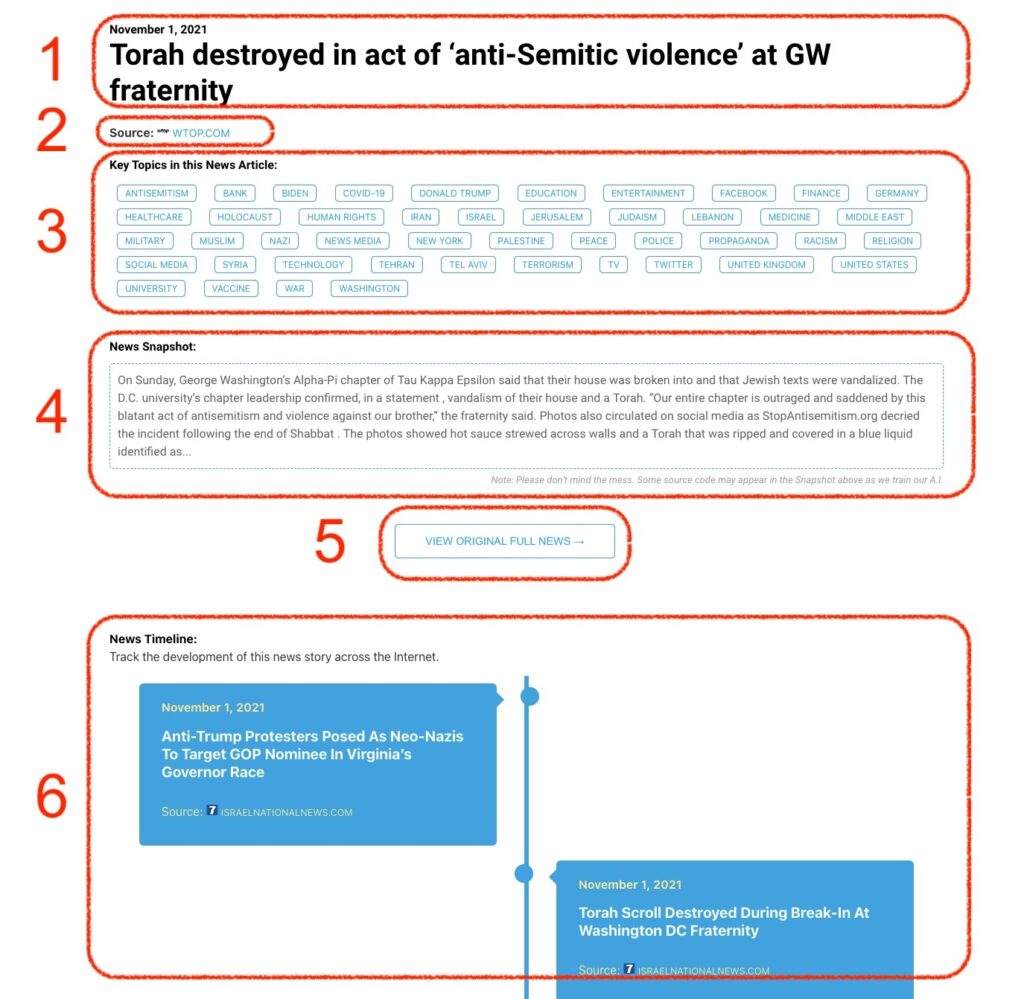
What Does This Data Mean?

1: Date and Title 
This displays both the date Hagg.ai picked up the news and the original headline of the news from the source.

2: Source
View the name of the original source website, along with the source’s icon image. You can click the source name to visit the homepage of that source.

3: Key Topics
The great power of Hagg.ai rests here, where we use A.I. technology to extract the key topics and themes for the news article. You can click each topic to see many more articles categorized to that specific topic.

4: News Snapshot
Read a quick blurb extracted from the source news.

5: View Original Full News
Click this button to go directly to the original source article on the source’s own website.

6: News Timeline
Hagg.ai is powerful and our News Timeline shows you the genesis of where this news came from and other related news stories. The Timeline builds you a history of where the news came, so you can chart where the news may go!

Hagg.ai How-To