Skip to content
  • Timeline
  • Subscribe
  • Contact Us
  • About
  • Timeline
  • Subscribe
  • Contact Us
  • About
Hagg.ai
Monitoring Antisemitism Intel
January 16, 2026
What is this data

AI is anti-Semitic, and here’s the proof

Source: telegraph.co.uk telegraph.co.uk
Key Topics in this News Article:
Antisemitism artificial intelligence Auschwitz Boycott education Elon Musk Football Gold Holocaust Internet Israel Judaism Law Microsoft Nazi Orthodox Police Racism Religion Sports Technology Tel Aviv United Kingdom University
News Snapshot:
Artificial intelligence (AI) has been accused of spreading anti-Semitism after bots created offensive pictures and videos of Jews. AI tools used by the Government, such as ChatGPT, can be used to generate images that lean into Jewish stereotypes, while others create outright racist pictures and videos with few guardrails. Jewish groups warned that the technology was being used to spread hateful posts at “frightening speed” and called for clear rules to prevent AI from being used to spread malicious anti-Semitic content. West Midlands Police was forced to apologise this week after officers used Microsoft’s Copilot AI tool to find evidence...

Note: Please don’t mind the mess. Some source code may appear in the Snapshot above as we train our A.I.
Share on Social Media:
Facebook
Twitter
LinkedIn
Telegram
Reddit
Pocket
View Original Full News →
You may also like

News Timeline:
Track the development of this news story across the Internet.

January 15, 2026

What to know about Grok and the controversies surrounding it


Source: bostonglobe.com bostonglobe.com

January 9, 2026

Grok Lies About Locking Its AI Porn Options Behind A Paywall


Source: kotaku.com kotaku.com

January 8, 2026

Musk’s AI chatbot faces global backlash over sexualised images of women and children


Source: thestar.com.my thestar.com.my

November 22, 2025

Elon Musk asks Twitter users to help fix Grok: We will not rest until…


Source: timesofindia.indiatimes.com timesofindia.indiatimes.com

August 12, 2025

Why AI Shouldn’t Replace Historians Anytime Soon


Source: gizmodo.com gizmodo.com

July 17, 2025

How Elon Musk’s rogue Grok chatbot became a cautionary AI tale


Source: irishtimes.com irishtimes.com

July 10, 2025

xAI debuts powerful Grok 4 AI model, but it’s not going to make people forget the antisemitism it spewed on X


Source: techradar.com techradar.com

July 10, 2025

Elon Musk introduced Grok 4 last night, calling it the ‘smartest AI in the world’ what businesses need to know


Source: venturebeat.com venturebeat.com

July 10, 2025

Musk’s xAI scrubs inappropriate posts after Grok chatbot makes antisemitic comments


Source: baytoday.ca baytoday.ca

July 9, 2025

Musk’s AI chatbot is suddenly posting antisemitic tropes


Source: mercurynews.com mercurynews.com

News Timeline | Contact | About | Privacy

Twitter Linkedin

© 2026 Hagg.ai. Individual news stories are copyright their respective sources. Computer algorithms generally select what is shown on Hagg.ai. The algorithms determine which stories, images, and videos show, and in what order.

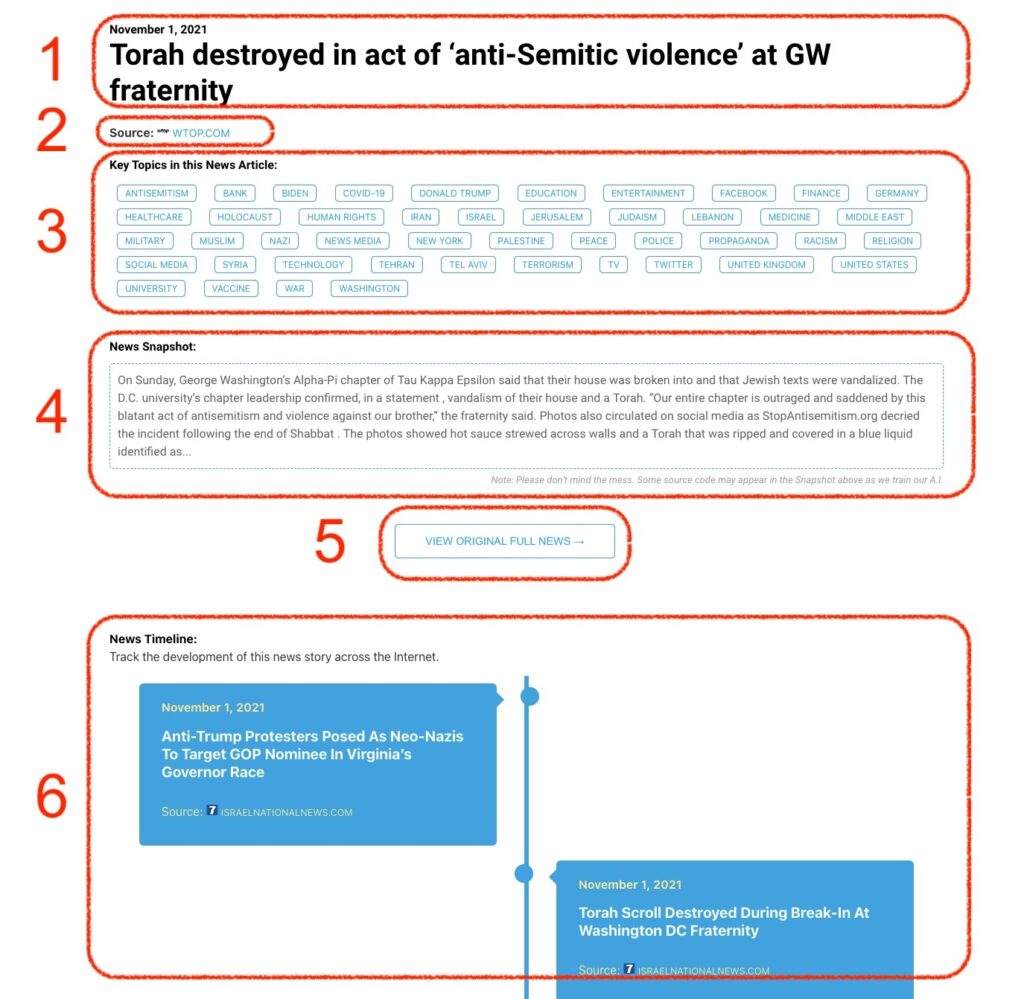
What Does This Data Mean?

1: Date and Title 
This displays both the date Hagg.ai picked up the news and the original headline of the news from the source.

2: Source
View the name of the original source website, along with the source’s icon image. You can click the source name to visit the homepage of that source.

3: Key Topics
The great power of Hagg.ai rests here, where we use A.I. technology to extract the key topics and themes for the news article. You can click each topic to see many more articles categorized to that specific topic.

4: News Snapshot
Read a quick blurb extracted from the source news.

5: View Original Full News
Click this button to go directly to the original source article on the source’s own website.

6: News Timeline
Hagg.ai is powerful and our News Timeline shows you the genesis of where this news came from and other related news stories. The Timeline builds you a history of where the news came, so you can chart where the news may go!

Hagg.ai How-To