Skip to content
  • Timeline
  • Subscribe
  • Contact Us
  • About
  • Timeline
  • Subscribe
  • Contact Us
  • About
Hagg.ai
Monitoring Antisemitism Intel
November 15, 2025
What is this data

An Acquaintance Might Be a Racist. Do I Need to Drop Him?

Source: nytimes.com nytimes.com
Key Topics in this News Article:
education Football Holocaust Racism Social Media Sports
News Snapshot:
The other day, I posted a photo of a soccer player, whom I consider to be an acquaintance — I’m closer to the photographer — to my Instagram story. (I’m in high school, as are all the people I’m discussing.) Shortly after, a friend D.M.’ed me to say that the soccer player is “a racist” who “did blackface and said the N-word.” Even so, I decided not to delete it. I told my friend that even if I’d known earlier, I wouldn’t have completely cut the soccer player off. I become close only with people I respect, and other things...

Note: Please don’t mind the mess. Some source code may appear in the Snapshot above as we train our A.I.
Share on Social Media:
Facebook
X
LinkedIn
Telegram
Reddit
WhatsApp
VIEW ORIGINAL FULL NEWS →
You may also like

News Timeline:
Track the development of this news story across the Internet.

November 15, 2025

Madrid’s ‘El Clásico’ offers Canada a playbook for peaceful World Cup soccer in 2026


Source: theglobeandmail.com theglobeandmail.com

November 5, 2025

Antisemitism charge kicked around as Maccabi Tel Aviv fans barred from UK match


Source: timesofisrael.com timesofisrael.com

October 21, 2025

He Was a Teen Tech Prodigy. Then He Became the ‘Crypto Godfather’


Source: rollingstone.com rollingstone.com

October 14, 2025

Full text of Trump’s Knesset speech: You’ve won. You can’t beat the world. It’s time for peace


Source: timesofisrael.com timesofisrael.com

News Timeline | Contact | About | Privacy

Twitter Linkedin

© 2026 Hagg.ai. Individual news stories are copyright their respective sources. Computer algorithms generally select what is shown on Hagg.ai. The algorithms determine which stories, images, and videos show, and in what order.

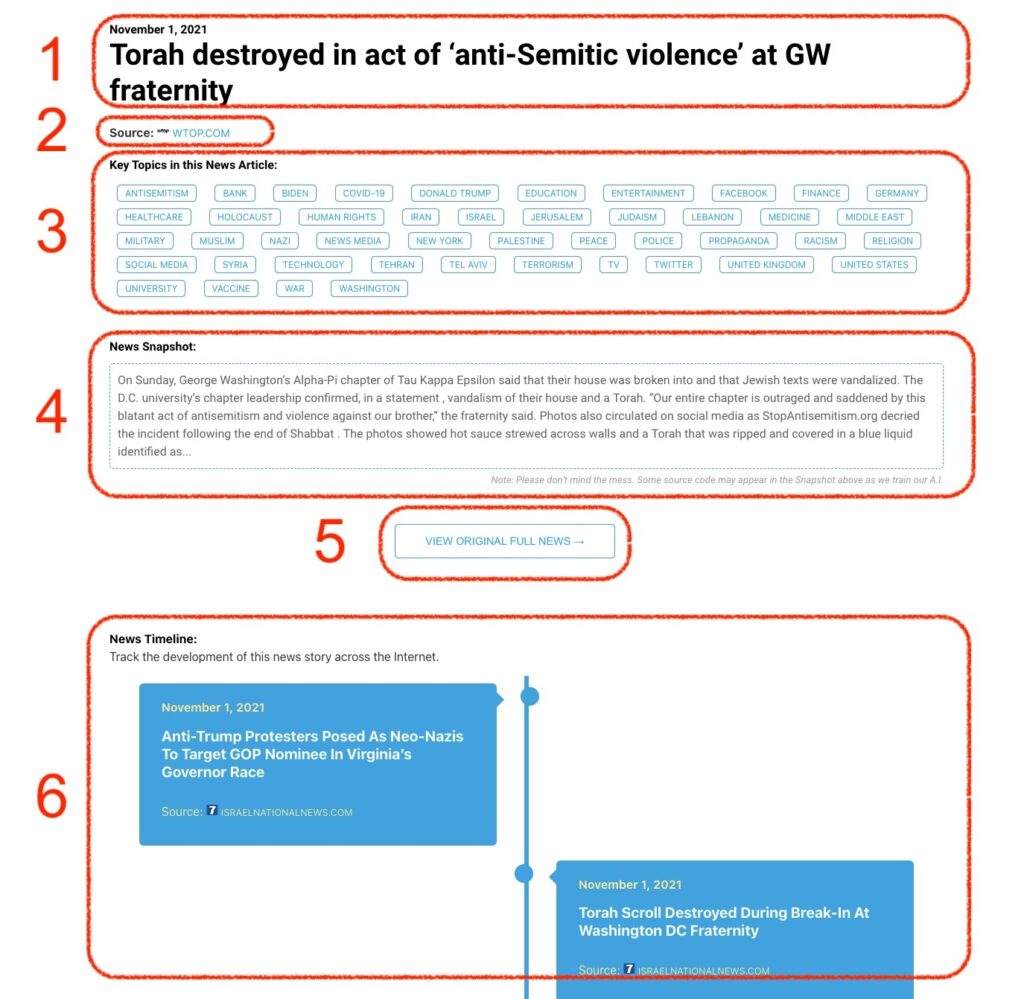
What Does This Data Mean?

1: Date and Title 
This displays both the date Hagg.ai picked up the news and the original headline of the news from the source.

2: Source
View the name of the original source website, along with the source’s icon image. You can click the source name to visit the homepage of that source.

3: Key Topics
The great power of Hagg.ai rests here, where we use A.I. technology to extract the key topics and themes for the news article. You can click each topic to see many more articles categorized to that specific topic.

4: News Snapshot
Read a quick blurb extracted from the source news.

5: View Original Full News
Click this button to go directly to the original source article on the source’s own website.

6: News Timeline
Hagg.ai is powerful and our News Timeline shows you the genesis of where this news came from and other related news stories. The Timeline builds you a history of where the news came, so you can chart where the news may go!

Hagg.ai How-To