Skip to content
  • Timeline
  • Subscribe
  • Contact Us
  • About
  • Timeline
  • Subscribe
  • Contact Us
  • About
Hagg.ai
Monitoring Antisemitism Intel
November 1, 2025
What is this data

Did Joe Rogan call himself a Nazi? The truth behind his viral talk with Elon Musk and media backlash

Source: timesofindia.indiatimes.com timesofindia.indiatimes.com
Key Topics in this News Article:
Covid-19 Elon Musk Extremism Far-Right Fascism Free Speech Nazi Podcast
News Snapshot:
Joe Rogan, on his podcast with Elon Musk, decried mainstream media's alleged misrepresentation of a UFC weigh-in photo. He claims outlets like CNN used the image to label him a "conspiracy theorist" or "Nazi," drawing parallels to Musk's own recent controversy. Rogan argued such extreme labeling dilutes serious accusations and unfairly paints public figures. Did Joe Rogan call himself a Nazi? The truth behind his viral talk with Elon Musk and media backlash (Image Via Getty) On October 31, 2025, podcaster and commentator Joe Rogan stirred controversy during episode #2404 of his show when he accused mainstream media of twisting...

Note: Please don’t mind the mess. Some source code may appear in the Snapshot above as we train our A.I.
Share on Social Media:
Facebook
X
LinkedIn
Telegram
Reddit
WhatsApp
VIEW ORIGINAL FULL NEWS →
You may also like

News Timeline:
Track the development of this news story across the Internet.

August 1, 2025

Musk boosts fortunes of hard-right figures in Europe


Source: cp24.com cp24.com

July 25, 2025

Netanyahu’s son claims Joe Rogan refused to have father on his show: ‘Years of antisemitic propaganda’


Source: nypost.com nypost.com

News Timeline | Contact | About | Privacy

Twitter Linkedin

© 2026 Hagg.ai. Individual news stories are copyright their respective sources. Computer algorithms generally select what is shown on Hagg.ai. The algorithms determine which stories, images, and videos show, and in what order.

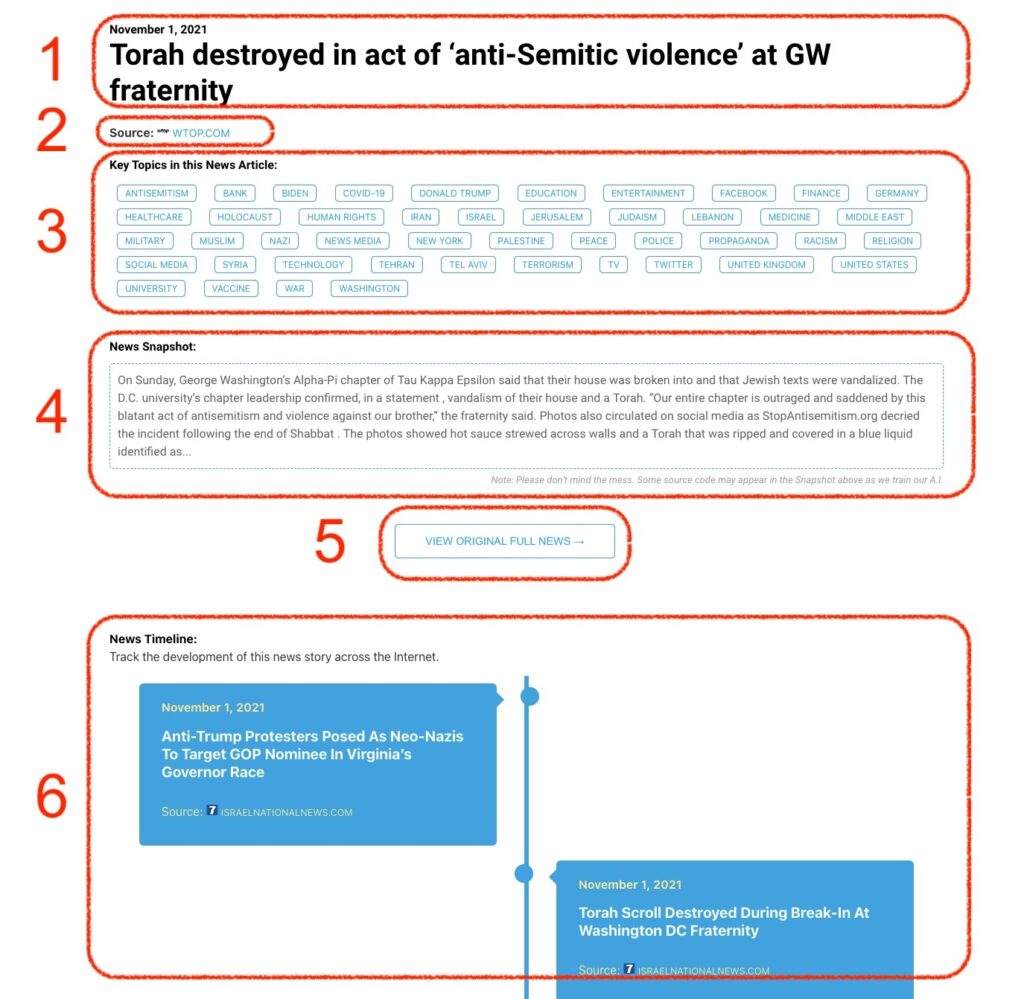
What Does This Data Mean?

1: Date and Title 
This displays both the date Hagg.ai picked up the news and the original headline of the news from the source.

2: Source
View the name of the original source website, along with the source’s icon image. You can click the source name to visit the homepage of that source.

3: Key Topics
The great power of Hagg.ai rests here, where we use A.I. technology to extract the key topics and themes for the news article. You can click each topic to see many more articles categorized to that specific topic.

4: News Snapshot
Read a quick blurb extracted from the source news.

5: View Original Full News
Click this button to go directly to the original source article on the source’s own website.

6: News Timeline
Hagg.ai is powerful and our News Timeline shows you the genesis of where this news came from and other related news stories. The Timeline builds you a history of where the news came, so you can chart where the news may go!

Hagg.ai How-To