Skip to content
  • Timeline
  • Subscribe
  • Contact Us
  • About
  • Timeline
  • Subscribe
  • Contact Us
  • About
Hagg.ai
Monitoring Antisemitism Intel
September 4, 2025
What is this data

DC Jewish Museum terror suspect Elias Rodriguez arraigned in federal court

Source: nypost.com nypost.com
Key Topics in this News Article:
Antisemitism Apple Chicago embassy Gaza Genocide Hate Crime Holocaust Illinois iPhone Israel Judaism Law Palestine Police Religion Social Media Socialism Terrorism Washington
News Snapshot:
WASHINGTON — The feds have a mountain of evidence against alleged homegrown terrorist Elias Rodriguez, who is charged with gunning down a pair of young Israeli diplomats outside the Capital Jewish Museum in Washington, DC in May, prosecutors revealed. Rodriguez, 31, appeared in DC federal court on Thursday for a 10-minute hearing while wearing an orange jumpsuit, glasses and sporting a beard — just three blocks from where the cold-blooded killings took place. He pleaded not guilty to murder and hate crime charges. 4 Rodriguez was heard shouting “Free, free Palestine” following the attack. Katie Kalisher via Storyful Judge Randolph...

Note: Please don’t mind the mess. Some source code may appear in the Snapshot above as we train our A.I.
Share on Social Media:
Facebook
X
LinkedIn
Telegram
Reddit
WhatsApp
VIEW ORIGINAL FULL NEWS →
You may also like

News Timeline:
Track the development of this news story across the Internet.

Timeline is being generated. Please check back and refresh this page soon.

News Timeline | Contact | About | Privacy

Twitter Linkedin

© 2026 Hagg.ai. Individual news stories are copyright their respective sources. Computer algorithms generally select what is shown on Hagg.ai. The algorithms determine which stories, images, and videos show, and in what order.

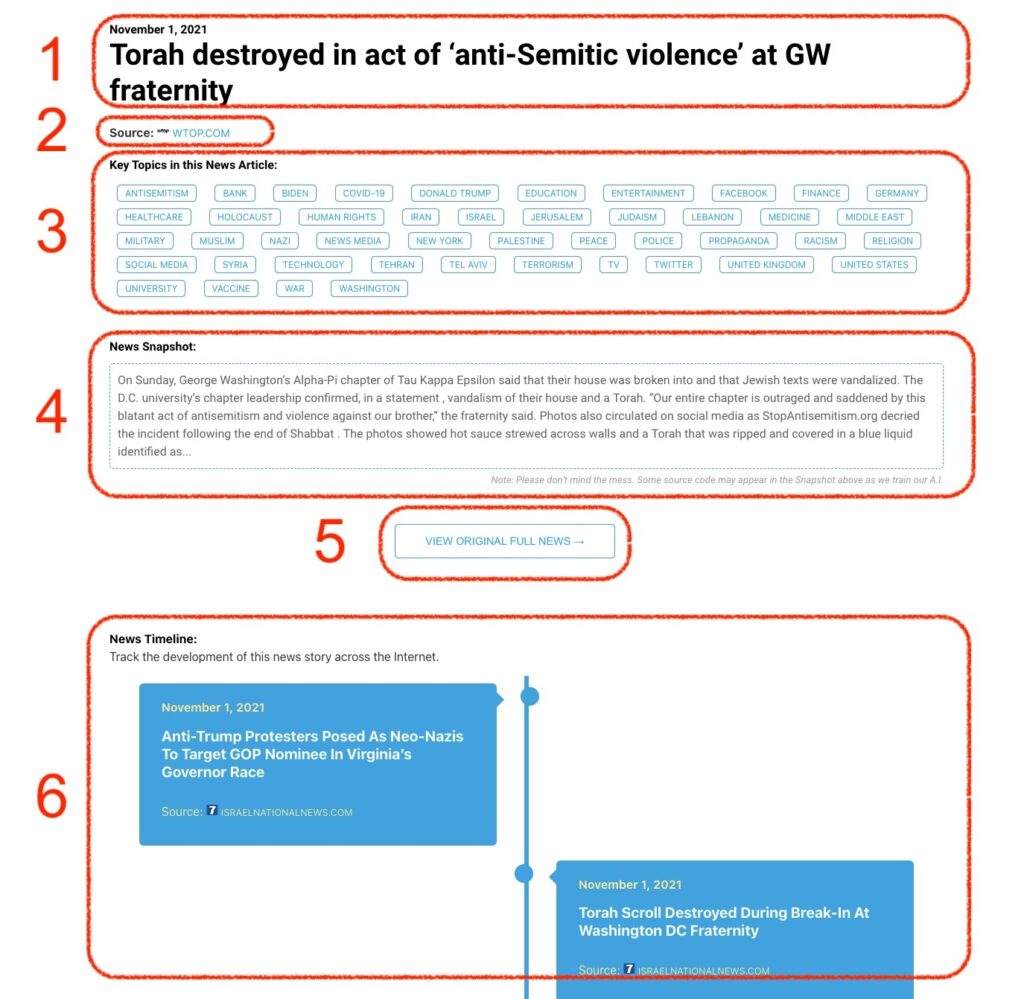
What Does This Data Mean?

1: Date and Title 
This displays both the date Hagg.ai picked up the news and the original headline of the news from the source.

2: Source
View the name of the original source website, along with the source’s icon image. You can click the source name to visit the homepage of that source.

3: Key Topics
The great power of Hagg.ai rests here, where we use A.I. technology to extract the key topics and themes for the news article. You can click each topic to see many more articles categorized to that specific topic.

4: News Snapshot
Read a quick blurb extracted from the source news.

5: View Original Full News
Click this button to go directly to the original source article on the source’s own website.

6: News Timeline
Hagg.ai is powerful and our News Timeline shows you the genesis of where this news came from and other related news stories. The Timeline builds you a history of where the news came, so you can chart where the news may go!

Hagg.ai How-To