Skip to content
  • Timeline
  • Subscribe
  • Contact Us
  • About
  • Timeline
  • Subscribe
  • Contact Us
  • About
Hagg.ai
Monitoring Antisemitism Intel
August 7, 2025
What is this data

Grok rolls out AI video creator for X with bonus “spicy” mode

Source: techradar.com techradar.com
Key Topics in this News Article:
Elon Musk Google Grok Nazi Search Engine Social Media Technology Twitter
News Snapshot:
X's AI video maker Grok Imagine is live for SuperGrok and Premium+ subscribers Grok Imagine turns prompts into looping six-second clips The tool includes a controversial “spicy mode” for some NSFW content xAI is pushing out the Grok Imagine AI video maker to those willing to pay for a SuperGrok or Premium+ subscription. Assuming you've paid your $30 or $35 a month, respectively, you can access Imagine in the Grok app under its own tab and turn prompts into short video clips. These last for around six seconds and include synced sound. You can also upload static images and animate...

Note: Please don’t mind the mess. Some source code may appear in the Snapshot above as we train our A.I.
Share on Social Media:
Facebook
X
LinkedIn
Telegram
Reddit
WhatsApp
VIEW ORIGINAL FULL NEWS →
You may also like

News Timeline:
Track the development of this news story across the Internet.

January 30, 2026

Grok’s ‘Put Her In a Bikini’ Surge and the Fragility of AI Safety Systems


Source: thequint.com thequint.com

January 18, 2026

What you need to know about Grok and the controversies surrounding it


Source: japantoday.com japantoday.com

January 15, 2026

What to know about Grok and the controversies surrounding it


Source: bostonglobe.com bostonglobe.com

January 9, 2026

Grok Lies About Locking Its AI Porn Options Behind A Paywall


Source: kotaku.com kotaku.com

January 8, 2026

Musk’s AI chatbot faces global backlash over sexualised images of women and children


Source: thestar.com.my thestar.com.my

News Timeline | Contact | About | Privacy

Twitter Linkedin

© 2026 Hagg.ai. Individual news stories are copyright their respective sources. Computer algorithms generally select what is shown on Hagg.ai. The algorithms determine which stories, images, and videos show, and in what order.

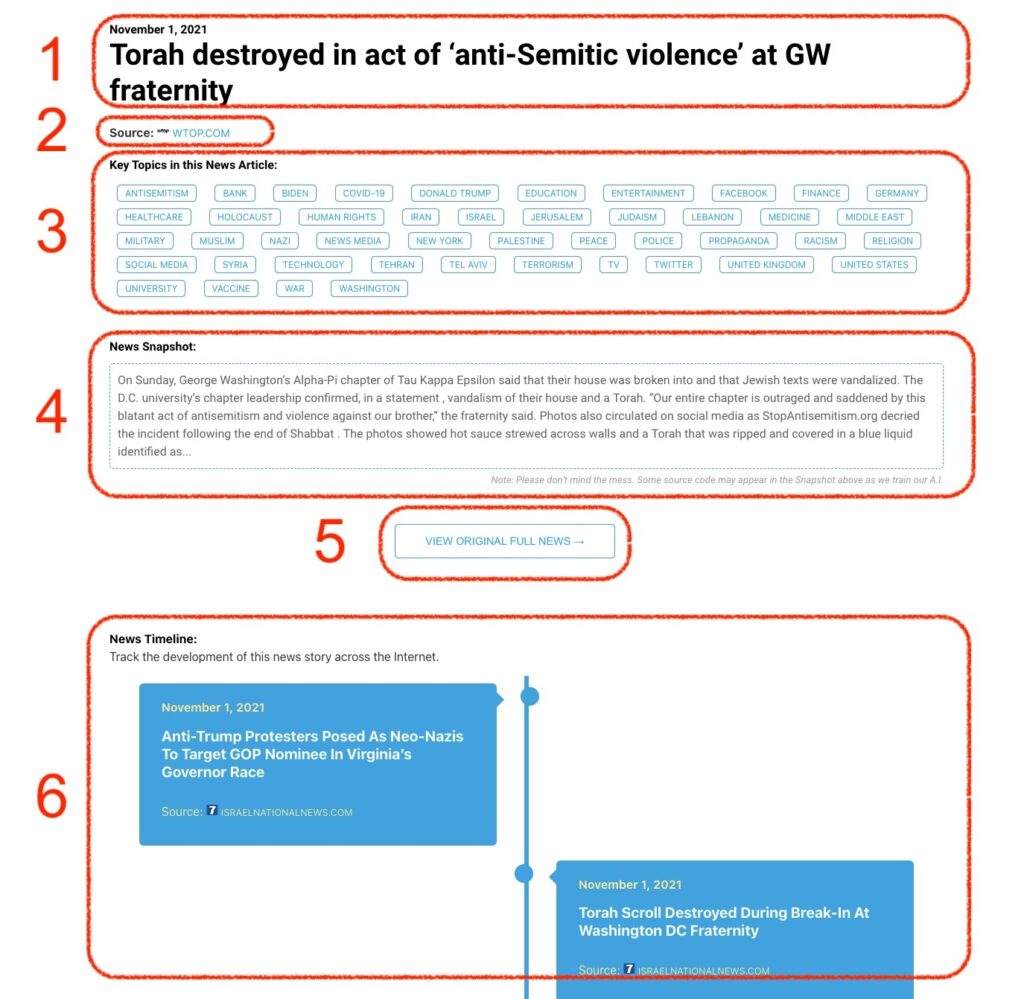
What Does This Data Mean?

1: Date and Title 
This displays both the date Hagg.ai picked up the news and the original headline of the news from the source.

2: Source
View the name of the original source website, along with the source’s icon image. You can click the source name to visit the homepage of that source.

3: Key Topics
The great power of Hagg.ai rests here, where we use A.I. technology to extract the key topics and themes for the news article. You can click each topic to see many more articles categorized to that specific topic.

4: News Snapshot
Read a quick blurb extracted from the source news.

5: View Original Full News
Click this button to go directly to the original source article on the source’s own website.

6: News Timeline
Hagg.ai is powerful and our News Timeline shows you the genesis of where this news came from and other related news stories. The Timeline builds you a history of where the news came, so you can chart where the news may go!

Hagg.ai How-To