Skip to content
  • Timeline
  • Subscribe
  • Contact Us
  • About
  • Timeline
  • Subscribe
  • Contact Us
  • About
Hagg.ai
Monitoring Antisemitism Intel
July 19, 2025
What is this data

15 incredible DOS classics you can play in your browser

Source: xda-developers.com xda-developers.com
Key Topics in this News Article:
Car Computer diplomacy Football Franchise Hitler Indiana Nazi Online Game Oregon PC Software Sports Technology University War World War
News Snapshot:
Between the bulk of the '80s and the '90s, DOS was the way to go for gamers, and was the backbone of PC gaming. Sure, there were plenty of other consoles and platforms with tons of games, yes, but DOS was where the most innovation was happening. We're talking about experimentation with 2.5D and 3D space, first-person shooters on PC, massive city-building sims, point-and-click adventures, and so much more. Devs were building games for DOS while pushing boundaries, experimenting with new perspectives, mechanics, and genres, effectively laying down the groundwork for modern gaming as we know it today. Now, what...

Note: Please don’t mind the mess. Some source code may appear in the Snapshot above as we train our A.I.
Share on Social Media:
Facebook
X
LinkedIn
Telegram
Reddit
WhatsApp
VIEW ORIGINAL FULL NEWS →
You may also like

News Timeline:
Track the development of this news story across the Internet.

July 4, 2025

‘Close to perfect’: readers’ favourite games of 2025 so far


Source: theguardian.com theguardian.com

June 18, 2025

Russell Crowe, Rami Malek Movie ‘Nuremberg’ Lands At Sony Pictures Classics


Source: deadline.com deadline.com

News Timeline | Contact | About | Privacy

Twitter Linkedin

© 2026 Hagg.ai. Individual news stories are copyright their respective sources. Computer algorithms generally select what is shown on Hagg.ai. The algorithms determine which stories, images, and videos show, and in what order.

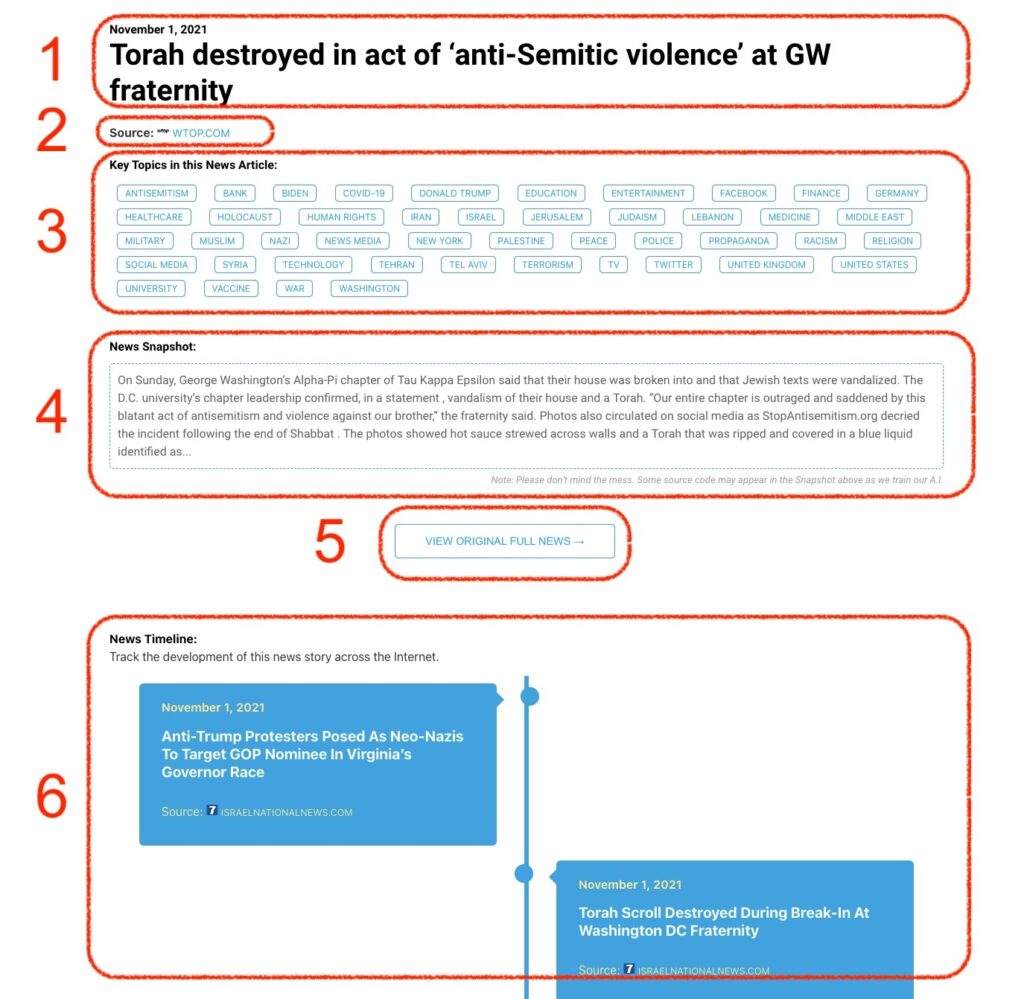
What Does This Data Mean?

1: Date and Title 
This displays both the date Hagg.ai picked up the news and the original headline of the news from the source.

2: Source
View the name of the original source website, along with the source’s icon image. You can click the source name to visit the homepage of that source.

3: Key Topics
The great power of Hagg.ai rests here, where we use A.I. technology to extract the key topics and themes for the news article. You can click each topic to see many more articles categorized to that specific topic.

4: News Snapshot
Read a quick blurb extracted from the source news.

5: View Original Full News
Click this button to go directly to the original source article on the source’s own website.

6: News Timeline
Hagg.ai is powerful and our News Timeline shows you the genesis of where this news came from and other related news stories. The Timeline builds you a history of where the news came, so you can chart where the news may go!

Hagg.ai How-To