Skip to content
  • Timeline
  • Subscribe
  • Contact Us
  • About
  • Timeline
  • Subscribe
  • Contact Us
  • About
Hagg.ai
Monitoring Antisemitism Intel
April 30, 2025
What is this data

Pandas and politics ? from World War II to the Cold War, zoos have always been ideological

Source: theconversation.com theconversation.com
Key Topics in this News Article:
America Britain Capitalism China Communism Donald Trump Fascism Germany Hate Symbol Healthcare Hitler Immigration Import Italy Japan JD Vance London Moscow Nazi North America Russia Sanctions Swastika Tokyo United Kingdom
News Snapshot:
President Donald Trump’s sweeping range of more than 130 executive orders and other decisions aim to upend everything from long-standing immigration policy to the control of a performing arts center. But so far, zoos are not among the many issues the Trump administration has focused on. That might no longer be the case. Trump issued an executive order on March 27, 2025, to restore “truth and sanity” at federal history sites. “Over the past decade, Americans have witnessed a concerted and widespread effort to rewrite our Nation’s history,” Trump wrote in the executive order, “replacing facts with a distorted narrative...

Note: Please don’t mind the mess. Some source code may appear in the Snapshot above as we train our A.I.
Share on Social Media:
Facebook
Twitter
LinkedIn
Telegram
Reddit
Pocket
View Original Full News →
You may also like

News Timeline:
Track the development of this news story across the Internet.

Timeline is being generated. Please check back and refresh this page soon.

News Timeline | Contact | About | Privacy

Twitter Linkedin

© 2026 Hagg.ai. Individual news stories are copyright their respective sources. Computer algorithms generally select what is shown on Hagg.ai. The algorithms determine which stories, images, and videos show, and in what order.

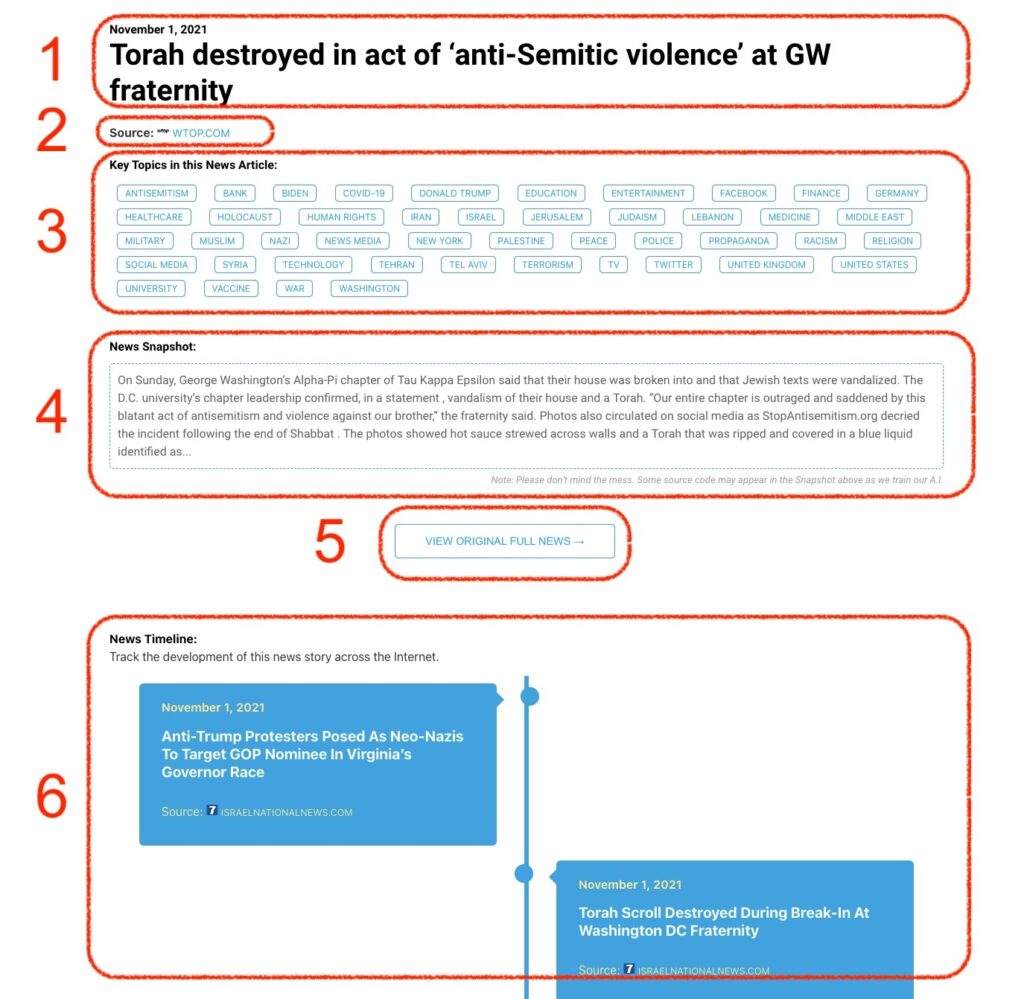
What Does This Data Mean?

1: Date and Title 
This displays both the date Hagg.ai picked up the news and the original headline of the news from the source.

2: Source
View the name of the original source website, along with the source’s icon image. You can click the source name to visit the homepage of that source.

3: Key Topics
The great power of Hagg.ai rests here, where we use A.I. technology to extract the key topics and themes for the news article. You can click each topic to see many more articles categorized to that specific topic.

4: News Snapshot
Read a quick blurb extracted from the source news.

5: View Original Full News
Click this button to go directly to the original source article on the source’s own website.

6: News Timeline
Hagg.ai is powerful and our News Timeline shows you the genesis of where this news came from and other related news stories. The Timeline builds you a history of where the news came, so you can chart where the news may go!

Hagg.ai How-To