Skip to content
  • Timeline
  • Subscribe
  • Contact Us
  • About
  • Timeline
  • Subscribe
  • Contact Us
  • About
Hagg.ai
Monitoring Antisemitism Intel
March 28, 2025
What is this data

Voice of America wins in court, for now, as judge blocks Trump administration from firing staff

Source: baytoday.ca baytoday.ca
Key Topics in this News Article:
Afghanistan America Biden Communism Computer Congress Cuba democracy Donald Trump Europe Firewall Law LGBTQ media intelligence Nazi New York News Media Propaganda TV United States USA War Washington Website White House
News Snapshot:
NEW YORK (AP) — The Voice of America can’t be silenced just yet. A federal judge on Friday halted the Trump administration’s efforts to dismantle the eight-decade-old U.S. government-funded international news service, calling the move a “classic case of arbitrary and capricious decision making.” Judge James Paul Oetken blocked the U.S. Agency for Global Media, which runs Voice of America, from firing more than 1,200 journalists, engineers and other staff that it sidelined two weeks ago in the wake of President Donald Trump ordering its funding slashed. Oetken issued a temporary restraining order barring the agency from “any further attempt...

Note: Please don’t mind the mess. Some source code may appear in the Snapshot above as we train our A.I.
Share on Social Media:
Facebook
Twitter
LinkedIn
Telegram
Reddit
Pocket
View Original Full News →
You may also like

News Timeline:
Track the development of this news story across the Internet.

Timeline is being generated. Please check back and refresh this page soon.

News Timeline | Contact | About | Privacy

Twitter Linkedin

© 2026 Hagg.ai. Individual news stories are copyright their respective sources. Computer algorithms generally select what is shown on Hagg.ai. The algorithms determine which stories, images, and videos show, and in what order.

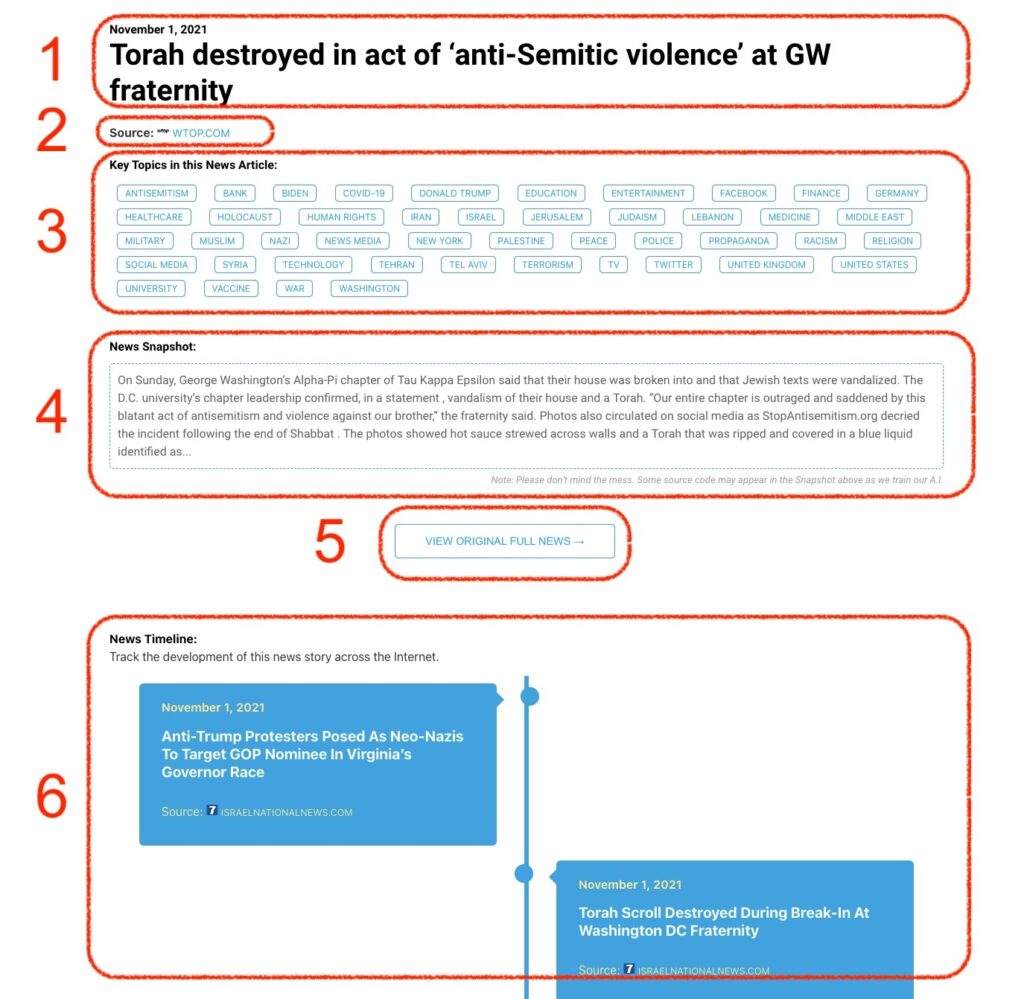
What Does This Data Mean?

1: Date and Title 
This displays both the date Hagg.ai picked up the news and the original headline of the news from the source.

2: Source
View the name of the original source website, along with the source’s icon image. You can click the source name to visit the homepage of that source.

3: Key Topics
The great power of Hagg.ai rests here, where we use A.I. technology to extract the key topics and themes for the news article. You can click each topic to see many more articles categorized to that specific topic.

4: News Snapshot
Read a quick blurb extracted from the source news.

5: View Original Full News
Click this button to go directly to the original source article on the source’s own website.

6: News Timeline
Hagg.ai is powerful and our News Timeline shows you the genesis of where this news came from and other related news stories. The Timeline builds you a history of where the news came, so you can chart where the news may go!

Hagg.ai How-To