Skip to content
  • Timeline
  • Subscribe
  • Contact Us
  • About
  • Timeline
  • Subscribe
  • Contact Us
  • About
Hagg.ai
Monitoring Antisemitism Intel
February 7, 2025
What is this data

Elon Musk Rehiring DOGE Staffer Who Resigned Over Racist Tweets

Source: gizmodo.com gizmodo.com
Key Topics in this News Article:
America Congress Denial Dogecoin Donald Trump Elon Musk Employee Extremism Far-Right Fascism Finance Gaza Holocaust Indian Israel Law Malaysia media intelligence Nazi News Media Podcast Racism Social Media Software Twitter
News Snapshot:
Elon Musk is rehiring the guy who resigned from DOGE yesterday. And we can’t say that we’re entirely surprised. Musk launched a poll on his social media platform X Friday to ask followers if he should rehire Marko Elez, a 25-year-old software engineer who had been working on the DOGE project that’s currently ransacking the federal government. Elez resigned Thursday after he was linked to a since-deleted account on X with tweets like, “I would not mind at all if Gaza and Israel were both wiped off the face of the Earth.” “Bring back @DOGE staffer who made inappropriate statements...

Note: Please don’t mind the mess. Some source code may appear in the Snapshot above as we train our A.I.
Share on Social Media:
Facebook
Twitter
LinkedIn
Telegram
Reddit
Pocket
View Original Full News →
You may also like

News Timeline:
Track the development of this news story across the Internet.

Timeline is being generated. Please check back and refresh this page soon.

News Timeline | Contact | About | Privacy

Twitter Linkedin

© 2026 Hagg.ai. Individual news stories are copyright their respective sources. Computer algorithms generally select what is shown on Hagg.ai. The algorithms determine which stories, images, and videos show, and in what order.

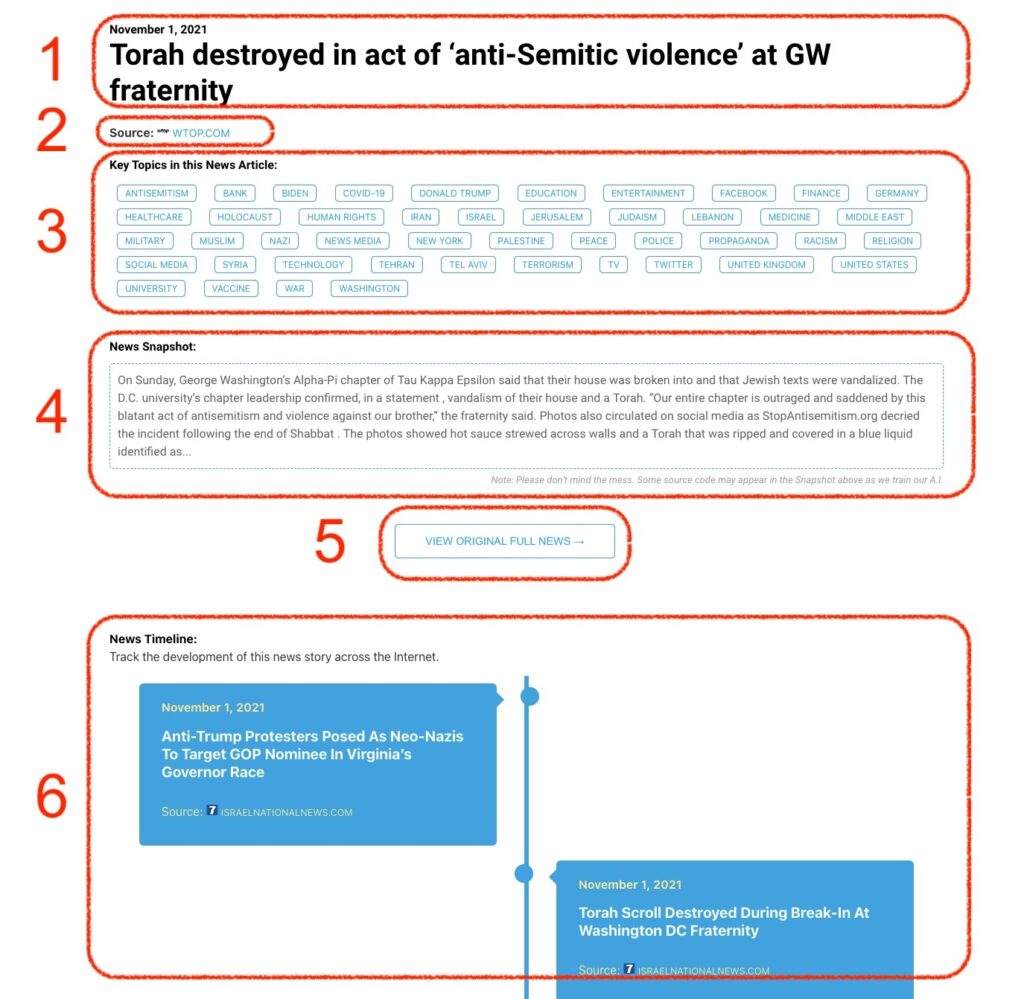
What Does This Data Mean?

1: Date and Title 
This displays both the date Hagg.ai picked up the news and the original headline of the news from the source.

2: Source
View the name of the original source website, along with the source’s icon image. You can click the source name to visit the homepage of that source.

3: Key Topics
The great power of Hagg.ai rests here, where we use A.I. technology to extract the key topics and themes for the news article. You can click each topic to see many more articles categorized to that specific topic.

4: News Snapshot
Read a quick blurb extracted from the source news.

5: View Original Full News
Click this button to go directly to the original source article on the source’s own website.

6: News Timeline
Hagg.ai is powerful and our News Timeline shows you the genesis of where this news came from and other related news stories. The Timeline builds you a history of where the news came, so you can chart where the news may go!

Hagg.ai How-To