Skip to content
  • Timeline
  • Subscribe
  • Contact Us
  • About
  • Timeline
  • Subscribe
  • Contact Us
  • About
Hagg.ai
Monitoring Antisemitism Intel
April 21, 2024
What is this data

footage reveals new details of exchange between police and antisemitism campaigner called ‘openly Jewish’

Source: news.sky.com news.sky.com
Key Topics in this News Article:
Activist Advertising Antisemitism Entertainment Gaza Hamas Israel Judaism London Palestine Police Religion Sadiq Khan Social Media War
News Snapshot:
A tense, extended stand-off between police and an antisemitism campaigner where he was called "openly Jewish" and threatened with arrest yards from a pro-Palestinian march was caught on film by Sky News. The footage gives context to the lengthy and fraught exchanges amid an increasingly volatile atmosphere, as the head of the Metropolitan Police faces calls to resign following the incident. Scotland Yard has already had to apologise twice after a short video clip emerged on social media, where Gideon Falter, chief executive of the Campaign Against Antisemitism, was blocked by an officer close to the protest in the Aldwych...

Note: Please don’t mind the mess. Some source code may appear in the Snapshot above as we train our A.I.
Share on Social Media:
Facebook
X
LinkedIn
Telegram
Reddit
WhatsApp
VIEW ORIGINAL FULL NEWS →
You may also like

News Timeline:
Track the development of this news story across the Internet.

December 30, 2025

The 50 greatest war movies of all time ranked


Source: telegraph.co.uk telegraph.co.uk

December 1, 2025

When Participating in Politics Puts Your Life at Risk


Source: newyorker.com newyorker.com

News Timeline | Contact | About | Privacy

Twitter Linkedin

© 2026 Hagg.ai. Individual news stories are copyright their respective sources. Computer algorithms generally select what is shown on Hagg.ai. The algorithms determine which stories, images, and videos show, and in what order.

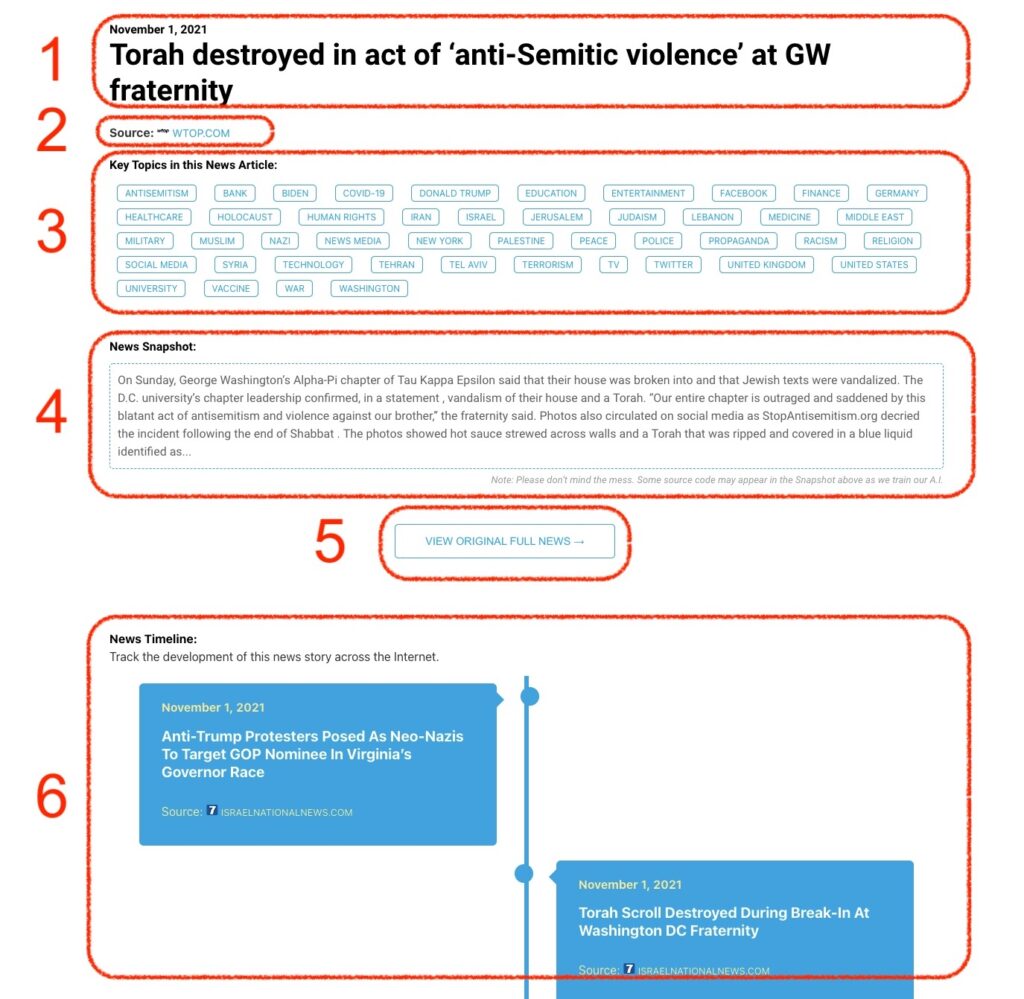
What Does This Data Mean?

1: Date and Title 
This displays both the date Hagg.ai picked up the news and the original headline of the news from the source.

2: Source
View the name of the original source website, along with the source’s icon image. You can click the source name to visit the homepage of that source.

3: Key Topics
The great power of Hagg.ai rests here, where we use A.I. technology to extract the key topics and themes for the news article. You can click each topic to see many more articles categorized to that specific topic.

4: News Snapshot
Read a quick blurb extracted from the source news.

5: View Original Full News
Click this button to go directly to the original source article on the source’s own website.

6: News Timeline
Hagg.ai is powerful and our News Timeline shows you the genesis of where this news came from and other related news stories. The Timeline builds you a history of where the news came, so you can chart where the news may go!

Hagg.ai How-To