Skip to content
  • Timeline
  • Subscribe
  • Contact Us
  • About
  • Timeline
  • Subscribe
  • Contact Us
  • About
Hagg.ai
Monitoring Antisemitism Intel
March 26, 2024
What is this data

How to Win an Information War by Peter Pomarantsev review the radio host who beat Goebbels at his own game

Source: theguardian.com theguardian.com
Key Topics in this News Article:
America army Britain Donald Trump embassy Europe Fascism Football Germany Hitler Judaism London Marxism media intelligence military Moscow Navy Nazi News Media Prison Propaganda Putin Religion Russia Sports
News Snapshot:
In 1941 a secret British radio station called on Germans to rise up against Hitler. Run by German exiles, it was explicitly left wing. The station’s target audience was “the Good German”. Its broadcasts were serious and idealistic: a ray of light amid totalitarian darkness. They were also a complete flop. With Nazi propaganda rampant, and Hitler’s armies seemingly invincible and on the march across Europe, few bothered to listen in. It was at this point that Britain’s wartime intelligence services tried a more radical approach. That summer, a talented journalist called Sefton Delmer was given the job of beating...

Note: Please don’t mind the mess. Some source code may appear in the Snapshot above as we train our A.I.
Share on Social Media:
Facebook
X
LinkedIn
Telegram
Reddit
WhatsApp
VIEW ORIGINAL FULL NEWS →
You may also like

News Timeline:
Track the development of this news story across the Internet.

Timeline is being generated. Please check back and refresh this page soon.

News Timeline | Contact | About | Privacy

Twitter Linkedin

© 2026 Hagg.ai. Individual news stories are copyright their respective sources. Computer algorithms generally select what is shown on Hagg.ai. The algorithms determine which stories, images, and videos show, and in what order.

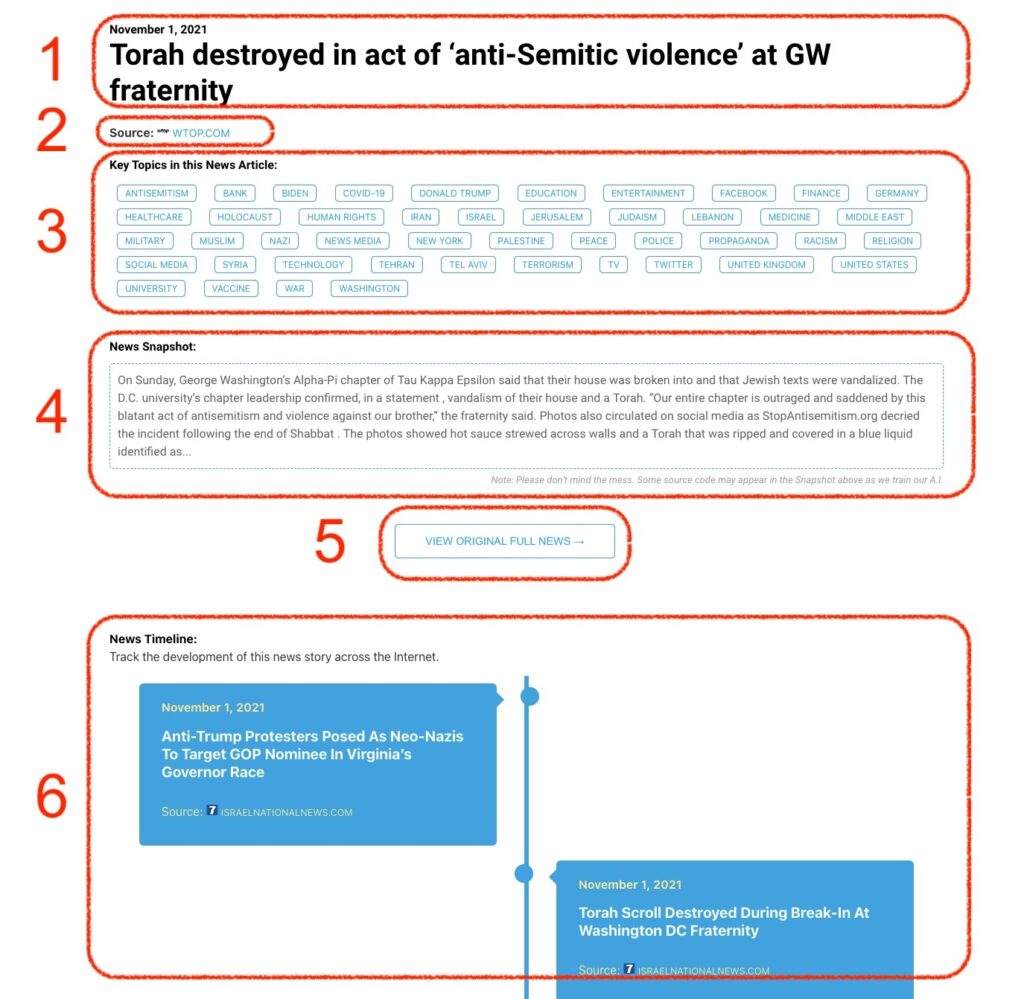
What Does This Data Mean?

1: Date and Title 
This displays both the date Hagg.ai picked up the news and the original headline of the news from the source.

2: Source
View the name of the original source website, along with the source’s icon image. You can click the source name to visit the homepage of that source.

3: Key Topics
The great power of Hagg.ai rests here, where we use A.I. technology to extract the key topics and themes for the news article. You can click each topic to see many more articles categorized to that specific topic.

4: News Snapshot
Read a quick blurb extracted from the source news.

5: View Original Full News
Click this button to go directly to the original source article on the source’s own website.

6: News Timeline
Hagg.ai is powerful and our News Timeline shows you the genesis of where this news came from and other related news stories. The Timeline builds you a history of where the news came, so you can chart where the news may go!

Hagg.ai How-To