Skip to content
  • Timeline
  • Subscribe
  • Contact Us
  • About
  • Timeline
  • Subscribe
  • Contact Us
  • About
Hagg.ai
Monitoring Antisemitism Intel
February 22, 2024
What is this data

Google pauses Gemini’s ability to generate people after overcorrecting for diversity in historical images

Source: engadget.com engadget.com
Key Topics in this News Article:
Advertising Catholic Germany Google Microsoft Nazi New York Pope Revenue Search Engine Social Media Twitter
News Snapshot:
Google said Thursday it’s pausing its Gemini chatbot’s ability to generate people. The move comes after viral social posts showed the AI tool overcorrecting for diversity, producing “historical” images of Nazis, America’s Founding Fathers and the Pope as people of color. “We’re already working to address recent issues with Gemini’s image generation feature,” Google posted on X (via The New York Times). “While we do this, we’re going to pause the image generation of people and will re-release an improved version soon.” The X user @JohnLu0x posted screenshots of Gemini’s results for the prompt, “Generate an image of a 1943...

Note: Please don’t mind the mess. Some source code may appear in the Snapshot above as we train our A.I.
Share on Social Media:
Facebook
X
LinkedIn
Telegram
Reddit
WhatsApp
VIEW ORIGINAL FULL NEWS →
You may also like

News Timeline:
Track the development of this news story across the Internet.

January 18, 2026

What you need to know about Grok and the controversies surrounding it


Source: japantoday.com japantoday.com

January 16, 2026

AI is anti-Semitic, and here’s the proof


Source: telegraph.co.uk telegraph.co.uk

January 15, 2026

What to know about Grok and the controversies surrounding it


Source: bostonglobe.com bostonglobe.com

January 9, 2026

Grok Lies About Locking Its AI Porn Options Behind A Paywall


Source: kotaku.com kotaku.com

News Timeline | Contact | About | Privacy

Twitter Linkedin

© 2026 Hagg.ai. Individual news stories are copyright their respective sources. Computer algorithms generally select what is shown on Hagg.ai. The algorithms determine which stories, images, and videos show, and in what order.

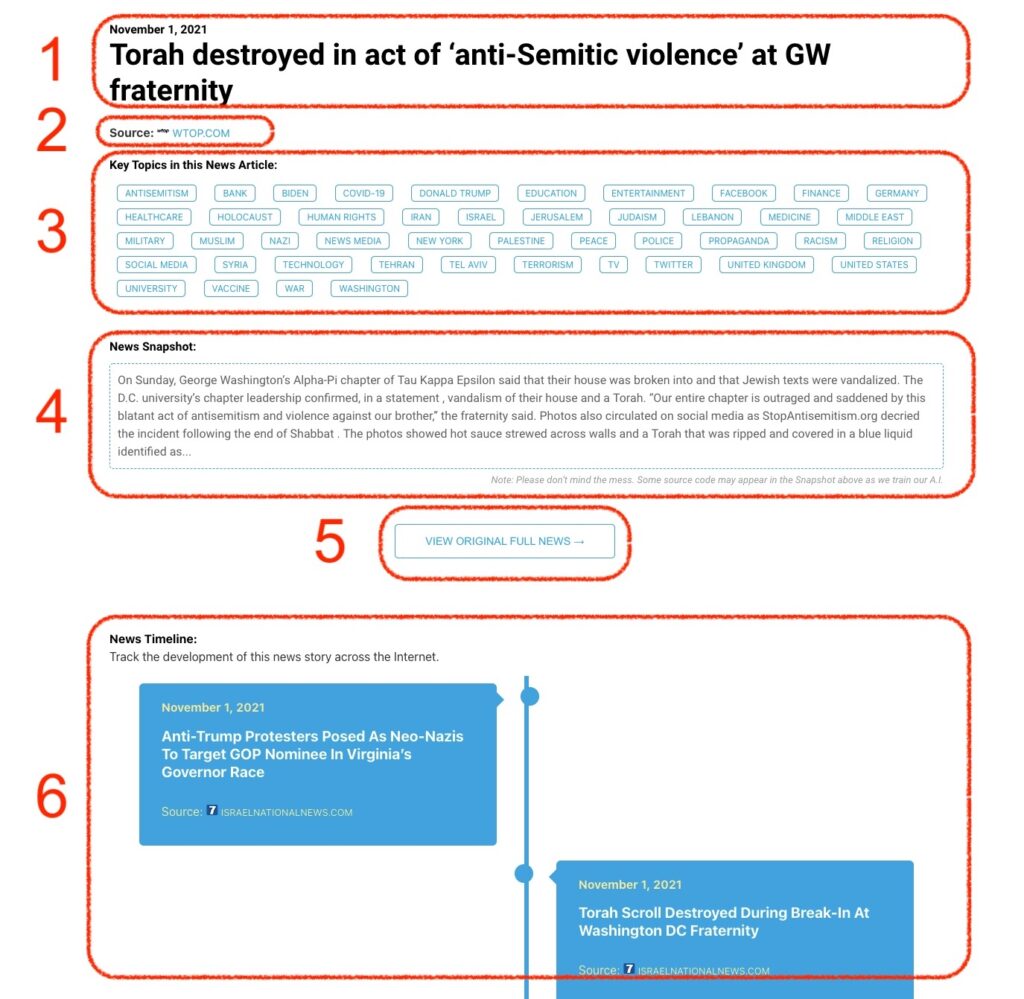
What Does This Data Mean?

1: Date and Title 
This displays both the date Hagg.ai picked up the news and the original headline of the news from the source.

2: Source
View the name of the original source website, along with the source’s icon image. You can click the source name to visit the homepage of that source.

3: Key Topics
The great power of Hagg.ai rests here, where we use A.I. technology to extract the key topics and themes for the news article. You can click each topic to see many more articles categorized to that specific topic.

4: News Snapshot
Read a quick blurb extracted from the source news.

5: View Original Full News
Click this button to go directly to the original source article on the source’s own website.

6: News Timeline
Hagg.ai is powerful and our News Timeline shows you the genesis of where this news came from and other related news stories. The Timeline builds you a history of where the news came, so you can chart where the news may go!

Hagg.ai How-To