Skip to content
  • Timeline
  • Subscribe
  • Contact Us
  • About
  • Timeline
  • Subscribe
  • Contact Us
  • About
Hagg.ai
Monitoring Antisemitism Intel
January 14, 2024
What is this data

Scientist cited in push to oust Harvard’s Claudine Gay has links to eugenicists

Source: theguardian.com theguardian.com
Key Topics in this News Article:
Activist ADL Antisemitism Britain California Denmark education Elections Employee European Extremism Far-Right Finance Holocaust Illinois Immigration Judaism Law London media intelligence New York News Media Poverty Racism Religion
News Snapshot:
A data scientist promoted by the rightwing activist Christopher Rufo, the Manhattan Institute thinktank, and other conservatives as an expert critic of the former Harvard president Claudine Gay has co-authored several papers in collaboration with a network of scholars who have been broadly criticized as eugenicists, or scientific racists. Rufo described Jonatan Pallesen as “a Danish data scientist who has raised new questions about Claudine Gay’s use – and potential misuse – of data in her PhD thesis” in an interview published in his newsletter and on the Manhattan Institute’s City Journal website last Friday. He did not tell readers...

Note: Please don’t mind the mess. Some source code may appear in the Snapshot above as we train our A.I.
Share on Social Media:
Facebook
X
LinkedIn
Telegram
Reddit
WhatsApp
VIEW ORIGINAL FULL NEWS →
You may also like

News Timeline:
Track the development of this news story across the Internet.

Timeline is being generated. Please check back and refresh this page soon.

News Timeline | Contact | About | Privacy

Twitter Linkedin

© 2026 Hagg.ai. Individual news stories are copyright their respective sources. Computer algorithms generally select what is shown on Hagg.ai. The algorithms determine which stories, images, and videos show, and in what order.

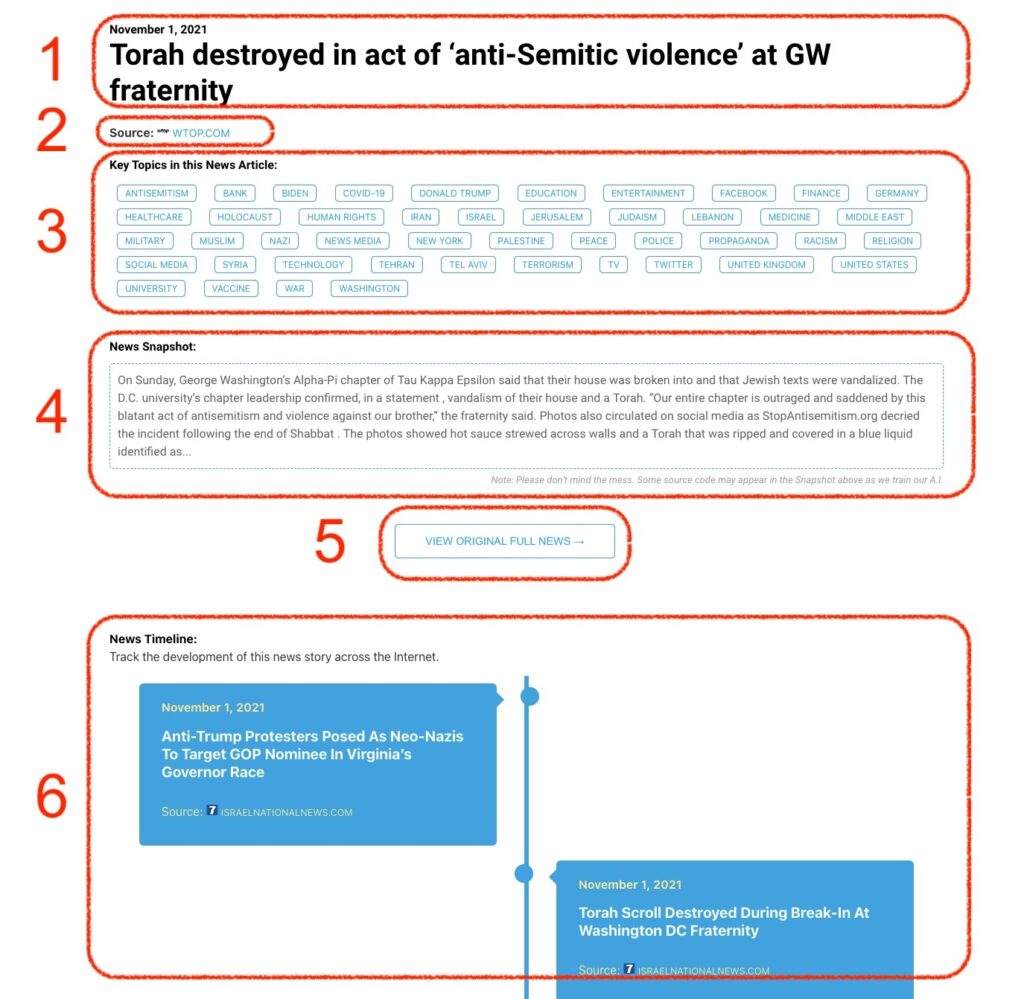
What Does This Data Mean?

1: Date and Title 
This displays both the date Hagg.ai picked up the news and the original headline of the news from the source.

2: Source
View the name of the original source website, along with the source’s icon image. You can click the source name to visit the homepage of that source.

3: Key Topics
The great power of Hagg.ai rests here, where we use A.I. technology to extract the key topics and themes for the news article. You can click each topic to see many more articles categorized to that specific topic.

4: News Snapshot
Read a quick blurb extracted from the source news.

5: View Original Full News
Click this button to go directly to the original source article on the source’s own website.

6: News Timeline
Hagg.ai is powerful and our News Timeline shows you the genesis of where this news came from and other related news stories. The Timeline builds you a history of where the news came, so you can chart where the news may go!

Hagg.ai How-To