Skip to content
  • Timeline
  • Subscribe
  • Contact Us
  • About
  • Timeline
  • Subscribe
  • Contact Us
  • About
Hagg.ai
Monitoring Antisemitism Intel
November 26, 2023
What is this data

Moment Tommy Robinson arrested at Campaign Against Antisemitism march as celebrities turn out to support British Jews

Source: thesun.ie thesun.ie
Key Topics in this News Article:
Antisemitism Britain Far-Right Gaza Hamas Hate Symbol Healthcare Ireland Israel Judaism London Medicine military Nazi Palestine Police Rabbi Religion Social Media Swastika Terrorism TV Twitter United Kingdom War
News Snapshot:
CROWDS cheered this afternoon as far-right leader Tommy Robinson was dragged out of a march against anti-Semitism. Hundreds of thousands gathered in central London in a massive protest organised by the Campaign Against Antisemitism. 11 Tommy Robinson was arrested at today's march against anti-Semitism Credit: PA 11 The far-right leader was collared for failing to leave when ordered to by cops - and crowds cheered Credit: Rex 11 It comes as celebrities showed their support for the cause - including former PM Boris Johnson and wife Carrie Credit: Tom Bowles 11 Other stars included Countdown's Rachel Riley, TV judge Rob...

Note: Please don’t mind the mess. Some source code may appear in the Snapshot above as we train our A.I.
Share on Social Media:
Facebook
X
LinkedIn
Telegram
Reddit
WhatsApp
VIEW ORIGINAL FULL NEWS →
You may also like

News Timeline:
Track the development of this news story across the Internet.

Timeline is being generated. Please check back and refresh this page soon.

News Timeline | Contact | About | Privacy

Twitter Linkedin

© 2026 Hagg.ai. Individual news stories are copyright their respective sources. Computer algorithms generally select what is shown on Hagg.ai. The algorithms determine which stories, images, and videos show, and in what order.

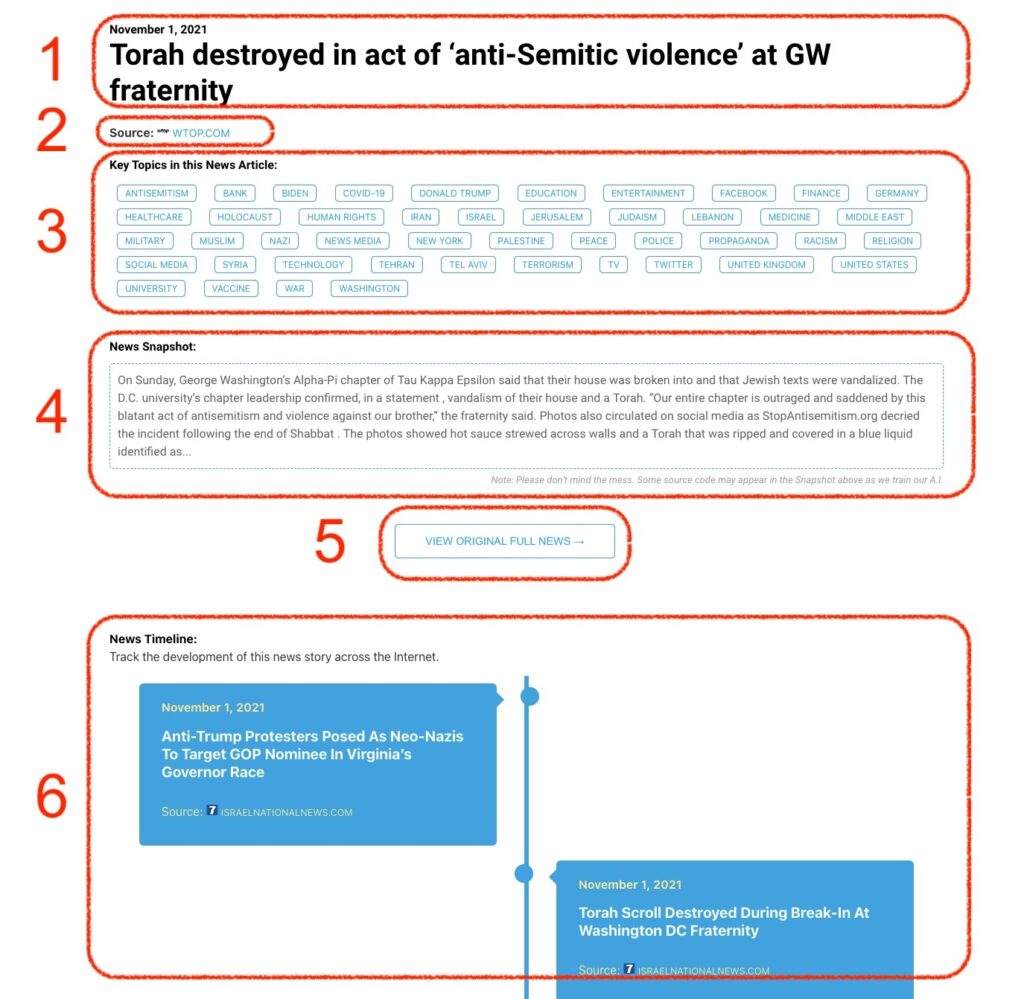
What Does This Data Mean?

1: Date and Title 
This displays both the date Hagg.ai picked up the news and the original headline of the news from the source.

2: Source
View the name of the original source website, along with the source’s icon image. You can click the source name to visit the homepage of that source.

3: Key Topics
The great power of Hagg.ai rests here, where we use A.I. technology to extract the key topics and themes for the news article. You can click each topic to see many more articles categorized to that specific topic.

4: News Snapshot
Read a quick blurb extracted from the source news.

5: View Original Full News
Click this button to go directly to the original source article on the source’s own website.

6: News Timeline
Hagg.ai is powerful and our News Timeline shows you the genesis of where this news came from and other related news stories. The Timeline builds you a history of where the news came, so you can chart where the news may go!

Hagg.ai How-To