Skip to content
  • Timeline
  • Subscribe
  • Contact Us
  • About
  • Timeline
  • Subscribe
  • Contact Us
  • About
Hagg.ai
Monitoring Antisemitism Intel
October 7, 2023
What is this data

Gookin under fire, fires back

Source: cdapress.com cdapress.com
Key Topics in this News Article:
Christianity Online Video Racism White Supremacist YouTube
News Snapshot:
COEUR d’ALENE — Most candidate forums are routine affairs with questions, answers and vows of transparency. The Kootenai County Republican Women Federated’s forum for registered Republican candidates Thursday followed that script — until there was time for a few questions from the crowd. That’s when there were tears, raised voices, accusations and a microphone was pulled from the hands of a candidate as he was speaking. About 100 people attended the meeting at the Best Western Plus Coeur d’Alene Inn. Things turned tense when Coeur d'Alene council member Dan Gookin was asked about "derogatory comments" he has made "toward Christians,...

Note: Please don’t mind the mess. Some source code may appear in the Snapshot above as we train our A.I.
Share on Social Media:
Facebook
X
LinkedIn
Telegram
Reddit
WhatsApp
VIEW ORIGINAL FULL NEWS →
You may also like

News Timeline:
Track the development of this news story across the Internet.

Timeline is being generated. Please check back and refresh this page soon.

News Timeline | Contact | About | Privacy

Twitter Linkedin

© 2026 Hagg.ai. Individual news stories are copyright their respective sources. Computer algorithms generally select what is shown on Hagg.ai. The algorithms determine which stories, images, and videos show, and in what order.

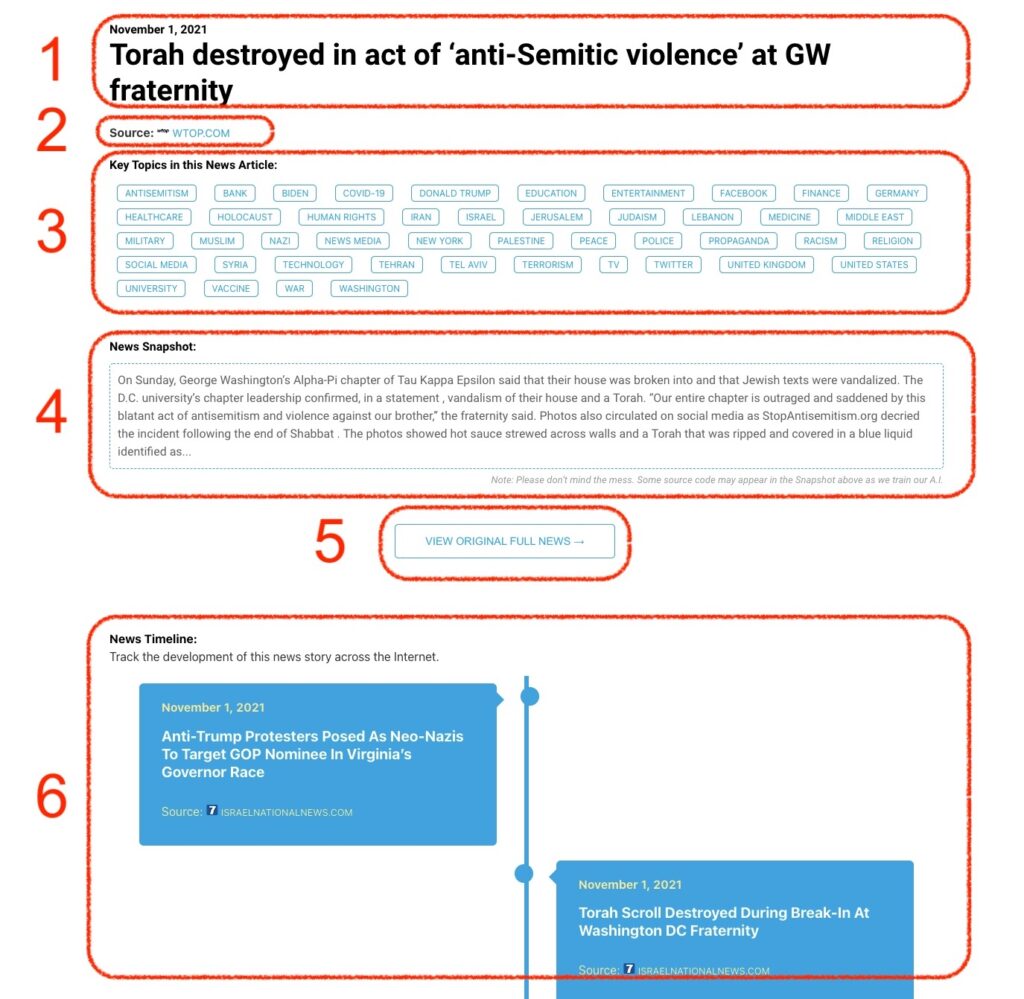
What Does This Data Mean?

1: Date and Title 
This displays both the date Hagg.ai picked up the news and the original headline of the news from the source.

2: Source
View the name of the original source website, along with the source’s icon image. You can click the source name to visit the homepage of that source.

3: Key Topics
The great power of Hagg.ai rests here, where we use A.I. technology to extract the key topics and themes for the news article. You can click each topic to see many more articles categorized to that specific topic.

4: News Snapshot
Read a quick blurb extracted from the source news.

5: View Original Full News
Click this button to go directly to the original source article on the source’s own website.

6: News Timeline
Hagg.ai is powerful and our News Timeline shows you the genesis of where this news came from and other related news stories. The Timeline builds you a history of where the news came, so you can chart where the news may go!

Hagg.ai How-To