Skip to content
  • Timeline
  • Subscribe
  • Contact Us
  • About
  • Timeline
  • Subscribe
  • Contact Us
  • About
Hagg.ai
Monitoring Antisemitism Intel
September 7, 2023
What is this data

Elon Musk’s hypocrisy about free speech hits a new low

Source: theguardian.com theguardian.com
Key Topics in this News Article:
ADL Advertising Alex Jones America Antisemitism army Censorship Christian Nationalist Christianity education Elon Musk Far-Right Fascism Florida Free Speech Google Hate Symbol KKK Law military Nazi Nick Fuentes Religion Revenue Search Engine Social Media
News Snapshot:
Even before he took over Twitter, Elon Musk touted himself as a “free speech absolutist”. This was always a troubling notion for an insanely rich guy with a cult following whose sense of history is as limited as his ego is boundless. As it turns out, what Musk had in mind was something more along the lines of “free speech for me, but not for thee”, as the title of the revered columnist Nat Hentoff’s 1992 book put it. A few days ago, he threatened to sue the Anti-Defamation League – for defamation, no less – blaming the non-profit for...

Note: Please don’t mind the mess. Some source code may appear in the Snapshot above as we train our A.I.
Share on Social Media:
Facebook
X
LinkedIn
Telegram
Reddit
WhatsApp
VIEW ORIGINAL FULL NEWS →
You may also like

News Timeline:
Track the development of this news story across the Internet.

Timeline is being generated. Please check back and refresh this page soon.

News Timeline | Contact | About | Privacy

Twitter Linkedin

© 2026 Hagg.ai. Individual news stories are copyright their respective sources. Computer algorithms generally select what is shown on Hagg.ai. The algorithms determine which stories, images, and videos show, and in what order.

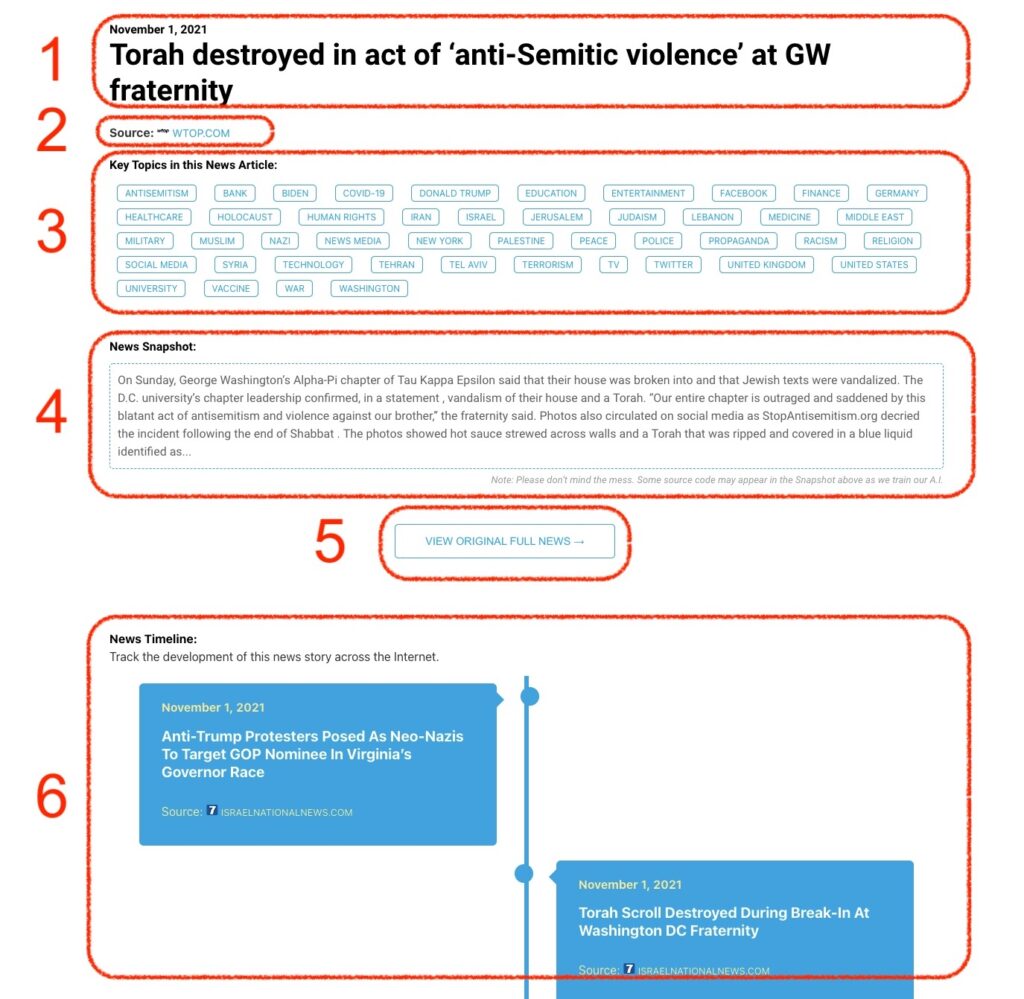
What Does This Data Mean?

1: Date and Title 
This displays both the date Hagg.ai picked up the news and the original headline of the news from the source.

2: Source
View the name of the original source website, along with the source’s icon image. You can click the source name to visit the homepage of that source.

3: Key Topics
The great power of Hagg.ai rests here, where we use A.I. technology to extract the key topics and themes for the news article. You can click each topic to see many more articles categorized to that specific topic.

4: News Snapshot
Read a quick blurb extracted from the source news.

5: View Original Full News
Click this button to go directly to the original source article on the source’s own website.

6: News Timeline
Hagg.ai is powerful and our News Timeline shows you the genesis of where this news came from and other related news stories. The Timeline builds you a history of where the news came, so you can chart where the news may go!

Hagg.ai How-To