Skip to content
  • Timeline
  • Subscribe
  • Contact Us
  • About
  • Timeline
  • Subscribe
  • Contact Us
  • About
Hagg.ai
Monitoring Antisemitism Intel
May 9, 2023
What is this data

Mad Women review even the dinosaurs of the ad industry couldn’t ignore these incredible women

Source: theguardian.com theguardian.com
Key Topics in this News Article:
Advertising Capitalism Google Nazi Search Engine TV Website
News Snapshot:
The past, as I often used to say to LP Hartley over a pint of Old Toejam, is a foreign country. They do things differently there. And even though I spent my formative years there, this seems never more true than when the 1980s come under scrutiny. What was happening? What were we thinking? And so to Mad Women, Channel 4’s entertaining jog-trot through the arrival in the 70s and ascendancy through the 80s and beyond of women in the advertising industry, as the rise of consumerism and growing affluence and appetites meant that all sorts of boys’ clubs began...

Note: Please don’t mind the mess. Some source code may appear in the Snapshot above as we train our A.I.
Share on Social Media:
Facebook
X
LinkedIn
Telegram
Reddit
WhatsApp
VIEW ORIGINAL FULL NEWS →
You may also like

News Timeline:
Track the development of this news story across the Internet.

Timeline is being generated. Please check back and refresh this page soon.

News Timeline | Contact | About | Privacy

Twitter Linkedin

© 2026 Hagg.ai. Individual news stories are copyright their respective sources. Computer algorithms generally select what is shown on Hagg.ai. The algorithms determine which stories, images, and videos show, and in what order.

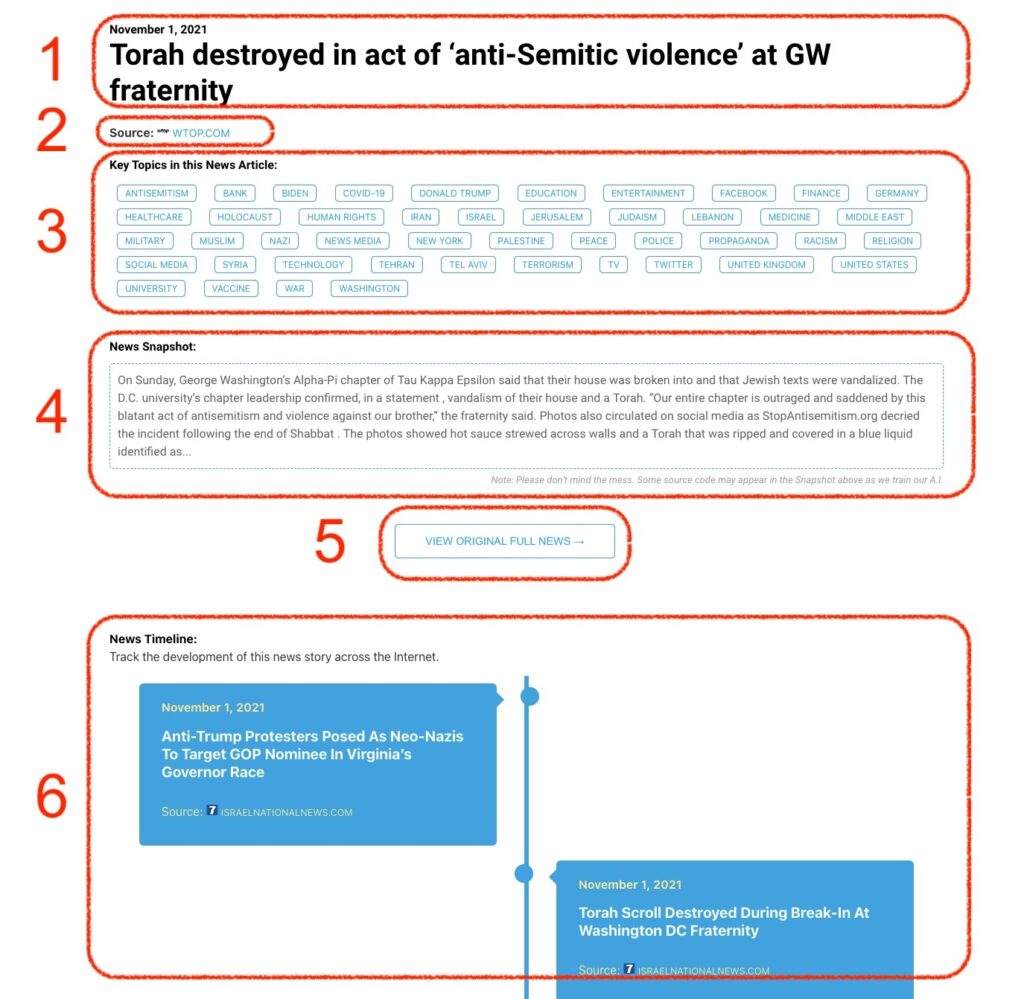
What Does This Data Mean?

1: Date and Title 
This displays both the date Hagg.ai picked up the news and the original headline of the news from the source.

2: Source
View the name of the original source website, along with the source’s icon image. You can click the source name to visit the homepage of that source.

3: Key Topics
The great power of Hagg.ai rests here, where we use A.I. technology to extract the key topics and themes for the news article. You can click each topic to see many more articles categorized to that specific topic.

4: News Snapshot
Read a quick blurb extracted from the source news.

5: View Original Full News
Click this button to go directly to the original source article on the source’s own website.

6: News Timeline
Hagg.ai is powerful and our News Timeline shows you the genesis of where this news came from and other related news stories. The Timeline builds you a history of where the news came, so you can chart where the news may go!

Hagg.ai How-To