Skip to content
  • Timeline
  • Subscribe
  • Contact Us
  • About
  • Timeline
  • Subscribe
  • Contact Us
  • About
Hagg.ai
Monitoring Antisemitism Intel
January 6, 2023
What is this data

A fake tweet spurred an anti-vaccine harassment campaign against a doctor

Source: nbcnews.com nbcnews.com
Key Topics in this News Article:
Canada Covid-19 Disinformation education Elections Elon Musk Florida Fraud Google Healthcare Internet Law Oklahoma Pandemic Podcast Search Engine Social Media Technology Twitter University Vaccine White Supremacist
News Snapshot:
When Dr. Natalia Solenkova woke up Monday morning, she was greeted with a flood of Twitter notifications on her phone. The Miami critical care physician had hundreds of new followers, and they, along with thousands of others on Twitter, were angry with her. In tweets, comments and direct messages across Twitter and other social platforms, strangers demanded to know why she had deleted a tweet that read: “I will never regret the vaccine. Even if it turns out I injected actual poison and have only days to live. My heart and is was in the right place. I got vaccinated...

Note: Please don’t mind the mess. Some source code may appear in the Snapshot above as we train our A.I.
Share on Social Media:
Facebook
X
LinkedIn
Telegram
Reddit
WhatsApp
VIEW ORIGINAL FULL NEWS →
You may also like

News Timeline:
Track the development of this news story across the Internet.

November 27, 2025

Revealed: How so many of the fake images fomenting racial division in Britain were made by foreign trolls to get rich


Source: dailymail.co.uk dailymail.co.uk

News Timeline | Contact | About | Privacy

Twitter Linkedin

© 2026 Hagg.ai. Individual news stories are copyright their respective sources. Computer algorithms generally select what is shown on Hagg.ai. The algorithms determine which stories, images, and videos show, and in what order.

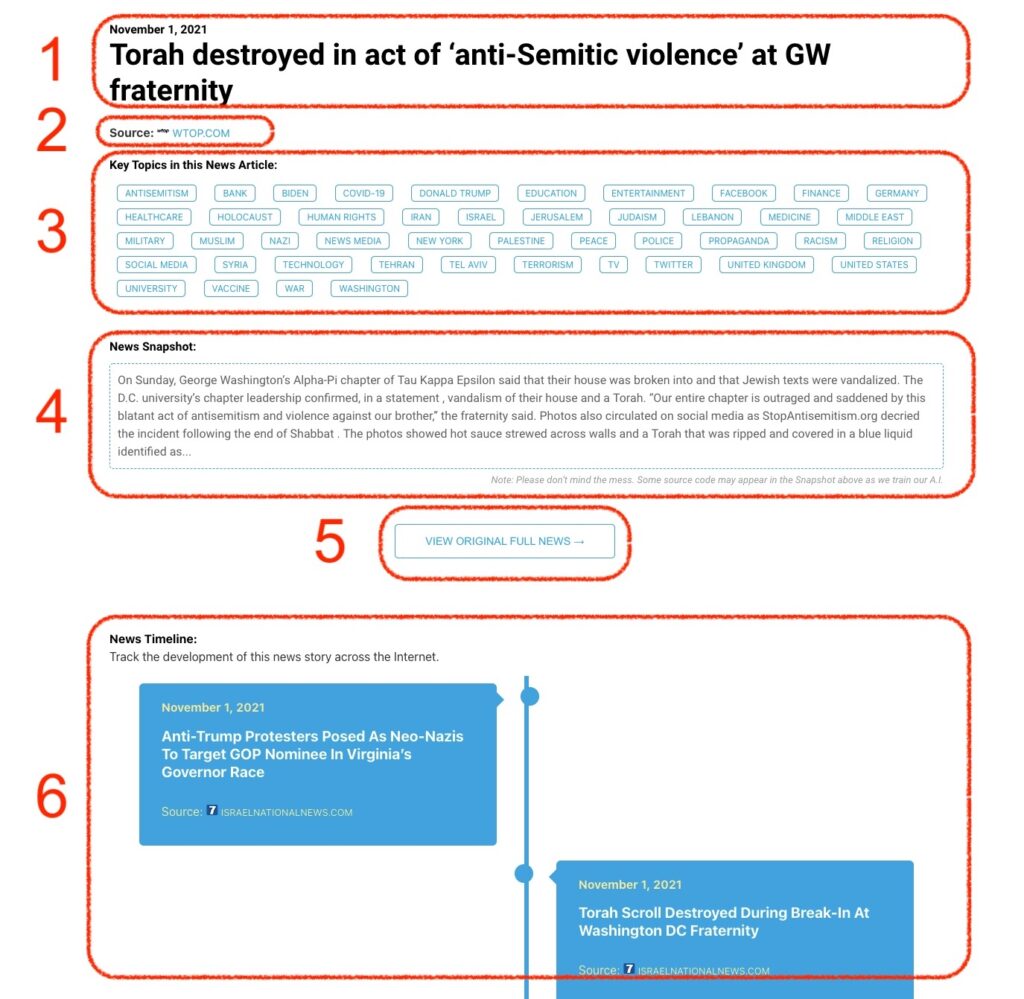
What Does This Data Mean?

1: Date and Title 
This displays both the date Hagg.ai picked up the news and the original headline of the news from the source.

2: Source
View the name of the original source website, along with the source’s icon image. You can click the source name to visit the homepage of that source.

3: Key Topics
The great power of Hagg.ai rests here, where we use A.I. technology to extract the key topics and themes for the news article. You can click each topic to see many more articles categorized to that specific topic.

4: News Snapshot
Read a quick blurb extracted from the source news.

5: View Original Full News
Click this button to go directly to the original source article on the source’s own website.

6: News Timeline
Hagg.ai is powerful and our News Timeline shows you the genesis of where this news came from and other related news stories. The Timeline builds you a history of where the news came, so you can chart where the news may go!

Hagg.ai How-To