Skip to content
  • Timeline
  • Subscribe
  • Contact Us
  • About
  • Timeline
  • Subscribe
  • Contact Us
  • About
Hagg.ai
Monitoring Antisemitism Intel
December 15, 2022
What is this data

Fight for control of the RNC turns heated as some members demand change

Source: edition.cnn.com edition.cnn.com
Key Topics in this News Article:
Antisemitism California Donald Trump Elections Georgia Immigration India Investment Law Louisiana Mississippi New Jersey New York Nick Fuentes North Carolina Racism Senate Tennessee Tucker Carlson War Washington White House White Supremacist
News Snapshot:
CNN — Shortly before announcing her campaign against Republican National Committee chair Ronna McDaniel, Harmeet Dhillon, a well-connected conservative attorney, phoned an important ally to solicit his thoughts. In a brief conversation with Donald Trump – whom she has served as an on-again, off-again legal adviser – Dhillon said she planned to challenge McDaniel and wanted to know what the former president made of the 2022 midterm results. She didn’t ask for Trump’s endorsement, nor did he offer one, according to three people familiar with the previously unreported conversation. But she took the former president’s passivity as a green light...

Note: Please don’t mind the mess. Some source code may appear in the Snapshot above as we train our A.I.
Share on Social Media:
Facebook
X
LinkedIn
Telegram
Reddit
WhatsApp
VIEW ORIGINAL FULL NEWS →
You may also like

News Timeline:
Track the development of this news story across the Internet.

Timeline is being generated. Please check back and refresh this page soon.

News Timeline | Contact | About | Privacy

Twitter Linkedin

© 2026 Hagg.ai. Individual news stories are copyright their respective sources. Computer algorithms generally select what is shown on Hagg.ai. The algorithms determine which stories, images, and videos show, and in what order.

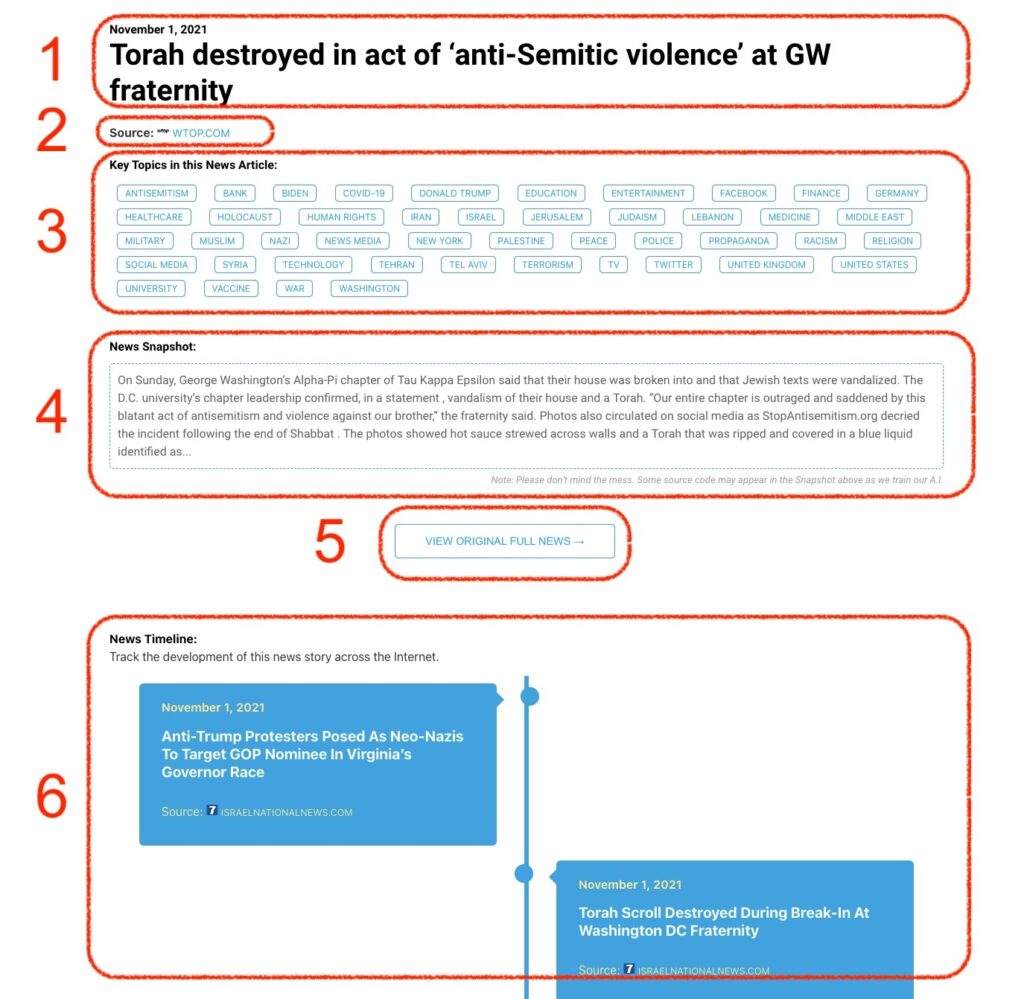
What Does This Data Mean?

1: Date and Title 
This displays both the date Hagg.ai picked up the news and the original headline of the news from the source.

2: Source
View the name of the original source website, along with the source’s icon image. You can click the source name to visit the homepage of that source.

3: Key Topics
The great power of Hagg.ai rests here, where we use A.I. technology to extract the key topics and themes for the news article. You can click each topic to see many more articles categorized to that specific topic.

4: News Snapshot
Read a quick blurb extracted from the source news.

5: View Original Full News
Click this button to go directly to the original source article on the source’s own website.

6: News Timeline
Hagg.ai is powerful and our News Timeline shows you the genesis of where this news came from and other related news stories. The Timeline builds you a history of where the news came, so you can chart where the news may go!

Hagg.ai How-To