Skip to content
  • Timeline
  • Subscribe
  • Contact Us
  • About
  • Timeline
  • Subscribe
  • Contact Us
  • About
Hagg.ai
Monitoring Antisemitism Intel
November 17, 2022
What is this data

Weinstein journalism drama She Said is satisfying, but not thrilling

Source: theglobeandmail.com theglobeandmail.com
Key Topics in this News Article:
Apparel Box Office Catholic Christianity Clothing Computer Donald Trump Elections Entertainment Hollywood Holocaust hotel Ireland Judaism Law New York News Media Religion
News Snapshot:
Zoe Kazan and Carey Mulligan in She Said, directed by Maria Schrader.Jojo Wilden/Universal Pictures She Said Directed by Maria Schrader Maria Schrader Written by Rebecca Lenkiewicz Rebecca Lenkiewicz Starring Carey Mulligan and Zoe Kazan Carey Mulligan and Zoe Kazan Classification 14A; 128 minutes 14A; 128 minutes Opens in theatres Nov. 18 One of the toughest tasks in journalism – and potentially the most tedious – is asking people questions they don’t want to answer. Their answers might serve the public interest but unwilling sources suspect, often correctly, that it won’t serve their personal interest. Based on the investigation and subsequent...

Note: Please don’t mind the mess. Some source code may appear in the Snapshot above as we train our A.I.
Share on Social Media:
Facebook
X
LinkedIn
Telegram
Reddit
WhatsApp
VIEW ORIGINAL FULL NEWS →
You may also like

News Timeline:
Track the development of this news story across the Internet.

Timeline is being generated. Please check back and refresh this page soon.

News Timeline | Contact | About | Privacy

Twitter Linkedin

© 2026 Hagg.ai. Individual news stories are copyright their respective sources. Computer algorithms generally select what is shown on Hagg.ai. The algorithms determine which stories, images, and videos show, and in what order.

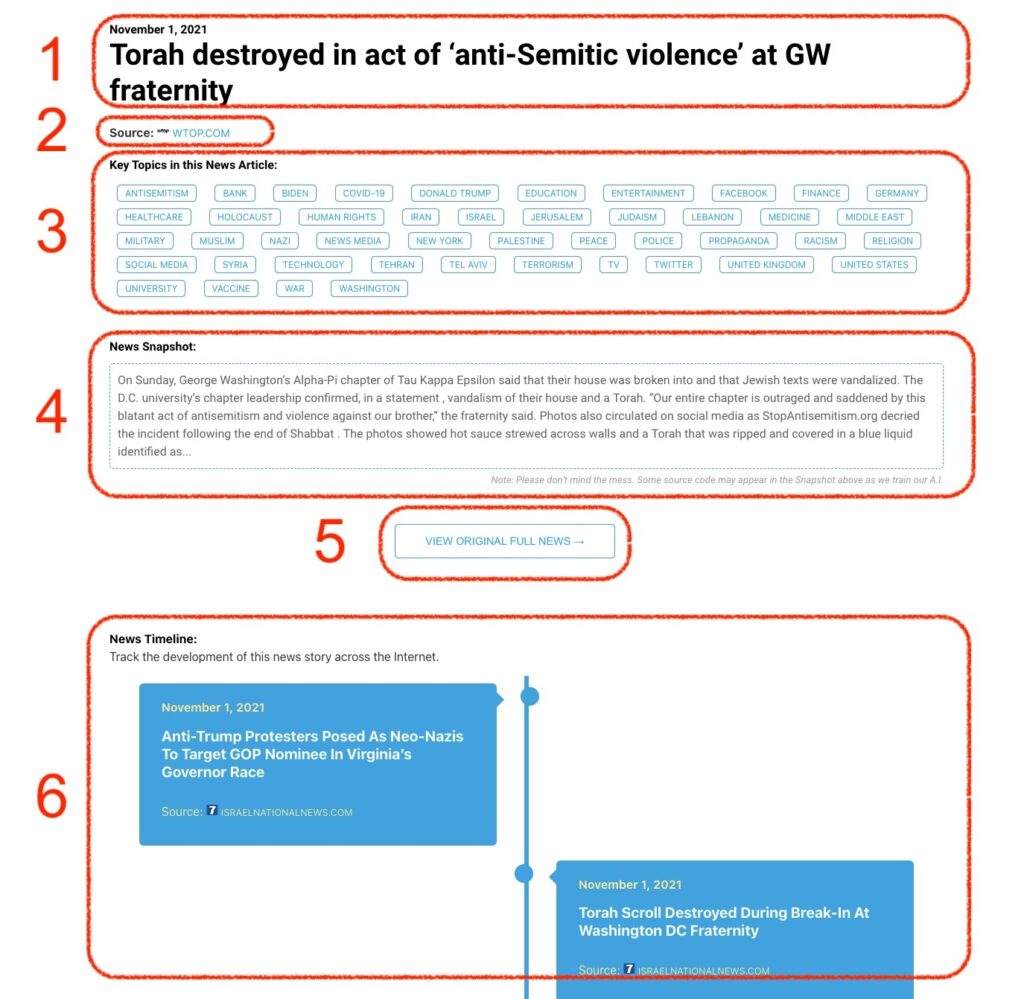
What Does This Data Mean?

1: Date and Title 
This displays both the date Hagg.ai picked up the news and the original headline of the news from the source.

2: Source
View the name of the original source website, along with the source’s icon image. You can click the source name to visit the homepage of that source.

3: Key Topics
The great power of Hagg.ai rests here, where we use A.I. technology to extract the key topics and themes for the news article. You can click each topic to see many more articles categorized to that specific topic.

4: News Snapshot
Read a quick blurb extracted from the source news.

5: View Original Full News
Click this button to go directly to the original source article on the source’s own website.

6: News Timeline
Hagg.ai is powerful and our News Timeline shows you the genesis of where this news came from and other related news stories. The Timeline builds you a history of where the news came, so you can chart where the news may go!

Hagg.ai How-To