Skip to content
  • Timeline
  • Subscribe
  • Contact Us
  • About
  • Timeline
  • Subscribe
  • Contact Us
  • About
Hagg.ai
Monitoring Antisemitism Intel
September 8, 2022
What is this data

Chief rabbi of UK: Queen Elizabeth II’s affection for the Jewish people ran deep

Source: jns.org jns.org
Key Topics in this News Article:
Britain Holocaust Judaism Queen Elizabeth Rabbi Religion Social Media Synagogue Torah Twitter United Kingdom
News Snapshot:
(September 8, 2022 / JNS) Rabbi Ephraim Mirvis, chief rabbi of the United Kingdom released a video message on Twitter praising Queen Elizabeth II following her passing on Thursday, claiming she “embodied the most noble values of British society.” “Throughout her extraordinary reign, she conducted herself with grace, dignity and humility and was a global role model for distinguished leadership and selfless devotion to society. In an ever-changing world, she was a rock of stability and a champion of timeless values,” he added. “Every week in synagogue we have prayed for her welfare, wellbeing and wisdom and she never let...

Note: Please don’t mind the mess. Some source code may appear in the Snapshot above as we train our A.I.
Share on Social Media:
Facebook
X
LinkedIn
Telegram
Reddit
WhatsApp
VIEW ORIGINAL FULL NEWS →
You may also like

News Timeline:
Track the development of this news story across the Internet.

November 24, 2025

As Oxford Chancellor, here’s my plan to confront extremism in UK and make free speech flourish


Source: thejc.com thejc.com

News Timeline | Contact | About | Privacy

Twitter Linkedin

© 2026 Hagg.ai. Individual news stories are copyright their respective sources. Computer algorithms generally select what is shown on Hagg.ai. The algorithms determine which stories, images, and videos show, and in what order.

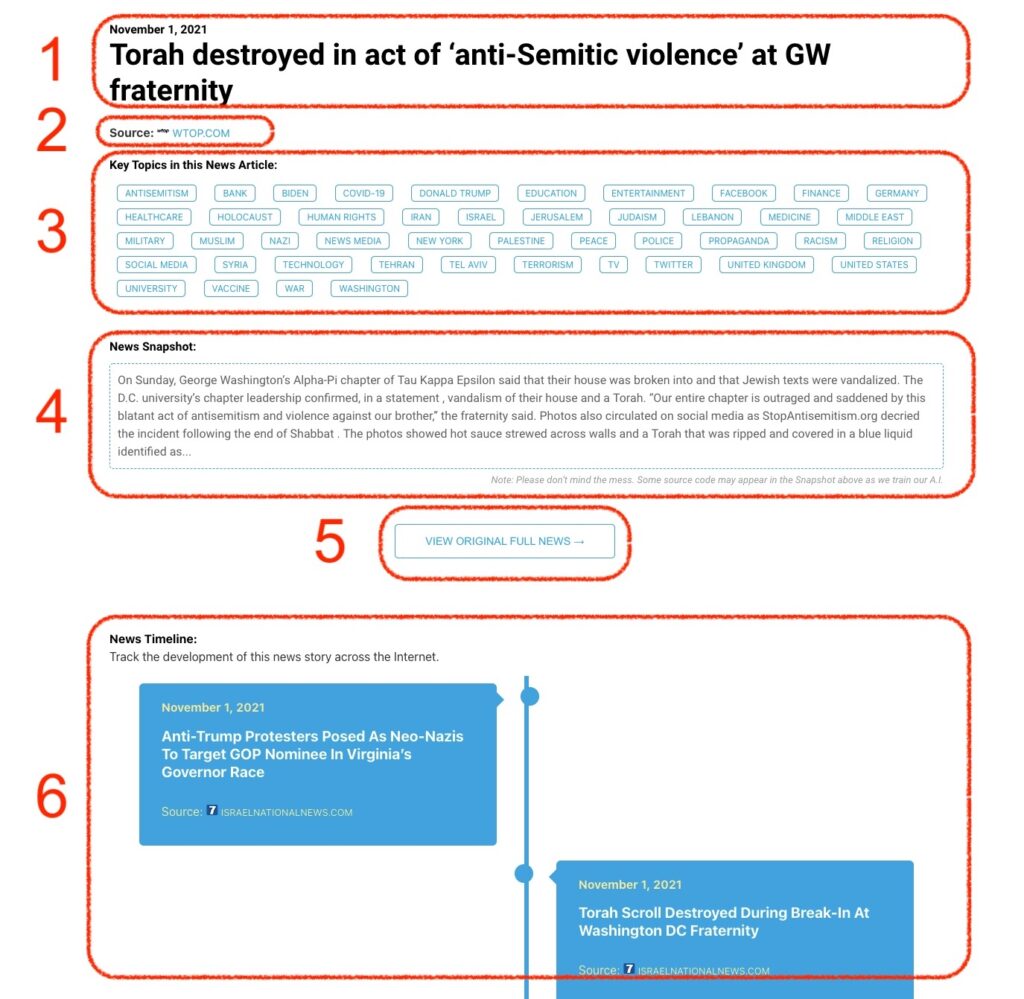
What Does This Data Mean?

1: Date and Title 
This displays both the date Hagg.ai picked up the news and the original headline of the news from the source.

2: Source
View the name of the original source website, along with the source’s icon image. You can click the source name to visit the homepage of that source.

3: Key Topics
The great power of Hagg.ai rests here, where we use A.I. technology to extract the key topics and themes for the news article. You can click each topic to see many more articles categorized to that specific topic.

4: News Snapshot
Read a quick blurb extracted from the source news.

5: View Original Full News
Click this button to go directly to the original source article on the source’s own website.

6: News Timeline
Hagg.ai is powerful and our News Timeline shows you the genesis of where this news came from and other related news stories. The Timeline builds you a history of where the news came, so you can chart where the news may go!

Hagg.ai How-To