Skip to content
  • Timeline
  • Subscribe
  • Contact Us
  • About
  • Timeline
  • Subscribe
  • Contact Us
  • About
Hagg.ai
Monitoring Antisemitism Intel
August 7, 2022
What is this data

Kirstie Allsopp rages as she's compared to Hitler over air con rant

Source: indiatimespost.com indiatimespost.com
Key Topics in this News Article:
Hitler Nazi Twitter
News Snapshot:
To which Kirstie sarcastically corrected his spelling: “It’s ie.” However, another user named Julian was on Kirstie’s wavelength and said: “Achieving 27 with aircon is more comfortable as the humidity will be much lower than a 27 we might have had recently.” In a separate tweet, Kirstie hit out at those criticising her and referred to her own experience visiting people’s homes. She ranted: “And PS for those throwing their toys out of the pram at the horror of heating less or cooling less, it says public buildings not homes.

Note: Please don’t mind the mess. Some source code may appear in the Snapshot above as we train our A.I.
Share on Social Media:
Facebook
X
LinkedIn
Telegram
Reddit
WhatsApp
VIEW ORIGINAL FULL NEWS →
You may also like

News Timeline:
Track the development of this news story across the Internet.

December 17, 2025

Elise writes about when ‘advert’ means life and elicits tears


Source: amarillo.com amarillo.com

December 1, 2025

When Participating in Politics Puts Your Life at Risk


Source: newyorker.com newyorker.com

August 30, 2025

Is Nip/Tuck cursed? All the scandals and tragedies that happened to the cast after Julian McMahon’s co-star was involved in a serious car accident


Source: dailymail.co.uk dailymail.co.uk

News Timeline | Contact | About | Privacy

Twitter Linkedin

© 2026 Hagg.ai. Individual news stories are copyright their respective sources. Computer algorithms generally select what is shown on Hagg.ai. The algorithms determine which stories, images, and videos show, and in what order.

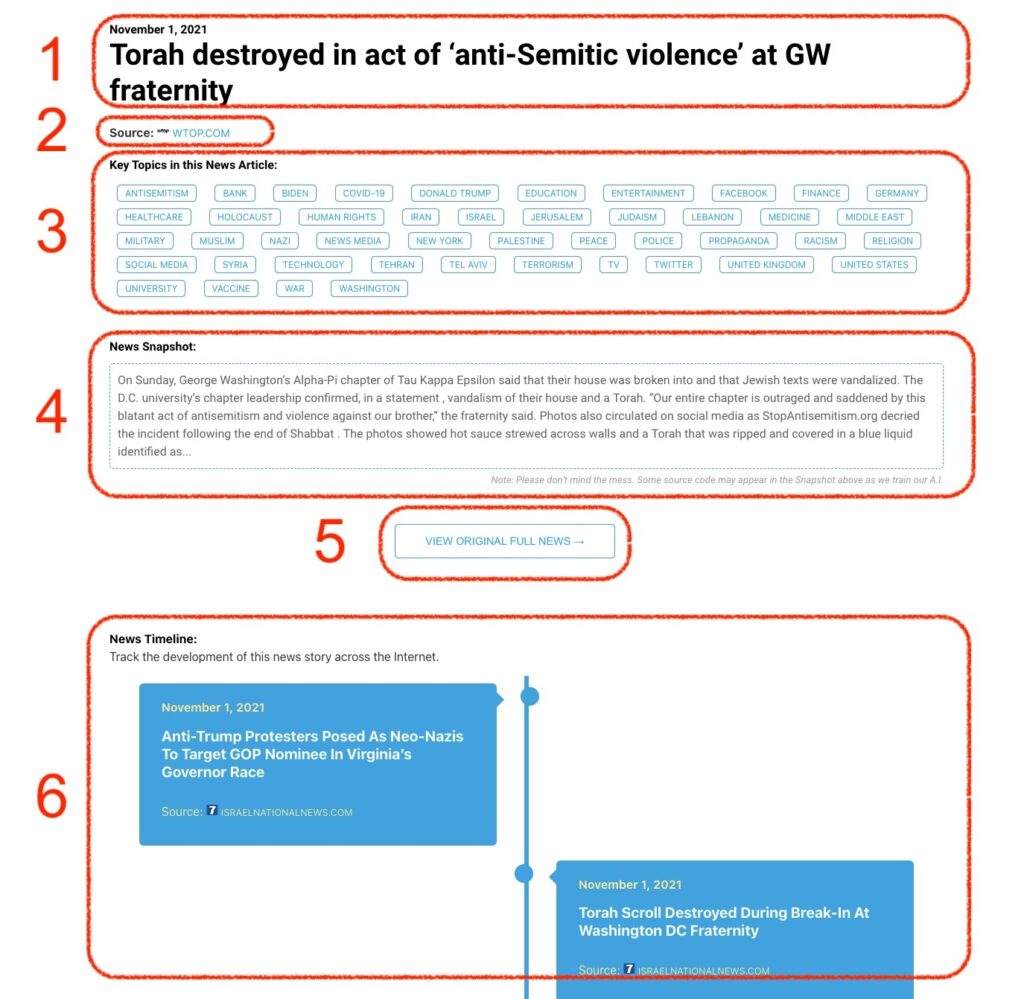
What Does This Data Mean?

1: Date and Title 
This displays both the date Hagg.ai picked up the news and the original headline of the news from the source.

2: Source
View the name of the original source website, along with the source’s icon image. You can click the source name to visit the homepage of that source.

3: Key Topics
The great power of Hagg.ai rests here, where we use A.I. technology to extract the key topics and themes for the news article. You can click each topic to see many more articles categorized to that specific topic.

4: News Snapshot
Read a quick blurb extracted from the source news.

5: View Original Full News
Click this button to go directly to the original source article on the source’s own website.

6: News Timeline
Hagg.ai is powerful and our News Timeline shows you the genesis of where this news came from and other related news stories. The Timeline builds you a history of where the news came, so you can chart where the news may go!

Hagg.ai How-To