Skip to content
  • Timeline
  • Subscribe
  • Contact Us
  • About
  • Timeline
  • Subscribe
  • Contact Us
  • About
Hagg.ai
Monitoring Antisemitism Intel
May 20, 2022
What is this data

Must See: Stefanik Attacks Dems For Calling Her A White Supremacist

Source: blabber.buzz blabber.buzz
Key Topics in this News Article:
Antisemitism Congress Donald Trump Elections Far-Right Free Speech Great Replacement Illinois Immigration Law Mexico National Security New York Police Racism Social Media Supermarket Texas Twitter White Supremacist
News Snapshot:
Login with your social media account Elise Stefanik defended herself against smears, insisting she is somehow accountable for supposedly stoking the “great replacement” conspiracy theory cited in the Buffalo mass shooter’s 180-page manifesto. On Monday, the New York representative, the No. 3 GOP lawmaker in the House, called the allegations by media and adversaries “disgraceful, dishonest and dangerous.” May 19, 2022 The woman she replaced for GOP Conference Chairwoman, Liz Cheney, is claiming that Republican leadership is contributing to the enabling of radical White supremacist views on the far-Right. “Any implication or attempt to blame the heinous shooting in Buffalo...

Note: Please don’t mind the mess. Some source code may appear in the Snapshot above as we train our A.I.
Share on Social Media:
Facebook
X
LinkedIn
Telegram
Reddit
WhatsApp
VIEW ORIGINAL FULL NEWS →
You may also like

News Timeline:
Track the development of this news story across the Internet.

Timeline is being generated. Please check back and refresh this page soon.

News Timeline | Contact | About | Privacy

Twitter Linkedin

© 2026 Hagg.ai. Individual news stories are copyright their respective sources. Computer algorithms generally select what is shown on Hagg.ai. The algorithms determine which stories, images, and videos show, and in what order.

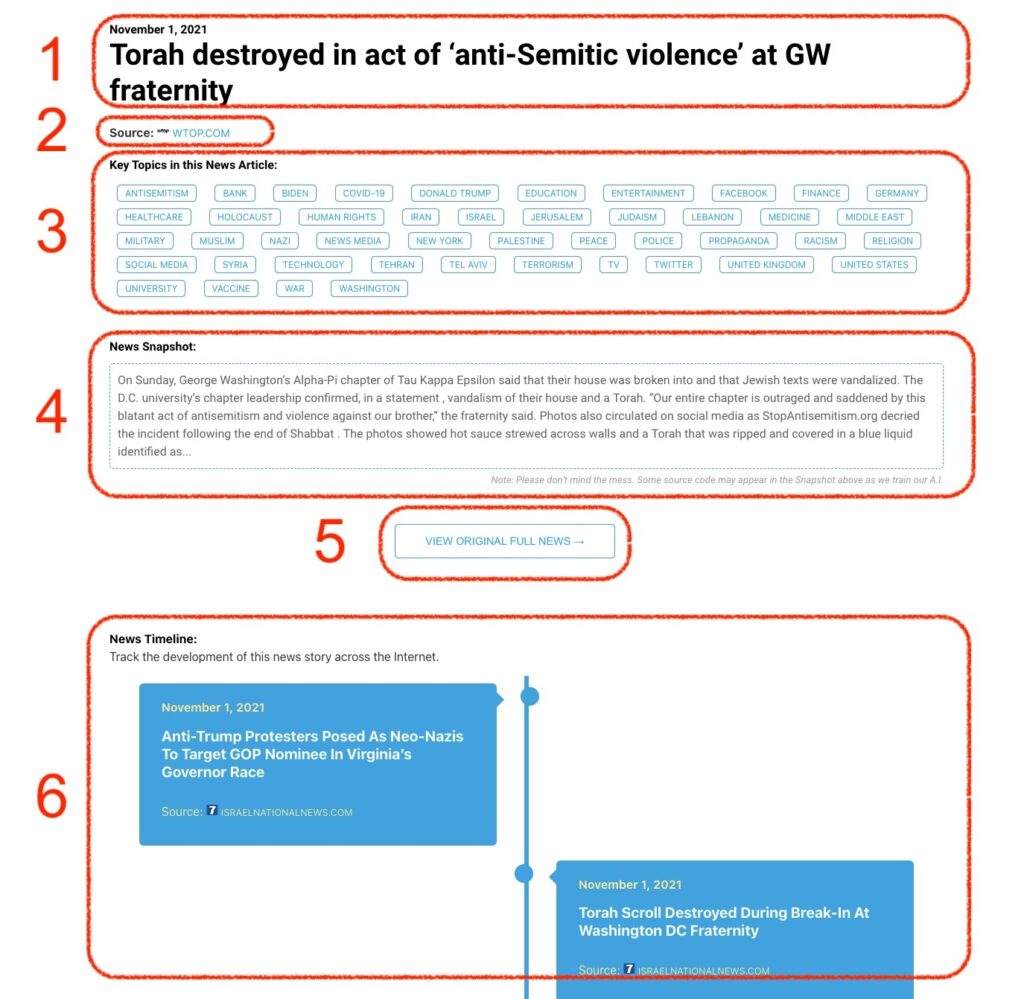
What Does This Data Mean?

1: Date and Title 
This displays both the date Hagg.ai picked up the news and the original headline of the news from the source.

2: Source
View the name of the original source website, along with the source’s icon image. You can click the source name to visit the homepage of that source.

3: Key Topics
The great power of Hagg.ai rests here, where we use A.I. technology to extract the key topics and themes for the news article. You can click each topic to see many more articles categorized to that specific topic.

4: News Snapshot
Read a quick blurb extracted from the source news.

5: View Original Full News
Click this button to go directly to the original source article on the source’s own website.

6: News Timeline
Hagg.ai is powerful and our News Timeline shows you the genesis of where this news came from and other related news stories. The Timeline builds you a history of where the news came, so you can chart where the news may go!

Hagg.ai How-To