Skip to content
  • Timeline
  • Subscribe
  • Contact Us
  • About
  • Timeline
  • Subscribe
  • Contact Us
  • About
Hagg.ai
Monitoring Antisemitism Intel
April 30, 2022
What is this data

Personally, I Prefer Having Fewer Nazis on Twitter

Source: drudge.com drudge.com
Key Topics in this News Article:
Advertising Elon Musk Google Judaism media intelligence Nazi News Media Religion Search Engine Social Media Twitter
News Snapshot:
Advertisement Personally, I Prefer Having Fewer Nazis on Twitter Jordan Weissmann, Slate: Like pretty much any journalist who compulsively wastes too much of their life on Twitter, I've had my fair share of unpleasant experiences with the site. In part, that's because I'm Jewish ... Suffice it to say, I'm feeling a little bit apprehensive about what exactly Elon Musk plans to do with Twitter, assuming he actually closes his deal to buy the company. RSS Feed retort Alternate links: Google News | Admin's note: Participants in this discussion must follow the site's [moderation policy](/help#acceptable) . Profanity will be filtered....

Note: Please don’t mind the mess. Some source code may appear in the Snapshot above as we train our A.I.
Share on Social Media:
Facebook
X
LinkedIn
Telegram
Reddit
WhatsApp
VIEW ORIGINAL FULL NEWS →
You may also like

News Timeline:
Track the development of this news story across the Internet.

November 10, 2025

B.C. woman returns figurines brought home from war by her father, an army officer


Source: theprovince.com theprovince.com

News Timeline | Contact | About | Privacy

Twitter Linkedin

© 2026 Hagg.ai. Individual news stories are copyright their respective sources. Computer algorithms generally select what is shown on Hagg.ai. The algorithms determine which stories, images, and videos show, and in what order.

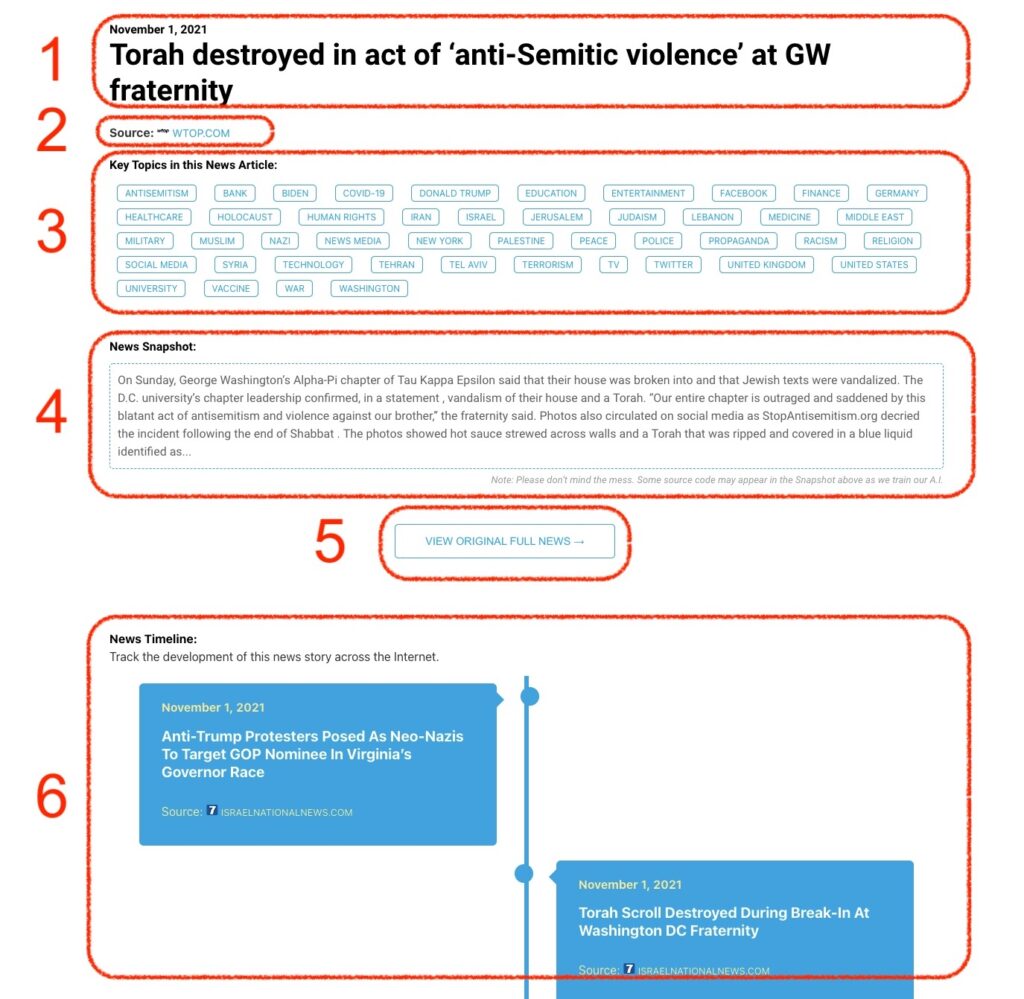
What Does This Data Mean?

1: Date and Title 
This displays both the date Hagg.ai picked up the news and the original headline of the news from the source.

2: Source
View the name of the original source website, along with the source’s icon image. You can click the source name to visit the homepage of that source.

3: Key Topics
The great power of Hagg.ai rests here, where we use A.I. technology to extract the key topics and themes for the news article. You can click each topic to see many more articles categorized to that specific topic.

4: News Snapshot
Read a quick blurb extracted from the source news.

5: View Original Full News
Click this button to go directly to the original source article on the source’s own website.

6: News Timeline
Hagg.ai is powerful and our News Timeline shows you the genesis of where this news came from and other related news stories. The Timeline builds you a history of where the news came, so you can chart where the news may go!

Hagg.ai How-To