Skip to content
  • Timeline
  • Subscribe
  • Contact Us
  • About
  • Timeline
  • Subscribe
  • Contact Us
  • About
Hagg.ai
Monitoring Antisemitism Intel
March 21, 2022
What is this data

Zelensky Urges Greater Support for Ukraine in Speech to Israel’s Knesset, Invoking Holocaust

Source: dispatchist.com dispatchist.com
Key Topics in this News Article:
Germany Holocaust Israel Knesset Socialism Ukraine War Zelensky Zoom
News Snapshot:
In a virtual address to Israeli lawmakers, Ukrainian President Volodymyr Zelensky on Sunday pleaded for help to defend his country and people from Russia’s invasion, which he compared to the “final solution.” Speaking to more than 120 Israeli ministers and members of Knesset via Zoom, Zelensky noted that February 24, the date of the start of Russia’s invasion of Ukraine, was also the date in which the National Socialist Workers’ Party of Germany (NSDAP) was founded in 1920.Zelensky’s comparison of Russia’s invasion to the Holocaust drew some criticism from Israeli lawmakers.“I appreciate the president of Ukraine and support the Ukrainian...

Note: Please don’t mind the mess. Some source code may appear in the Snapshot above as we train our A.I.
Share on Social Media:
Facebook
X
LinkedIn
Telegram
Reddit
WhatsApp
VIEW ORIGINAL FULL NEWS →
You may also like

News Timeline:
Track the development of this news story across the Internet.

November 24, 2025

The Poison Pill in the US Peace Plan for Ukraine: Europe Written Into the Outline


Source: nakedcapitalism.com nakedcapitalism.com

September 23, 2025

Why does it matter?


Source: washingtonexaminer.com washingtonexaminer.com

August 30, 2025

How Russian propaganda makes its way to Australia


Source: sbs.com.au sbs.com.au

News Timeline | Contact | About | Privacy

Twitter Linkedin

© 2026 Hagg.ai. Individual news stories are copyright their respective sources. Computer algorithms generally select what is shown on Hagg.ai. The algorithms determine which stories, images, and videos show, and in what order.

What Does This Data Mean?

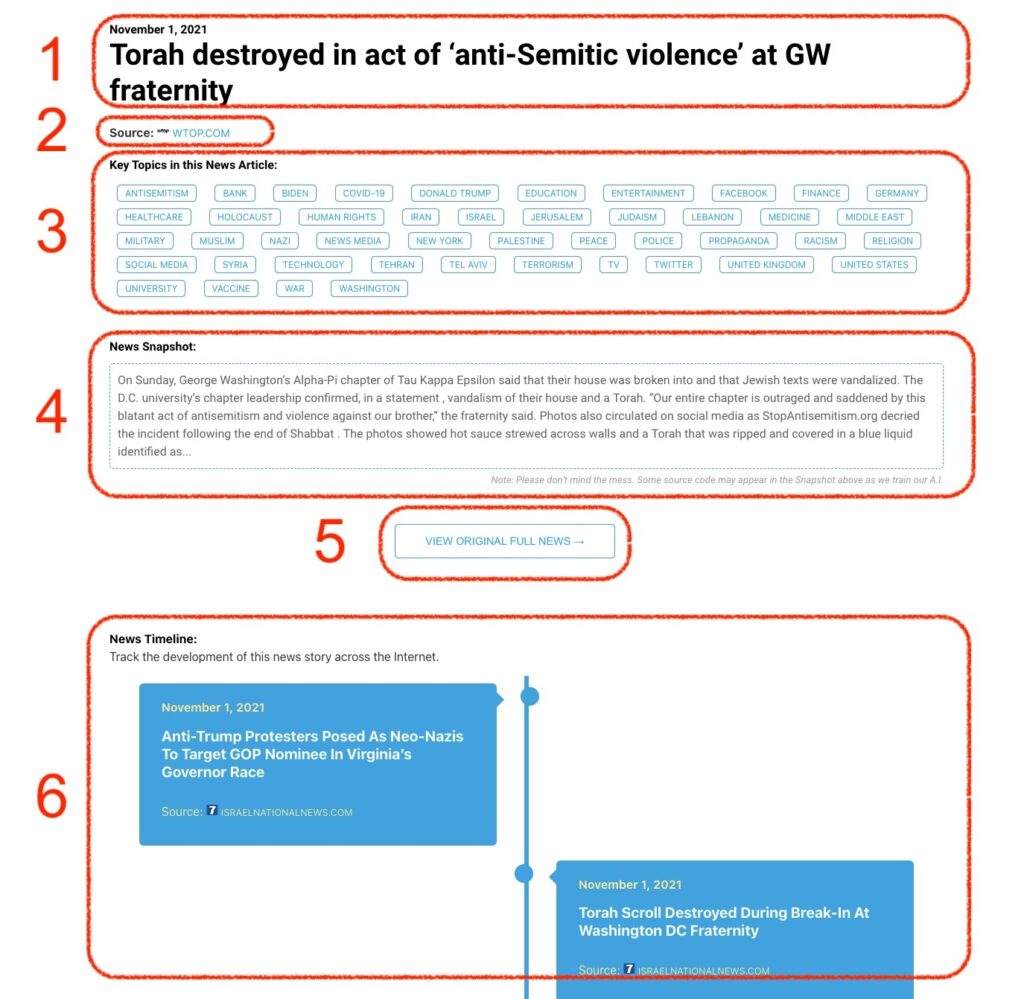
1: Date and Title 
This displays both the date Hagg.ai picked up the news and the original headline of the news from the source.

2: Source
View the name of the original source website, along with the source’s icon image. You can click the source name to visit the homepage of that source.

3: Key Topics
The great power of Hagg.ai rests here, where we use A.I. technology to extract the key topics and themes for the news article. You can click each topic to see many more articles categorized to that specific topic.

4: News Snapshot
Read a quick blurb extracted from the source news.

5: View Original Full News
Click this button to go directly to the original source article on the source’s own website.

6: News Timeline
Hagg.ai is powerful and our News Timeline shows you the genesis of where this news came from and other related news stories. The Timeline builds you a history of where the news came, so you can chart where the news may go!

Hagg.ai How-To