Skip to content
  • Timeline
  • Subscribe
  • Contact Us
  • About
  • Timeline
  • Subscribe
  • Contact Us
  • About
Hagg.ai
Monitoring Antisemitism Intel
February 19, 2022
What is this data

Elon Musk's Hitler tweet highlights right-wing faux-populism

Source: leportale.com leportale.com
Key Topics in this News Article:
Antifa Antisemitism California Canada Capitalism Civil War Confederacy Donald Trump electric vehicle Elon Musk European Extremism Factory Fascism Genocide George Soros Healthcare Hitler Holocaust Judaism Manufacturing Medicine Nazi Pandemic Racism
News Snapshot:
A populist movement that attracts enthusiastic support from billionaires probably isn’t much of a populist movement. Tesla CEO Elon Musk once again reminded everyone why it’s important not to trust a billionaire populist . This week Musk , who loves to post nonsense on Twitter , embraced the weeks-long Canadian trucker antivaccination protest with his usual clumsy belligerence. He tweeted an image of Adolf Hitler that said, “Stop comparing me to Justin Trudeau. I had a budget.” After heavy criticism, Musk deleted the tweet with no explanation or apology. After heavy criticism, Musk deleted the tweet with no explanation or...

Note: Please don’t mind the mess. Some source code may appear in the Snapshot above as we train our A.I.
Share on Social Media:
Facebook
X
LinkedIn
Telegram
Reddit
WhatsApp
VIEW ORIGINAL FULL NEWS →
You may also like

News Timeline:
Track the development of this news story across the Internet.

Timeline is being generated. Please check back and refresh this page soon.

News Timeline | Contact | About | Privacy

Twitter Linkedin

© 2026 Hagg.ai. Individual news stories are copyright their respective sources. Computer algorithms generally select what is shown on Hagg.ai. The algorithms determine which stories, images, and videos show, and in what order.

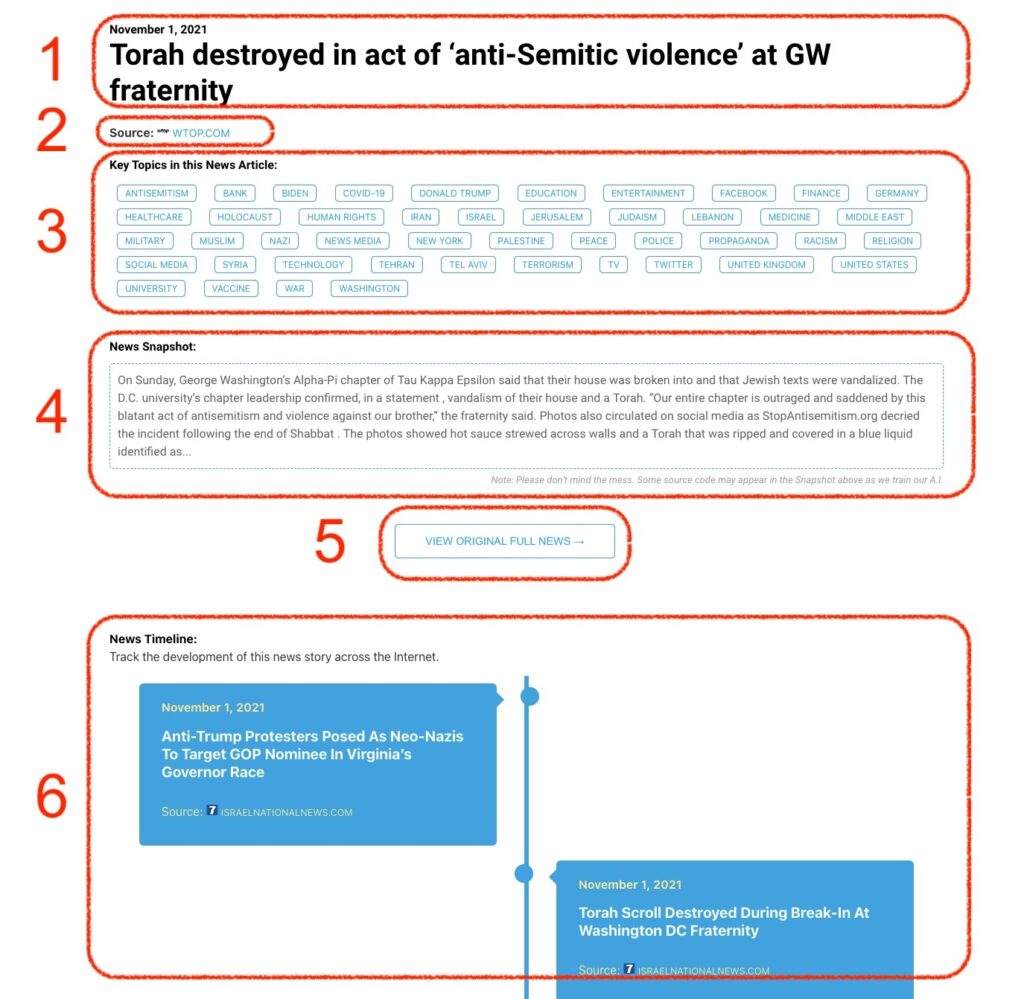
What Does This Data Mean?

1: Date and Title 
This displays both the date Hagg.ai picked up the news and the original headline of the news from the source.

2: Source
View the name of the original source website, along with the source’s icon image. You can click the source name to visit the homepage of that source.

3: Key Topics
The great power of Hagg.ai rests here, where we use A.I. technology to extract the key topics and themes for the news article. You can click each topic to see many more articles categorized to that specific topic.

4: News Snapshot
Read a quick blurb extracted from the source news.

5: View Original Full News
Click this button to go directly to the original source article on the source’s own website.

6: News Timeline
Hagg.ai is powerful and our News Timeline shows you the genesis of where this news came from and other related news stories. The Timeline builds you a history of where the news came, so you can chart where the news may go!

Hagg.ai How-To