Skip to content
  • Timeline
  • Subscribe
  • Contact Us
  • About
  • Timeline
  • Subscribe
  • Contact Us
  • About
Hagg.ai
Monitoring Antisemitism Intel
February 6, 2022
What is this data

Victoria Coren Mitchell supports ‘good and kind’ Jimmy Carr after Holocaust joke

Source: honestcolumnist.com honestcolumnist.com
Key Topics in this News Article:
Antisemitism Auschwitz Christmas Comedy Entertainment Facebook Fascism Finance Holocaust Judaism Metro Nazi Religion Social Media Travel Twitter United Kingdom War
News Snapshot:
Victoria Coren Mitchell has defended Jimmy Carr after backlash over a shocking joke he made in his latest special, where he described the deaths of hundreds of thousands of Roma and Sinti people at the hands of the Nazis as ‘positive’. In the clip, the 49-year-old said that people ‘never mention the thousands of Gypsies that were killed by the Nazis’ because ‘no one ever wants to talk about the positives.’ While the special was launched on Christmas Day in 2021, a clip from the programme – described by Carr himself as a ‘career-ender’ – [has recently gone viral](//metro.co.uk/2022/02/04/jimmy-carr-slammed-over-abhorrent-joke-about-gypsies-killed-by-nazis-16051195/) ,...

Note: Please don’t mind the mess. Some source code may appear in the Snapshot above as we train our A.I.
Share on Social Media:
Facebook
X
LinkedIn
Telegram
Reddit
WhatsApp
VIEW ORIGINAL FULL NEWS →
You may also like

News Timeline:
Track the development of this news story across the Internet.

Timeline is being generated. Please check back and refresh this page soon.

News Timeline | Contact | About | Privacy

Twitter Linkedin

© 2026 Hagg.ai. Individual news stories are copyright their respective sources. Computer algorithms generally select what is shown on Hagg.ai. The algorithms determine which stories, images, and videos show, and in what order.

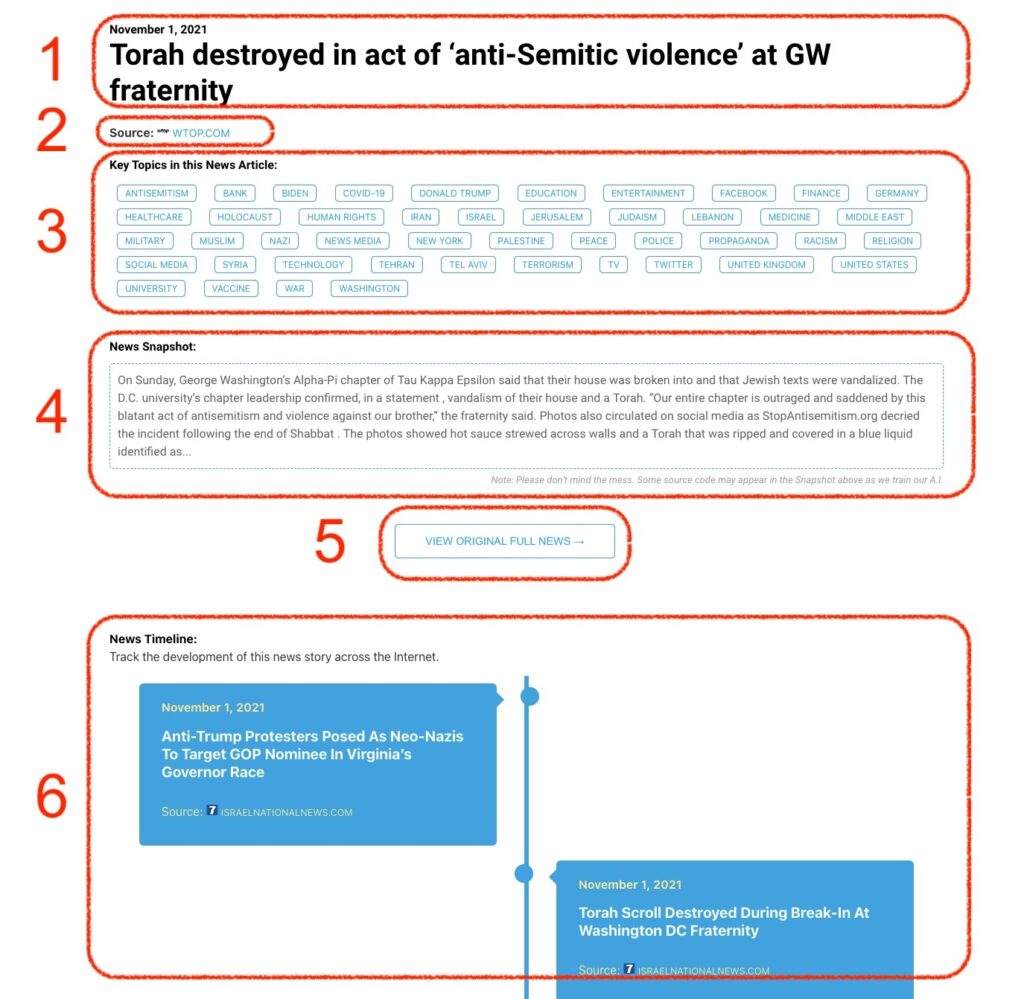
What Does This Data Mean?

1: Date and Title 
This displays both the date Hagg.ai picked up the news and the original headline of the news from the source.

2: Source
View the name of the original source website, along with the source’s icon image. You can click the source name to visit the homepage of that source.

3: Key Topics
The great power of Hagg.ai rests here, where we use A.I. technology to extract the key topics and themes for the news article. You can click each topic to see many more articles categorized to that specific topic.

4: News Snapshot
Read a quick blurb extracted from the source news.

5: View Original Full News
Click this button to go directly to the original source article on the source’s own website.

6: News Timeline
Hagg.ai is powerful and our News Timeline shows you the genesis of where this news came from and other related news stories. The Timeline builds you a history of where the news came, so you can chart where the news may go!

Hagg.ai How-To