Skip to content
  • Timeline
  • Subscribe
  • Contact Us
  • About
  • Timeline
  • Subscribe
  • Contact Us
  • About
Hagg.ai
Monitoring Antisemitism Intel
January 20, 2022
What is this data

FBI director calls Texas synagogue attack an act of anti-Semitism

Source: worldnationnews.com worldnationnews.com
Key Topics in this News Article:
ADL Afghanistan America Antisemitism Britain Disinformation education Elders of Zion FBI Israel Judaism New York Police Prison Rabbi Religion Senate South Carolina Synagogue Tennessee Terrorism Texas United Kingdom United States USA
News Snapshot:
DALLAS. The FBI is treating the attack on a synagogue in a suburb of Fort Worth on Saturday as a “terrorist act against the Jewish community,” bureau director Christopher A. Wray said Thursday. “This was not some random event,” Mr. Ray told viewers of the webinar hosted by the Anti-Defamation League. “It was deliberate, it was symbolic, and we’re not going to tolerate anti-Semitism in this country.” The bureau initially stated that the attacker, a British citizen named Malik Faisal Akram, was not motivated by anti-Semitism when he held four people hostage in a synagogue for 11 hours. At a...

Note: Please don’t mind the mess. Some source code may appear in the Snapshot above as we train our A.I.
Share on Social Media:
Facebook
X
LinkedIn
Telegram
Reddit
WhatsApp
VIEW ORIGINAL FULL NEWS →
You may also like

News Timeline:
Track the development of this news story across the Internet.

Timeline is being generated. Please check back and refresh this page soon.

News Timeline | Contact | About | Privacy

Twitter Linkedin

© 2026 Hagg.ai. Individual news stories are copyright their respective sources. Computer algorithms generally select what is shown on Hagg.ai. The algorithms determine which stories, images, and videos show, and in what order.

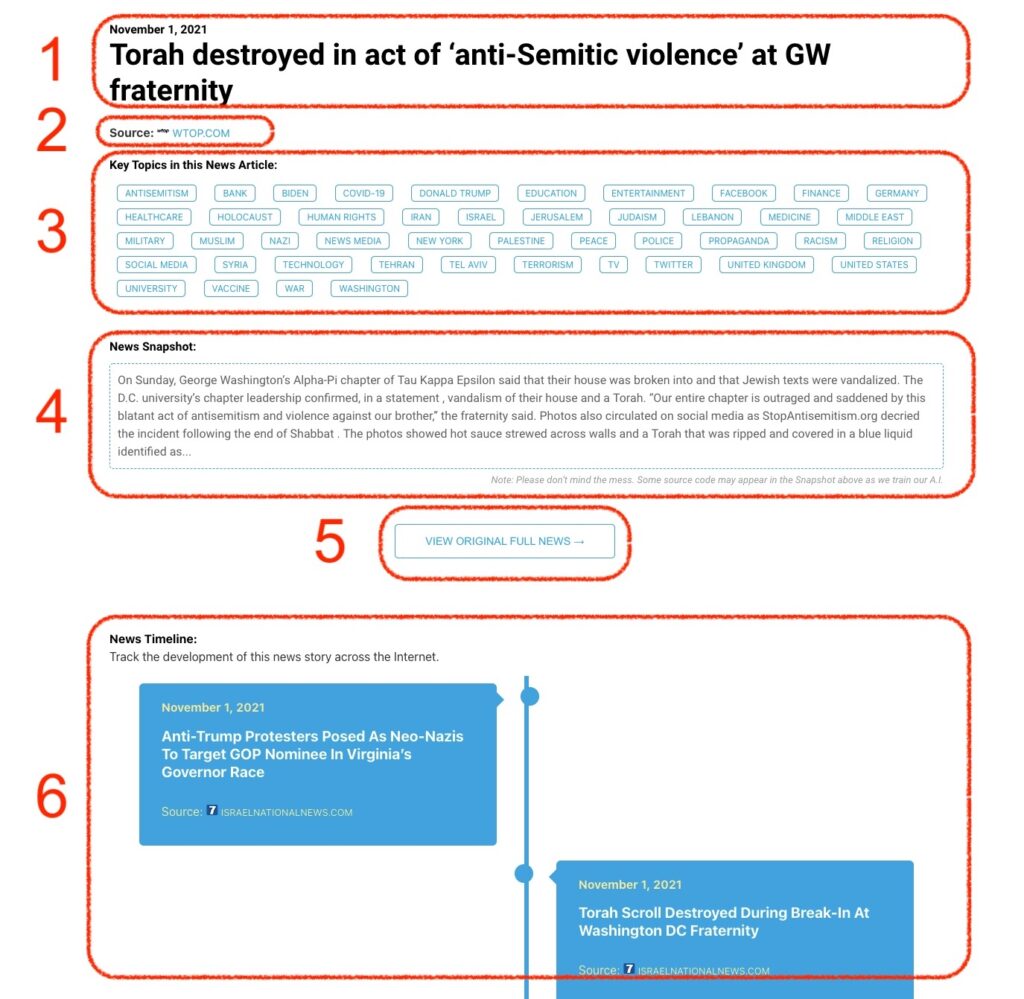
What Does This Data Mean?

1: Date and Title 
This displays both the date Hagg.ai picked up the news and the original headline of the news from the source.

2: Source
View the name of the original source website, along with the source’s icon image. You can click the source name to visit the homepage of that source.

3: Key Topics
The great power of Hagg.ai rests here, where we use A.I. technology to extract the key topics and themes for the news article. You can click each topic to see many more articles categorized to that specific topic.

4: News Snapshot
Read a quick blurb extracted from the source news.

5: View Original Full News
Click this button to go directly to the original source article on the source’s own website.

6: News Timeline
Hagg.ai is powerful and our News Timeline shows you the genesis of where this news came from and other related news stories. The Timeline builds you a history of where the news came, so you can chart where the news may go!

Hagg.ai How-To