Skip to content
  • Timeline
  • Subscribe
  • Contact Us
  • About
  • Timeline
  • Subscribe
  • Contact Us
  • About
Hagg.ai
Monitoring Antisemitism Intel
January 20, 2022
What is this data

FBI director calls Texas hostage situation ‘act of terrorism targeting the Jewish community’

Source: 1010wcsi.com 1010wcsi.com
Key Topics in this News Article:
ADL FBI Judaism Religion Synagogue Terrorism Texas
News Snapshot:
FBI director calls Texas hostage situation ‘act of terrorism targeting the Jewish community’ Federal Bureau of Investigations Director Christopher Wray called Saturday’s hostage situation at a Colleyville, Texas synagogue an “act of terrorism targeting the Jewish community.” Wray made the comments during an address given to the Anti-Defamation League during a webinar on Wednesday. CLICK HERE TO GET THE FOX NEWS APP “Now let me be clear and blunt, the FBI is, and has been, treating Saturday’s events as an act of terrorism targeting the Jewish community. Within a matter of hours, we deployed FBI SWAT, two highly trained units...

Note: Please don’t mind the mess. Some source code may appear in the Snapshot above as we train our A.I.
Share on Social Media:
Facebook
X
LinkedIn
Telegram
Reddit
WhatsApp
VIEW ORIGINAL FULL NEWS →
You may also like

News Timeline:
Track the development of this news story across the Internet.

November 26, 2025

Trump’s campaign of retribution: At least 470 targets and counting


Source: economictimes.indiatimes.com economictimes.indiatimes.com

November 21, 2025

FBI restricted CAIR contact for decade over Hamas ties, report shows


Source: foxnews.com foxnews.com

November 17, 2025

FBI, Secret Service butchered the Thomas Crooks case and invited conspiracies we deserve the truth


Source: nypost.com nypost.com

News Timeline | Contact | About | Privacy

Twitter Linkedin

© 2026 Hagg.ai. Individual news stories are copyright their respective sources. Computer algorithms generally select what is shown on Hagg.ai. The algorithms determine which stories, images, and videos show, and in what order.

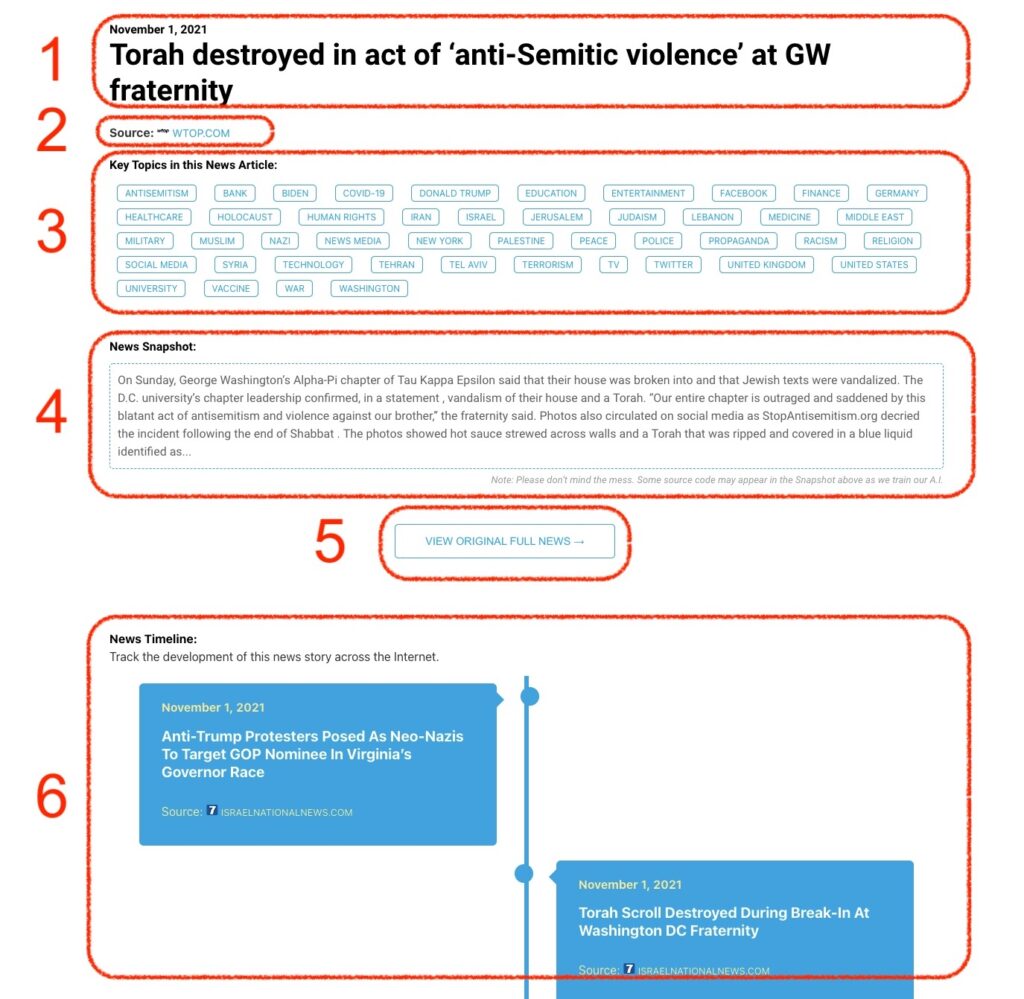
What Does This Data Mean?

1: Date and Title 
This displays both the date Hagg.ai picked up the news and the original headline of the news from the source.

2: Source
View the name of the original source website, along with the source’s icon image. You can click the source name to visit the homepage of that source.

3: Key Topics
The great power of Hagg.ai rests here, where we use A.I. technology to extract the key topics and themes for the news article. You can click each topic to see many more articles categorized to that specific topic.

4: News Snapshot
Read a quick blurb extracted from the source news.

5: View Original Full News
Click this button to go directly to the original source article on the source’s own website.

6: News Timeline
Hagg.ai is powerful and our News Timeline shows you the genesis of where this news came from and other related news stories. The Timeline builds you a history of where the news came, so you can chart where the news may go!

Hagg.ai How-To