Skip to content
  • Timeline
  • Subscribe
  • Contact Us
  • About
  • Timeline
  • Subscribe
  • Contact Us
  • About
Hagg.ai
Monitoring Antisemitism Intel
January 7, 2022
What is this data

Watson in the heat of criticism. “Gryffindor 10 points for anti-Semitism”

Source: archynewsy.com archynewsy.com
Key Topics in this News Article:
Activist Antisemitism Hamas Harry Potter Ireland Israel Middle East Palestine Social Media Twitter United Nations
News Snapshot:
The entry of the “Harry Potter” star infuriated the Israelis who belong to the more than 60 million community she has gathered on Instagram. And this despite the fact that she used the words of a researcher dealing with, inter alia, post-colonialism. The rest of the text below the video. “Solidarity includes commitment and work, as well as recognizing that even when we do not have the same feelings, the same life, or the same bodies, we live on common ground,” Watson continued. This and the photo she used on the web made her known as an anti-Semite. Emma Watson...

Note: Please don’t mind the mess. Some source code may appear in the Snapshot above as we train our A.I.
Share on Social Media:
Facebook
X
LinkedIn
Telegram
Reddit
WhatsApp
VIEW ORIGINAL FULL NEWS →
You may also like

News Timeline:
Track the development of this news story across the Internet.

Timeline is being generated. Please check back and refresh this page soon.

News Timeline | Contact | About | Privacy

Twitter Linkedin

© 2026 Hagg.ai. Individual news stories are copyright their respective sources. Computer algorithms generally select what is shown on Hagg.ai. The algorithms determine which stories, images, and videos show, and in what order.

What Does This Data Mean?

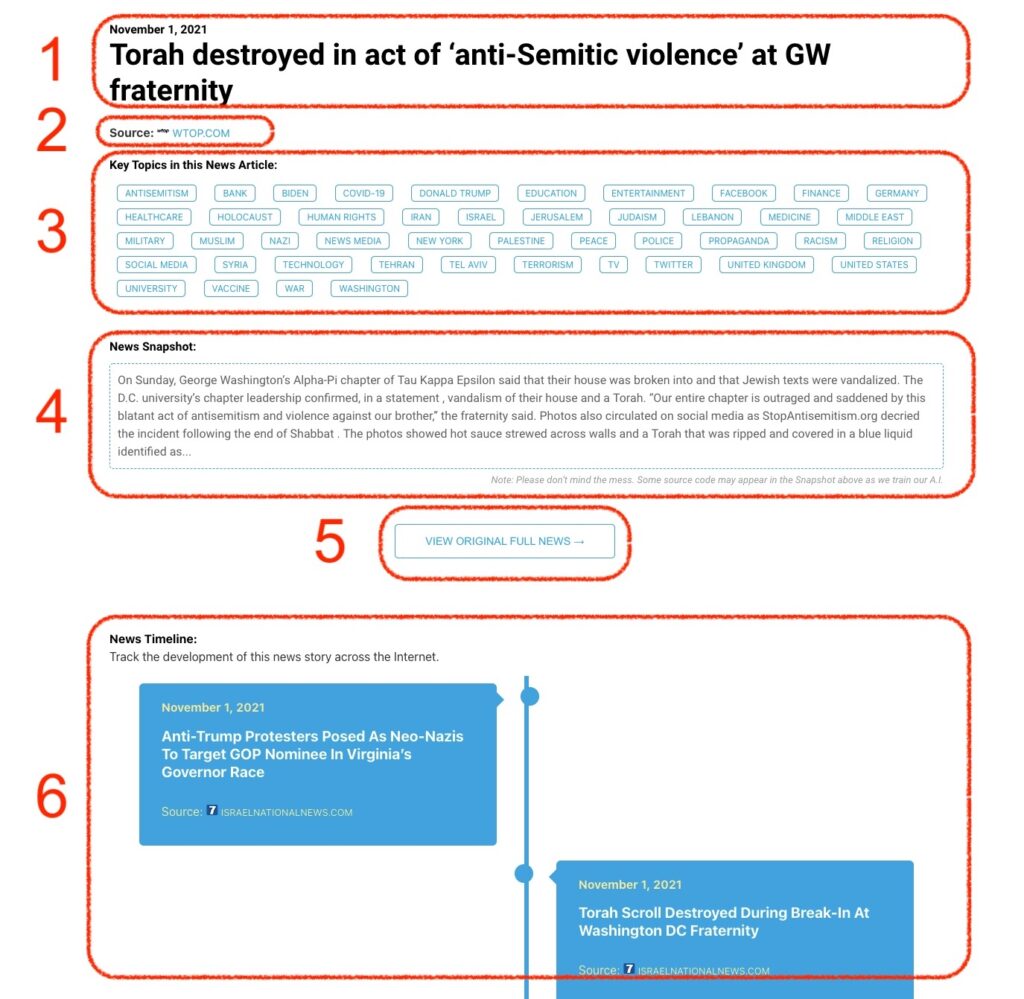
1: Date and Title 
This displays both the date Hagg.ai picked up the news and the original headline of the news from the source.

2: Source
View the name of the original source website, along with the source’s icon image. You can click the source name to visit the homepage of that source.

3: Key Topics
The great power of Hagg.ai rests here, where we use A.I. technology to extract the key topics and themes for the news article. You can click each topic to see many more articles categorized to that specific topic.

4: News Snapshot
Read a quick blurb extracted from the source news.

5: View Original Full News
Click this button to go directly to the original source article on the source’s own website.

6: News Timeline
Hagg.ai is powerful and our News Timeline shows you the genesis of where this news came from and other related news stories. The Timeline builds you a history of where the news came, so you can chart where the news may go!

Hagg.ai How-To