Skip to content
  • Timeline
  • Subscribe
  • Contact Us
  • About
  • Timeline
  • Subscribe
  • Contact Us
  • About
Hagg.ai
Monitoring Antisemitism Intel
January 4, 2022
What is this data

Coco Chanel: fashion designer, Nazi informant Antiques roadshow

Source: exbulletin.com exbulletin.com
Key Topics in this News Article:
Antisemitism army Britain California Car Catholic Connecticut Economy Entertainment Espionage Europe France Germany Healthcare Hitler Insurance Internet Italy Jewelry Judaism London Medicine military Nazi Paris Peace Poverty Propaganda Religion Soviet Union
News Snapshot:
In the summer of 2021, when ANTIQUES ROADSHOW visited Wadsworth Mansion in Middletown, Connecticut, a guest named Georgiana brought a beautiful cuff bracelet that she said once belonged to her mother’s great-aunt, actress Helen. Hayes. Collectibles appraiser Laura Woolley informed Georgina that the bracelet was originally designed for the jewelry line of famous Parisian designer Coco Chanel. Coco Chanel is one of the most notable fashion icons of the 20th century, fundamentally redefining the style of women in what we know today, ridding the closets of frustrated Victorian dresses and introducing effortless chic pieces like the ” little black dress”....

Note: Please don’t mind the mess. Some source code may appear in the Snapshot above as we train our A.I.
Share on Social Media:
Facebook
X
LinkedIn
Telegram
Reddit
WhatsApp
VIEW ORIGINAL FULL NEWS →
You may also like

News Timeline:
Track the development of this news story across the Internet.

Timeline is being generated. Please check back and refresh this page soon.

News Timeline | Contact | About | Privacy

Twitter Linkedin

© 2026 Hagg.ai. Individual news stories are copyright their respective sources. Computer algorithms generally select what is shown on Hagg.ai. The algorithms determine which stories, images, and videos show, and in what order.

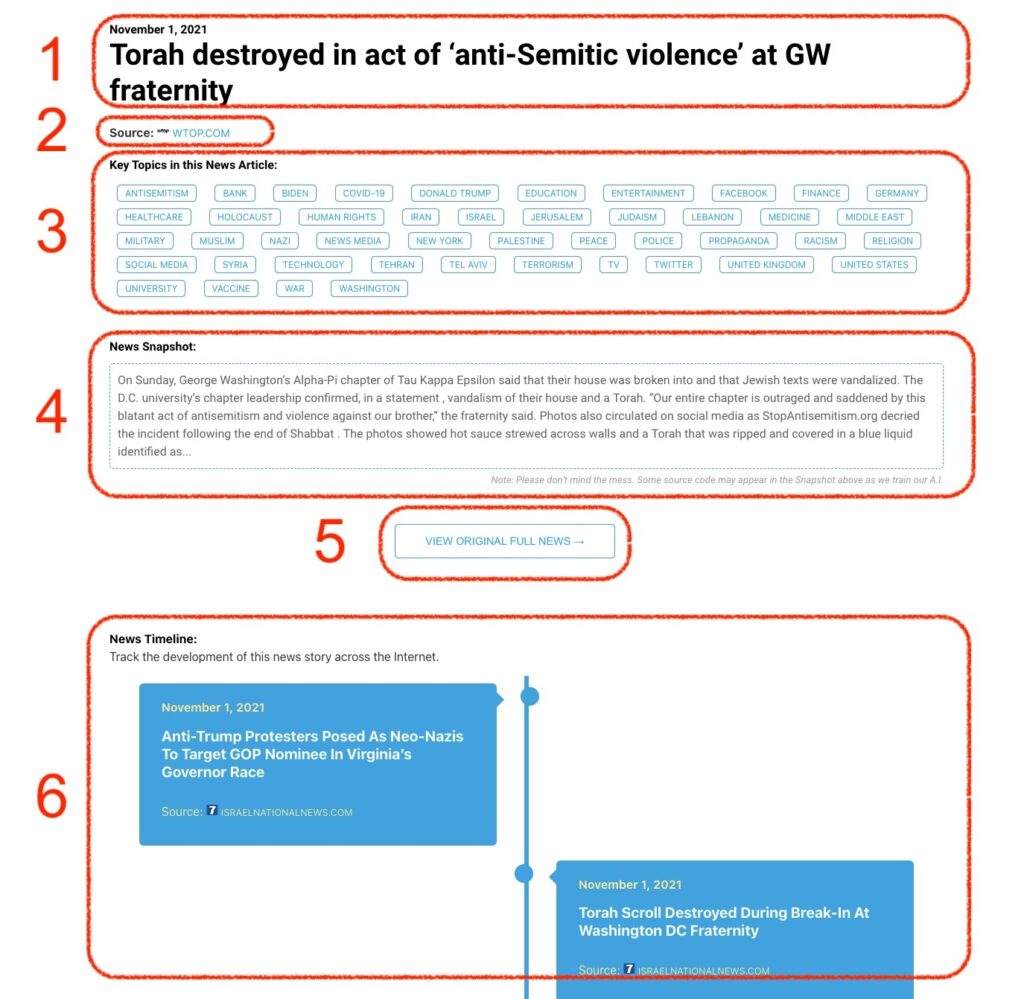
What Does This Data Mean?

1: Date and Title 
This displays both the date Hagg.ai picked up the news and the original headline of the news from the source.

2: Source
View the name of the original source website, along with the source’s icon image. You can click the source name to visit the homepage of that source.

3: Key Topics
The great power of Hagg.ai rests here, where we use A.I. technology to extract the key topics and themes for the news article. You can click each topic to see many more articles categorized to that specific topic.

4: News Snapshot
Read a quick blurb extracted from the source news.

5: View Original Full News
Click this button to go directly to the original source article on the source’s own website.

6: News Timeline
Hagg.ai is powerful and our News Timeline shows you the genesis of where this news came from and other related news stories. The Timeline builds you a history of where the news came, so you can chart where the news may go!

Hagg.ai How-To