Skip to content
  • Timeline
  • Subscribe
  • Contact Us
  • About
  • Timeline
  • Subscribe
  • Contact Us
  • About
Hagg.ai
Monitoring Antisemitism Intel
December 30, 2021
What is this data

Commissioner for Anti-Semitism on the Wiesenthal Center “Anti-Semitic List”

Source: sparkchronicles.com sparkchronicles.com
Key Topics in this News Article:
Antisemitism California Facebook Genocide Germany Holocaust Iran Israel Judaism Nazi News Media Racism Religion Social Media Terrorism Twitter United Kingdom Zionism
News Snapshot:
Michael Blume, the Commissioner for Anti-Semitism in Baden-Württemberg, is on the list of anti-Semites prepared by the Wiesenthal Center. However, Jewish communities are behind him, informs the magazine “Der Spiegel”. Wiesenthal Center, headquartered in Los Angeles, has the Baden-Württemberg Commissioner for Anti-Semitism, Michael Blume, on its 2021 Global Anti-Semitism List. According to the Wisenthal Center, the main reasons are that Blume likes anti-Jewish, anti-Israel and conspiratorial Twitter accounts and spreads posts about serious anti-Semitic incidents around the world. In addition, Blume liked the post on Facebook comparing the Zionists to the Nazis. The organization did not specify the exact posts...

Note: Please don’t mind the mess. Some source code may appear in the Snapshot above as we train our A.I.
Share on Social Media:
Facebook
X
LinkedIn
Telegram
Reddit
WhatsApp
VIEW ORIGINAL FULL NEWS →
You may also like

News Timeline:
Track the development of this news story across the Internet.

Timeline is being generated. Please check back and refresh this page soon.

News Timeline | Contact | About | Privacy

Twitter Linkedin

© 2026 Hagg.ai. Individual news stories are copyright their respective sources. Computer algorithms generally select what is shown on Hagg.ai. The algorithms determine which stories, images, and videos show, and in what order.

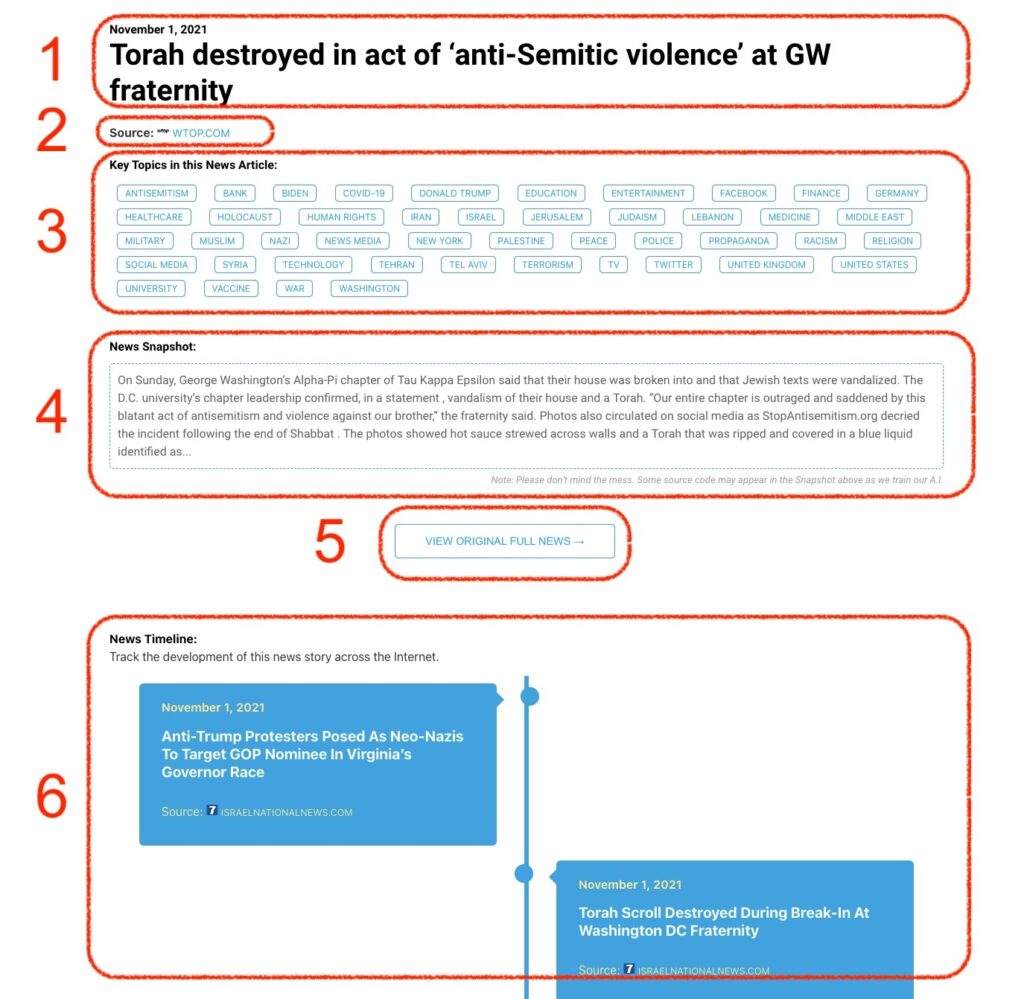
What Does This Data Mean?

1: Date and Title 
This displays both the date Hagg.ai picked up the news and the original headline of the news from the source.

2: Source
View the name of the original source website, along with the source’s icon image. You can click the source name to visit the homepage of that source.

3: Key Topics
The great power of Hagg.ai rests here, where we use A.I. technology to extract the key topics and themes for the news article. You can click each topic to see many more articles categorized to that specific topic.

4: News Snapshot
Read a quick blurb extracted from the source news.

5: View Original Full News
Click this button to go directly to the original source article on the source’s own website.

6: News Timeline
Hagg.ai is powerful and our News Timeline shows you the genesis of where this news came from and other related news stories. The Timeline builds you a history of where the news came, so you can chart where the news may go!

Hagg.ai How-To