Skip to content
  • Timeline
  • Subscribe
  • Contact Us
  • About
  • Timeline
  • Subscribe
  • Contact Us
  • About
Hagg.ai
Monitoring Antisemitism Intel
December 15, 2021
What is this data

Gottheimer takes fight against antisemitism to Rutgers

Source: timesofisrael.com timesofisrael.com
Key Topics in this News Article:
America Antisemitism BDS Boycott Charlottesville Congress education European Far-Right Finance Hillel Holocaust Israel Judaism Law New Jersey Religion Sanctions Senate stocks Tel Aviv Terrorism United States University USA Virginia Washington West Bank White Supremacist Zionism
News Snapshot:
Some people send letters. Some people show up. Congressman Josh Gottheimer (D-NJ Dist. 5) does both. After writing letters to Rutgers University officials protesting antisemitic actions at the state school, this week Mr. Gottheimer went to the Eva and Arie Halpern Hillel House on College Avenue in New Brunswick, where he spoke about and condemned antisemitism, and urged students to “continue to insist that there be no tolerance for antisemitism in our society.” Rutgers University President Jonathan Holloway accompanied the congressman. In his talk, Mr. Gottheimer criticized the university for silence in the face of a part-time faculty union’s calls...

Note: Please don’t mind the mess. Some source code may appear in the Snapshot above as we train our A.I.
Share on Social Media:
Facebook
X
LinkedIn
Telegram
Reddit
WhatsApp
VIEW ORIGINAL FULL NEWS →
You may also like

News Timeline:
Track the development of this news story across the Internet.

Timeline is being generated. Please check back and refresh this page soon.

News Timeline | Contact | About | Privacy

Twitter Linkedin

© 2026 Hagg.ai. Individual news stories are copyright their respective sources. Computer algorithms generally select what is shown on Hagg.ai. The algorithms determine which stories, images, and videos show, and in what order.

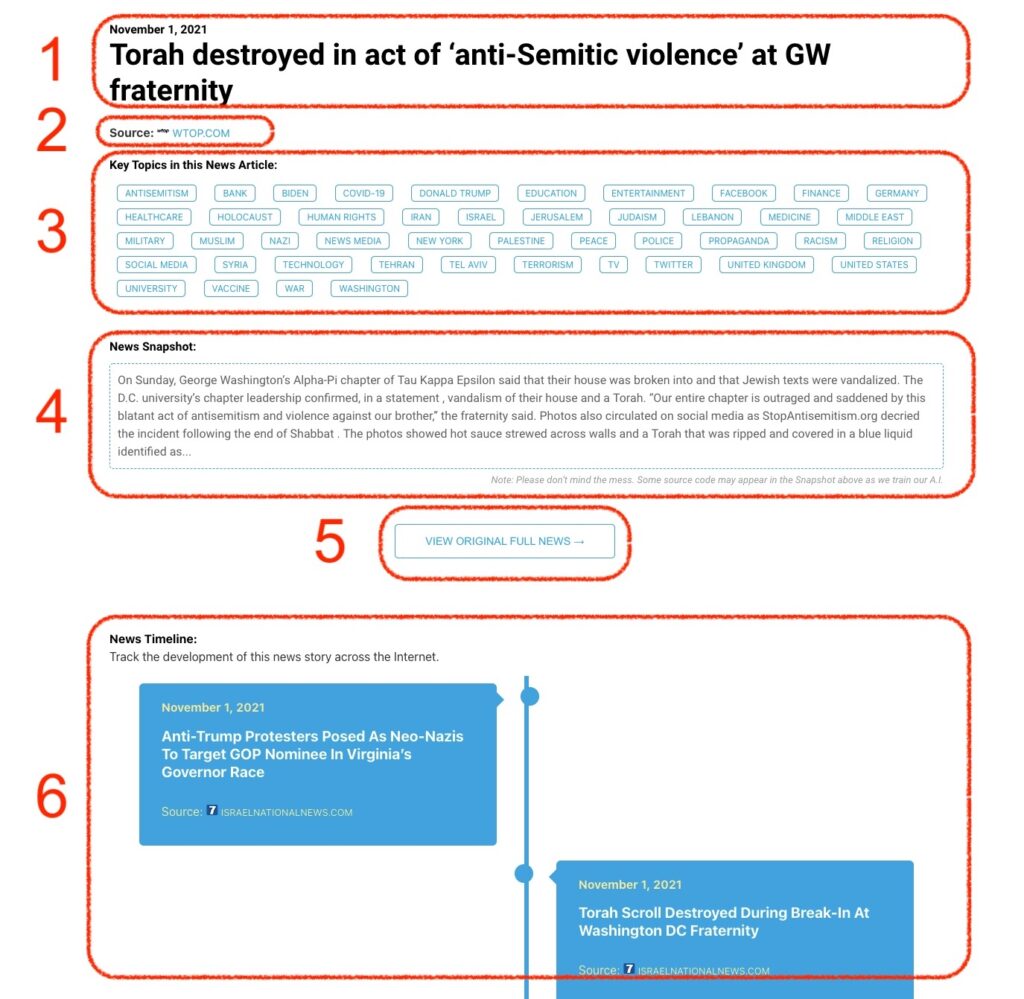
What Does This Data Mean?

1: Date and Title 
This displays both the date Hagg.ai picked up the news and the original headline of the news from the source.

2: Source
View the name of the original source website, along with the source’s icon image. You can click the source name to visit the homepage of that source.

3: Key Topics
The great power of Hagg.ai rests here, where we use A.I. technology to extract the key topics and themes for the news article. You can click each topic to see many more articles categorized to that specific topic.

4: News Snapshot
Read a quick blurb extracted from the source news.

5: View Original Full News
Click this button to go directly to the original source article on the source’s own website.

6: News Timeline
Hagg.ai is powerful and our News Timeline shows you the genesis of where this news came from and other related news stories. The Timeline builds you a history of where the news came, so you can chart where the news may go!

Hagg.ai How-To