Skip to content
  • Timeline
  • Subscribe
  • Contact Us
  • About
  • Timeline
  • Subscribe
  • Contact Us
  • About
Hagg.ai
Monitoring Antisemitism Intel
December 13, 2021
What is this data

The Day the RAF Killed 7,000 Nazi Concentration Camp Inmates

Source: historyofyesterday.com historyofyesterday.com
Key Topics in this News Article:
air force America Belgium Britain Car Denmark education Entertainment France Germany Hitler Holocaust Judaism military Nazi Netherlands Norway Paris Peace Poland Prison Propaganda Religion shipping Sweden United Kingdom United States University USA War
News Snapshot:
The Day the RAF Killed 7,000 Nazi Concentration Camp Inmates British bombed German ships with prisoners days before World War II ended In early 1945, Nazi concentration camps still held some 700,00 prisoners. The SS emptied the camps as Allied forces pushed into Nazi territory, moving the prisoners into Germany. So many thousands died on these forced transfers that are known to history as “death marches.” Lost in that history is how the Royal Air Force (“RAF”) killed several thousand inmates on May 3, 1945, when it bombed ships sitting in Lübeck Bay on the Baltic Sea. The SS evacuated...

Note: Please don’t mind the mess. Some source code may appear in the Snapshot above as we train our A.I.
Share on Social Media:
Facebook
X
LinkedIn
Telegram
Reddit
WhatsApp
VIEW ORIGINAL FULL NEWS →
You may also like

News Timeline:
Track the development of this news story across the Internet.

Timeline is being generated. Please check back and refresh this page soon.

News Timeline | Contact | About | Privacy

Twitter Linkedin

© 2026 Hagg.ai. Individual news stories are copyright their respective sources. Computer algorithms generally select what is shown on Hagg.ai. The algorithms determine which stories, images, and videos show, and in what order.

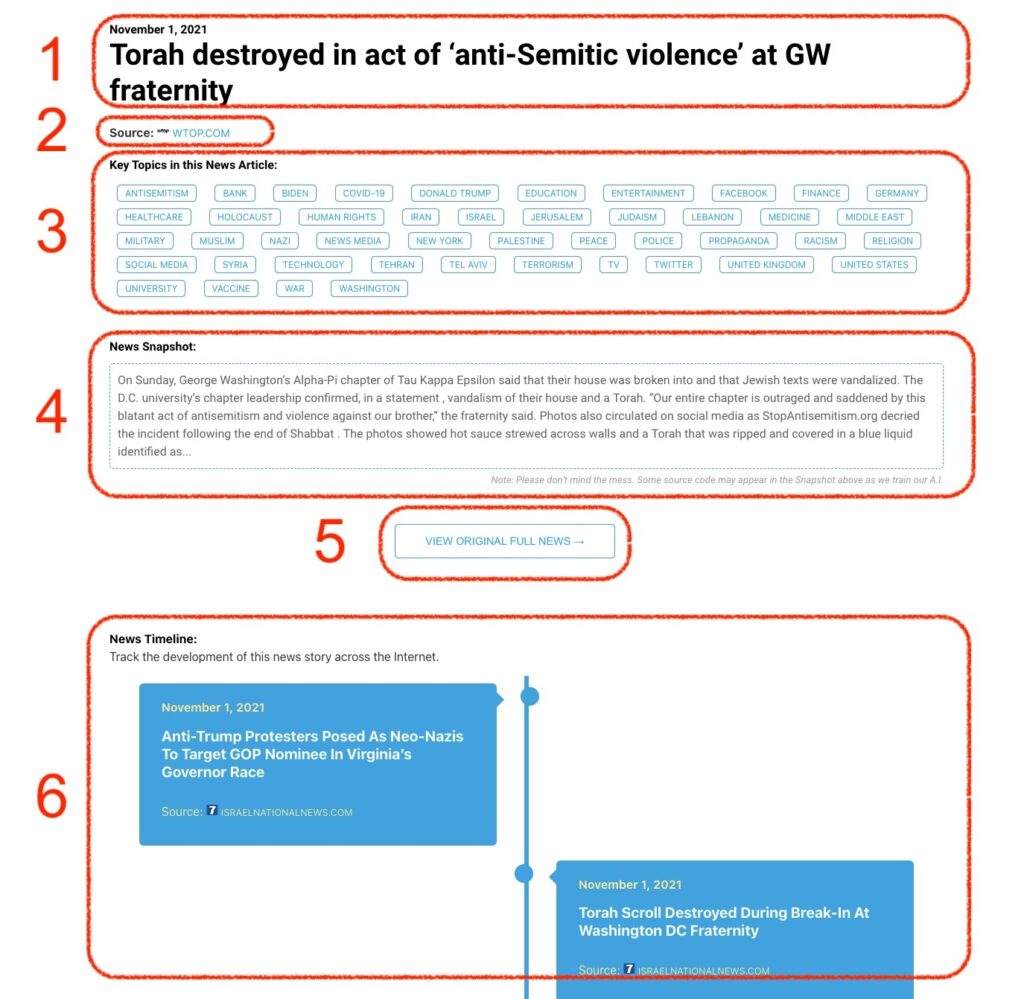
What Does This Data Mean?

1: Date and Title 
This displays both the date Hagg.ai picked up the news and the original headline of the news from the source.

2: Source
View the name of the original source website, along with the source’s icon image. You can click the source name to visit the homepage of that source.

3: Key Topics
The great power of Hagg.ai rests here, where we use A.I. technology to extract the key topics and themes for the news article. You can click each topic to see many more articles categorized to that specific topic.

4: News Snapshot
Read a quick blurb extracted from the source news.

5: View Original Full News
Click this button to go directly to the original source article on the source’s own website.

6: News Timeline
Hagg.ai is powerful and our News Timeline shows you the genesis of where this news came from and other related news stories. The Timeline builds you a history of where the news came, so you can chart where the news may go!

Hagg.ai How-To