Skip to content
  • Timeline
  • Subscribe
  • Contact Us
  • About
  • Timeline
  • Subscribe
  • Contact Us
  • About
Hagg.ai
Monitoring Antisemitism Intel
February 12, 2025
What is this data

Withdrawing my support for Tesla and Elon Musk

Source: mercurynews.com mercurynews.com
Key Topics in this News Article:
Africa America Car China Congress Dogecoin Donald Trump electric vehicle Elon Musk Healthcare Latin America Law Medicine Middle East Police Tesla United States USA Weather
News Snapshot:
Submit your letter to the editor via this form. Read more Letters to the Editor. Withdrawing support for Tesla and Musk To the employees of Tesla, I apologize. You have made an amazing car. I believed in Tesla and waited in line to put my deposit down on a Model 3 before it was even in production. I believed in the vision of Elon Musk to change the gas-emitting auto industry to electric. I drove my two Model 3’s for 100,000 miles and loved the car, but I was duped by Musk. I believed he cared for the environment, but...

Note: Please don’t mind the mess. Some source code may appear in the Snapshot above as we train our A.I.
Share on Social Media:
Facebook
Twitter
LinkedIn
Telegram
Reddit
Pocket
View Original Full News →
You may also like

News Timeline:
Track the development of this news story across the Internet.

February 10, 2025

Elon Musk’s DOGE activities trigger protests, vandalism for Tesla


Source: theverge.com theverge.com

February 10, 2025

Musk risks putting EU buyers off Tesla: analysts


Source: rawstory.com rawstory.com

News Timeline | Contact | About | Privacy

Twitter Linkedin

© 2026 Hagg.ai. Individual news stories are copyright their respective sources. Computer algorithms generally select what is shown on Hagg.ai. The algorithms determine which stories, images, and videos show, and in what order.

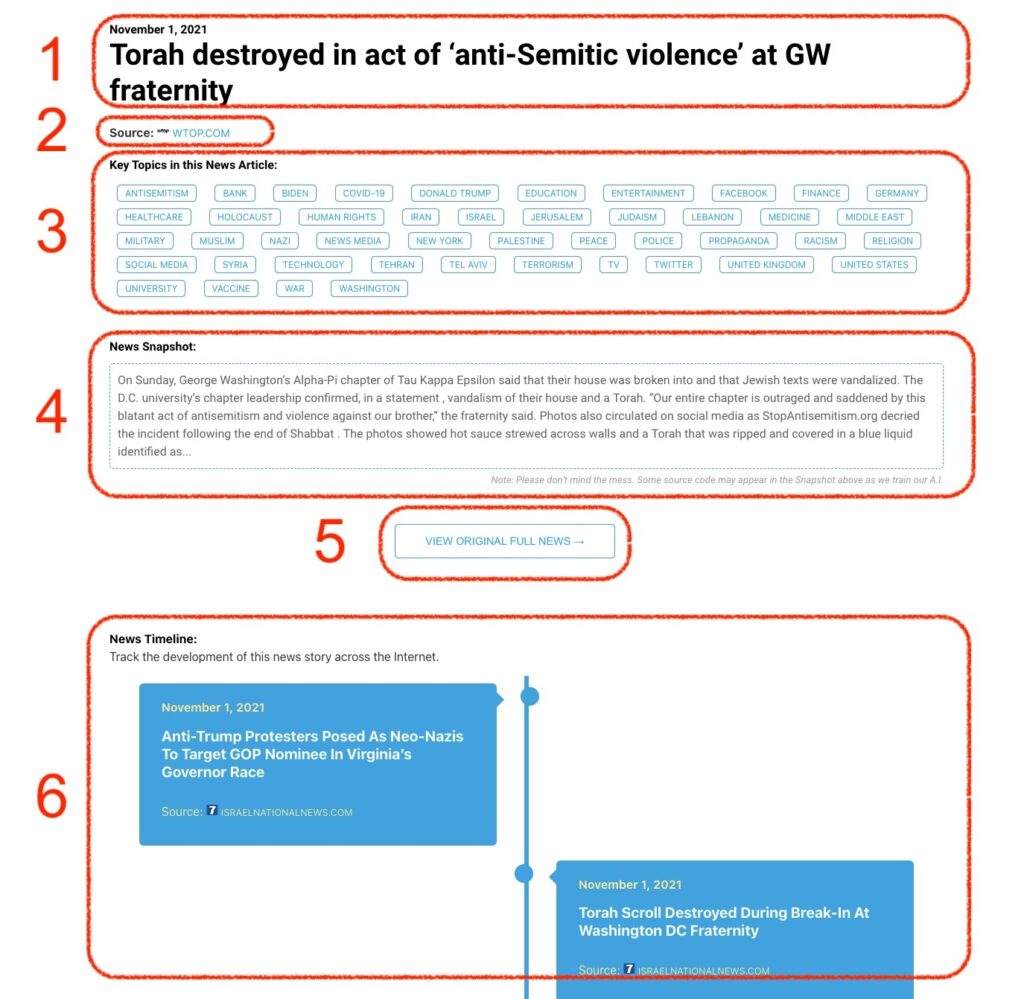
What Does This Data Mean?

1: Date and Title 
This displays both the date Hagg.ai picked up the news and the original headline of the news from the source.

2: Source
View the name of the original source website, along with the source’s icon image. You can click the source name to visit the homepage of that source.

3: Key Topics
The great power of Hagg.ai rests here, where we use A.I. technology to extract the key topics and themes for the news article. You can click each topic to see many more articles categorized to that specific topic.

4: News Snapshot
Read a quick blurb extracted from the source news.

5: View Original Full News
Click this button to go directly to the original source article on the source’s own website.

6: News Timeline
Hagg.ai is powerful and our News Timeline shows you the genesis of where this news came from and other related news stories. The Timeline builds you a history of where the news came, so you can chart where the news may go!

Hagg.ai How-To