Skip to content
  • Timeline
  • Subscribe
  • Contact Us
  • About
  • Timeline
  • Subscribe
  • Contact Us
  • About
Hagg.ai
Monitoring Antisemitism Intel
March 10, 2024
What is this data

Bad Bunny Spends 30th Birthday Presenting at Oscars With Dwayne Johnson

Source: billboard.com billboard.com
Key Topics in this News Article:
Box Office Britain California Entertainment Gaza Germany Hollywood Holocaust Israel Jonathan Glazer Middle East Poland Puerto Rico Spain United Kingdom War World War
News Snapshot:
As one of the world’s biggest global music stars, it was only fitting that Bad Bunny helped present best international feature film at the 2024 Oscars on Sunday (March 10) — which just so happens to be the “MIA” artist’s birthday. Taking the stage alongside Dwayne Johnson at the Dolby Theatre in Los Angeles, the Puerto Rican artist began his portion of the presentation by speaking in Spanish. He poignantly noted, “Cinema is a universal language,” after which The Rock joked, “See? He’s not such a bad bunny.” Then, after running through the category’s nominees, Benito — looking dapper in...

Note: Please don’t mind the mess. Some source code may appear in the Snapshot above as we train our A.I.
Share on Social Media:
Facebook
X
LinkedIn
Telegram
Reddit
WhatsApp
VIEW ORIGINAL FULL NEWS →
You may also like

News Timeline:
Track the development of this news story across the Internet.

Timeline is being generated. Please check back and refresh this page soon.

News Timeline | Contact | About | Privacy

Twitter Linkedin

© 2026 Hagg.ai. Individual news stories are copyright their respective sources. Computer algorithms generally select what is shown on Hagg.ai. The algorithms determine which stories, images, and videos show, and in what order.

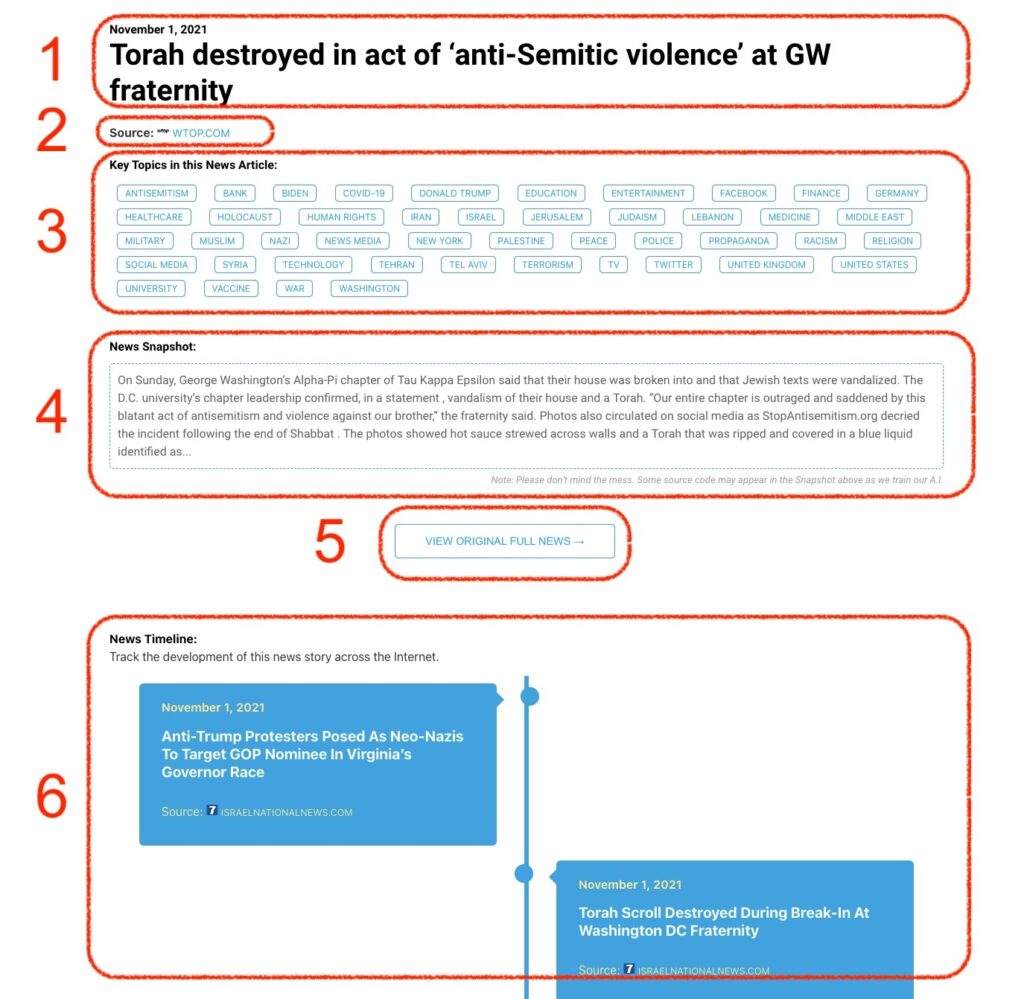
What Does This Data Mean?

1: Date and Title 
This displays both the date Hagg.ai picked up the news and the original headline of the news from the source.

2: Source
View the name of the original source website, along with the source’s icon image. You can click the source name to visit the homepage of that source.

3: Key Topics
The great power of Hagg.ai rests here, where we use A.I. technology to extract the key topics and themes for the news article. You can click each topic to see many more articles categorized to that specific topic.

4: News Snapshot
Read a quick blurb extracted from the source news.

5: View Original Full News
Click this button to go directly to the original source article on the source’s own website.

6: News Timeline
Hagg.ai is powerful and our News Timeline shows you the genesis of where this news came from and other related news stories. The Timeline builds you a history of where the news came, so you can chart where the news may go!

Hagg.ai How-To