Skip to content
  • Timeline
  • Subscribe
  • Contact Us
  • About
  • Timeline
  • Subscribe
  • Contact Us
  • About
Hagg.ai
Monitoring Antisemitism Intel
April 22, 2023
What is this data

‘I’ll Burn You Alive’

Source: politico.com politico.com
Key Topics in this News Article:
Activist Albania Chicago Computer democracy diplomacy Disinformation Donald Trump education Expat Facebook Fraud Free Speech Hate Symbol Illinois Internet Iran media intelligence Middle East Muslim Nazi News Media Propaganda Religion Sanctions
News Snapshot:
Shahrooz was born in Iran shortly after the 1979 revolution. He moved abroad when he was 10, and he said his family’s experience inspired him to become an Iran analyst. “I lost many family members in Iran’s prisons because of their activism,” he said. “I knew and my family knew [the regime] could not be trusted.” Among Iranian expats, personal pain was a commonly cited reason for condemning peers. I also called Sana Ebrahimi, a computer science Ph.D. student at the University of Illinois at Chicago, who frequently launches attacks against dovish analysts. She told me her father had once...

Note: Please don’t mind the mess. Some source code may appear in the Snapshot above as we train our A.I.
Share on Social Media:
Facebook
X
LinkedIn
Telegram
Reddit
WhatsApp
VIEW ORIGINAL FULL NEWS →
You may also like

News Timeline:
Track the development of this news story across the Internet.

Timeline is being generated. Please check back and refresh this page soon.

News Timeline | Contact | About | Privacy

Twitter Linkedin

© 2026 Hagg.ai. Individual news stories are copyright their respective sources. Computer algorithms generally select what is shown on Hagg.ai. The algorithms determine which stories, images, and videos show, and in what order.

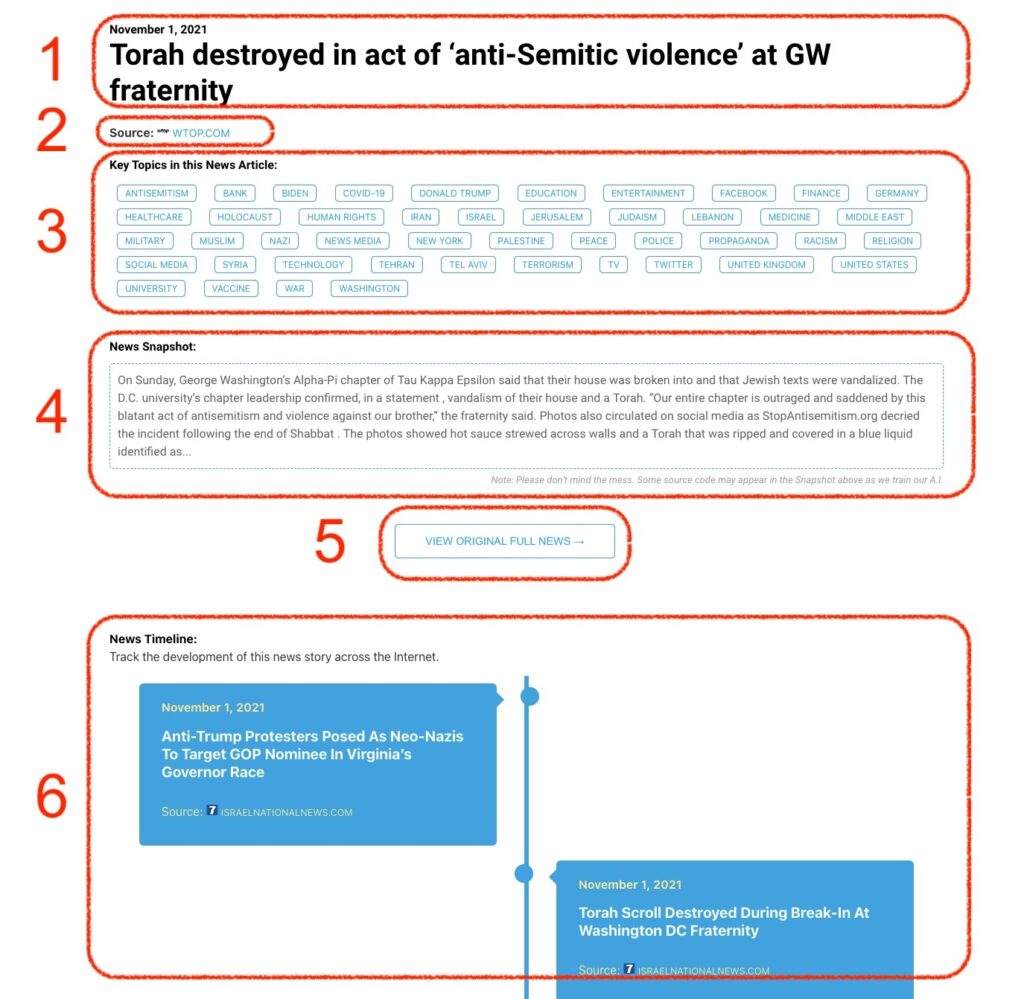
What Does This Data Mean?

1: Date and Title 
This displays both the date Hagg.ai picked up the news and the original headline of the news from the source.

2: Source
View the name of the original source website, along with the source’s icon image. You can click the source name to visit the homepage of that source.

3: Key Topics
The great power of Hagg.ai rests here, where we use A.I. technology to extract the key topics and themes for the news article. You can click each topic to see many more articles categorized to that specific topic.

4: News Snapshot
Read a quick blurb extracted from the source news.

5: View Original Full News
Click this button to go directly to the original source article on the source’s own website.

6: News Timeline
Hagg.ai is powerful and our News Timeline shows you the genesis of where this news came from and other related news stories. The Timeline builds you a history of where the news came, so you can chart where the news may go!

Hagg.ai How-To