Skip to content
  • Timeline
  • Subscribe
  • Contact Us
  • About
  • Timeline
  • Subscribe
  • Contact Us
  • About
Hagg.ai
Monitoring Antisemitism Intel
November 7, 2022
What is this data

Vancouver artist Rodney Graham’s ‘infuriatingly hilarious’ work was a Venice Biennale highlight

Source: theglobeandmail.com theglobeandmail.com
Key Topics in this News Article:
America Art Automobile Box Office Britain California Canada Car Disney education Entertainment Europe Finance France Germany Hollywood London Nazi New York North America Paris Social Media Spain United Kingdom United States
News Snapshot:
Rodney Graham was one of Canada’s most internationally recognized artists, exhibiting throughout North America and Europe.John Lehmann/The Globe and Mail Rodney Graham was a brilliant artist known for his singular ability to combine an encyclopedic knowledge of art, literature and popular culture with humour. Mr. Graham, who died of cancer in Vancouver on Oct. 22 at age 73, was one of Canada’s most internationally recognized artists, exhibiting throughout North America and Europe while his work was avidly collected by art museums and private collectors. He was part of a milieu that developed in Vancouver during the 1970s in which new,...

Note: Please don’t mind the mess. Some source code may appear in the Snapshot above as we train our A.I.
Share on Social Media:
Facebook
X
LinkedIn
Telegram
Reddit
WhatsApp
VIEW ORIGINAL FULL NEWS →
You may also like

News Timeline:
Track the development of this news story across the Internet.

September 30, 2025

Lally Weymouth died at 82 after battle with cancer


Source: bostonglobe.com bostonglobe.com

News Timeline | Contact | About | Privacy

Twitter Linkedin

© 2026 Hagg.ai. Individual news stories are copyright their respective sources. Computer algorithms generally select what is shown on Hagg.ai. The algorithms determine which stories, images, and videos show, and in what order.

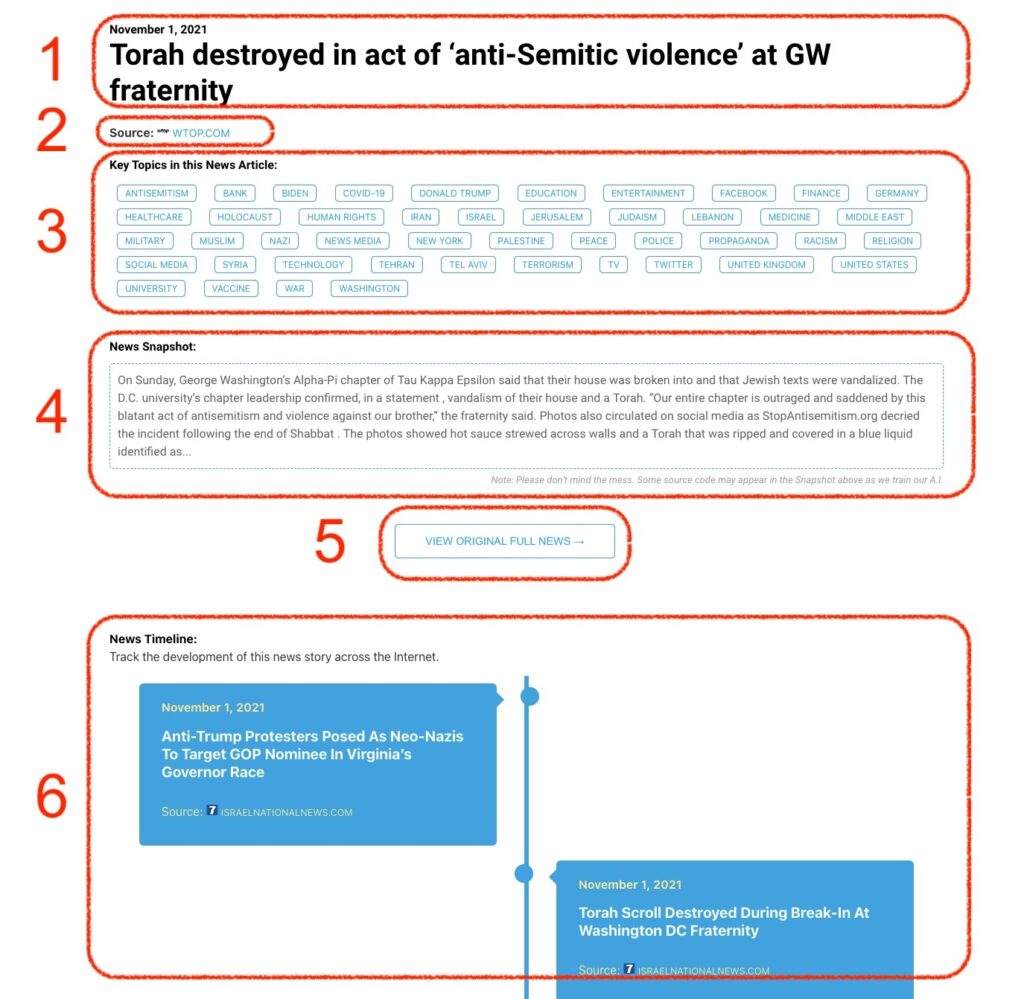
What Does This Data Mean?

1: Date and Title 
This displays both the date Hagg.ai picked up the news and the original headline of the news from the source.

2: Source
View the name of the original source website, along with the source’s icon image. You can click the source name to visit the homepage of that source.

3: Key Topics
The great power of Hagg.ai rests here, where we use A.I. technology to extract the key topics and themes for the news article. You can click each topic to see many more articles categorized to that specific topic.

4: News Snapshot
Read a quick blurb extracted from the source news.

5: View Original Full News
Click this button to go directly to the original source article on the source’s own website.

6: News Timeline
Hagg.ai is powerful and our News Timeline shows you the genesis of where this news came from and other related news stories. The Timeline builds you a history of where the news came, so you can chart where the news may go!

Hagg.ai How-To